

On the page Top placement > Directories you decide how much you spend on visibility each month. This article explains every control on that page and what happens to your credit when you change a running budget.
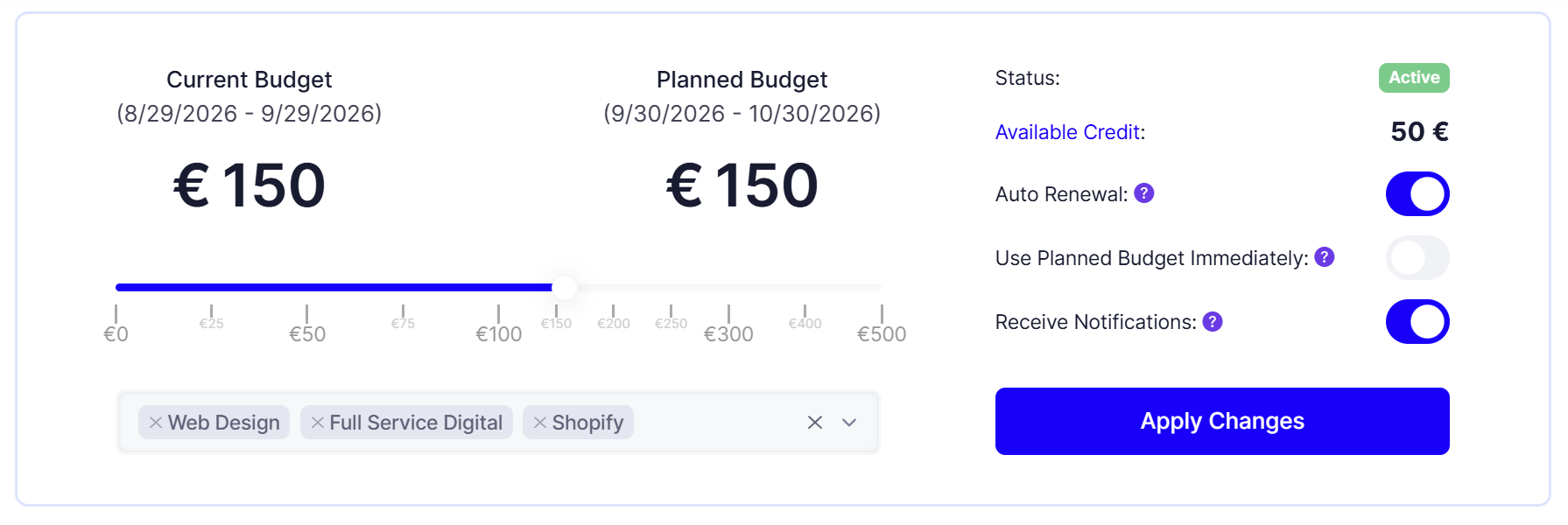
The budget slider
Above the slider you see "Planned Budget" and below it the period it covers, for example "9/9/2026 to 10/9/2026". A period always lasts exactly one month.
The steps of the slider are fixed: 0 €, 25 €, 50 €, 75 €, 100 €, 150 €, 200 €, 250 €, 300 €, 400 € and 500 €.
Two rules apply when saving:
The budget has to be greater than 0 if you do not have a configuration yet.
The budget must not exceed your available credit. Otherwise the page reports that the budget is higher than your credit.
Status and available credit
At the top right you see two values:
Status: "Not Started" while no period is running, otherwise "Active".
Available Credit: your current Feedbax credit. The value is a link and takes you straight to the top-up page.
The displayed credit reacts to your settings immediately. If you switch on "Use Planned Budget Immediately", you see right away how the proportional refund changes your balance.
Switch 1: Auto renewal
With this switch on, your planned budget is spent again automatically every month. The top placement renews and the amount is taken from your credit.
With it off, your placement ends when the current period runs out and you have to start it again yourself.
For Enterprise customers there is an addition: up to 50 € per month no credit is deducted, because that amount is a gift. Only above it is the difference used. With a 150 € budget you therefore pay 100 € from your credit.
Our recommendation: leave the switch on. A top placement that expires mid-month usually only gets noticed once the enquiries stop.
Switch 2: Receive notifications
With this switch on, you get an email as soon as another provider in one of your directories spends a higher budget than you and pushes you down.
That matters more than it sounds. There are only ten top slots per directory. Once you are pushed out of the top 10, your budget keeps running but is no longer visible and therefore has no effect. The notification lets you react in time and adjust budget or focus.
Changing a running budget early
While a period is running, a third switch appears: "Use Planned Budget Immediately".
With it off, your change only takes effect from the next period. The running one stays untouched.
With it on, this happens:
The running period ends immediately.
The unused share is calculated to the day and credited back to you. If only 12 of 30 days have passed, you get roughly 60 percent back.
The new budget starts right away and runs for a full month again.
This is worth it when you want to react faster: after a notification that someone outbid you, or when you notice that a lower budget is enough.
One exception: for Enterprise customers the gifted share of 50 € per month is not refunded. Only what you paid yourself comes back.
Ending a budget
Set the slider to 0 € and switch on "Use Planned Budget Immediately". The running period ends, the unused share returns to your credit, and no new period starts.
If you only want to stop the automatic renewal, switch off "Auto Renewal" instead. The running period then finishes normally.
What your subscription has to do with it
The whole page is tied to an active subscription. Without Business, Premium or Enterprise you cannot save a budget.
Your plan also decides how much credit you have available in the first place:
Business: 200 € of credit included per year, 20 percent bonus on top-ups.
Premium: 300 € per year included, 60 percent bonus.
Enterprise: 400 € per year included, 100 percent bonus, plus 50 € per month on top for the top placement.
Details are in the article Topping up your credit.
Frequently asked questions
What happens if my credit is not enough?
Then the budget cannot be saved. The page reports that the budget you want is higher than your available credit. Top up first.
Do I get money back if I end early?
You get credit back, not a payout. The unused share of the running period is credited to the day.
Is the Enterprise bonus refunded too?
No. The 50 € per month are a gift, they are not booked back when you end early.
Can I raise the budget mid-month?
Yes. Move the slider up and switch on "Use Planned Budget Immediately". The old period is settled and the new one starts immediately.
Does my budget continue automatically?
Only if "Auto Renewal" is on. Otherwise the placement ends with the running period.
Why do I not see the switch "Use Planned Budget Immediately"?
It only appears once a period is active. Before your first start there is nothing that could be ended early.