

The Profile > Social media page links your company’s social media channels to your provider profile. The links appear in your profile. Feedbax also builds a video gallery from the YouTube channel, which you control here.
The page can be used from the Business subscription. With Starter, you see a preview and a note about the subscription.
At a glance
You find the page in the provider dashboard under Profile > Social media. The address ends in
?section=profile-social.Six fields: LinkedIn, Facebook, X, Instagram, YouTube and TikTok. All are optional.
With the Business subscription and higher, there is also the YouTube videos block with your channel’s gallery.
The page counts toward profile progress with up to 100 percent. Two channels are enough for that.
You don’t enter your profile’s main video here, but under Company details.
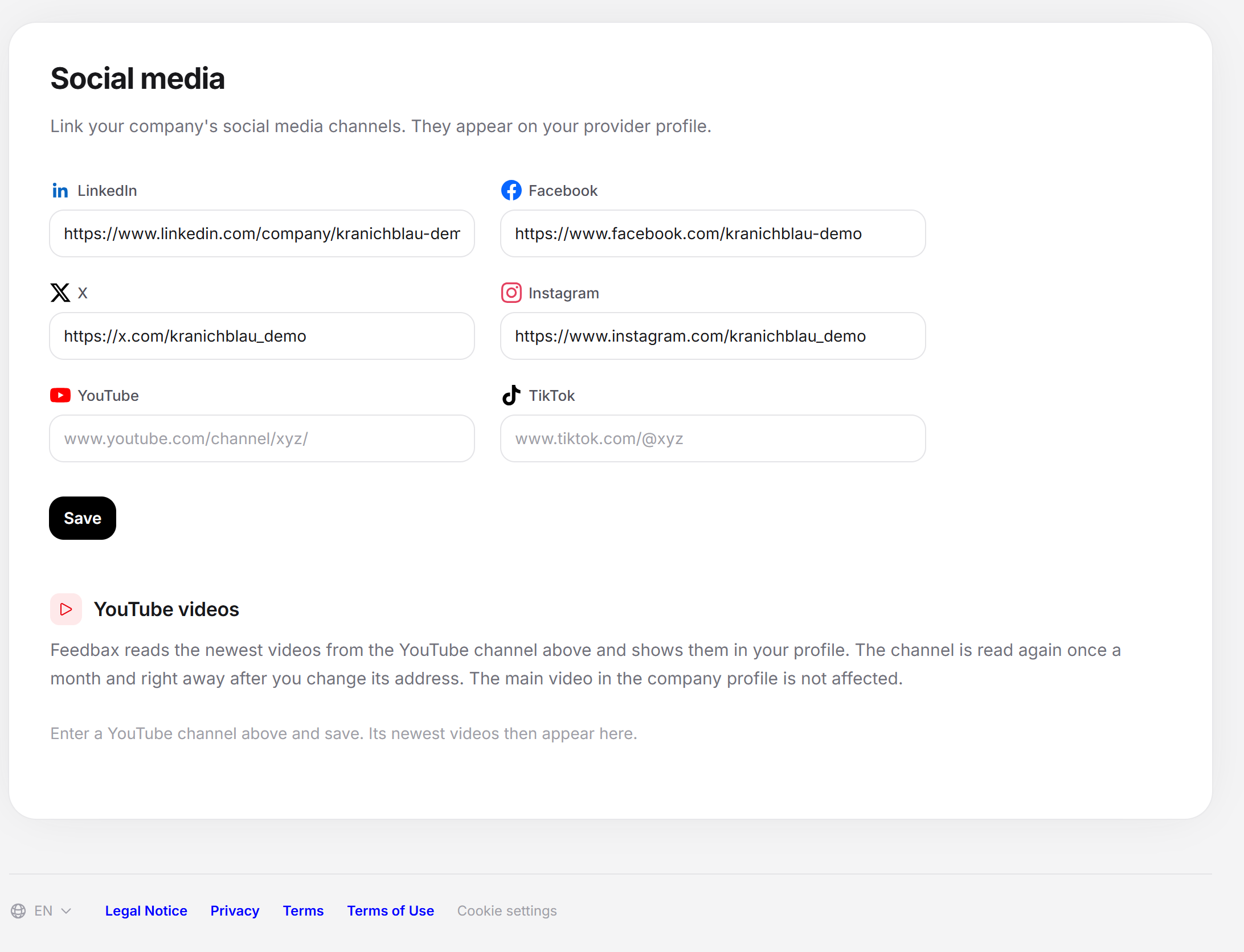
Linking the channels
At the top is the note “Link your company’s social media channels. They appear in your provider profile.” In front of each field is the platform’s logo. The placeholders show what an address looks like, for example “www.linkedin.com/company/xyz/”.
Open Profile > Social media.
Enter the address of each channel you maintain. Leave the others empty.
Click Save. The button briefly shows “Saving …”, then “Saved.” appears.
| Field | Example in the placeholder |
|---|---|
| www.linkedin.com/company/xyz/ | |
| www.facebook.com/xyz/ | |
| X | www.x.com/xyz/ |
| www.instagram.com/xyz/ | |
| YouTube | www.youtube.com/channel/xyz/ |
| TikTok | www.tiktok.com/@xyz |
Each address must be a valid web address, otherwise the field reports “Please enter a valid web address.” Then nothing is saved. An empty field deletes the saved link.
Link only what you actually use. A channel whose last post is years old does more harm than good.
Without the Business subscription
With Starter, a note “Business plan needed” lies over a preview of the fields. It carries the title “Not included in your plan” and the text “Social media links appear on your profile from the Business plan.” The button View plans takes you to the subscriptions. The preview is only an image with sample addresses: you can’t enter anything, and nothing is saved. The server also rejects saving without Business and reports “This area is available from the Business plan.” Which subscriptions there are is explained under Which subscriptions does Feedbax offer?.
The YouTube gallery
The YouTube videos block appears below the fields as soon as your subscription is at least Business. It has the note “Feedbax reads the newest videos from the YouTube channel above and shows them in your profile. The channel is read again once a month and immediately after every change of the address. The main video in the company profile is not affected.”
How the channel gets into the gallery
In the YouTube field, enter the address of your channel, not that of a single video. Addresses of the form
youtube.com/@name,youtube.com/channel/UC…,youtube.com/c/nameandyoutube.com/user/nameare recognized.Click Save. This marks the channel to be read.
In the YouTube videos block, it first says “The channel is being read. This takes a moment.” with a button Refresh. It reloads the status, it doesn’t start a new read.
Once the channel has been read, the block shows its name and “Last read on {date}.” and below that the videos.
Which videos get into the gallery
Feedbax reads the newest 12 videos of the channel, newest first. Older ones drop out as soon as newer ones appear.
Each row shows a thumbnail, title, publication date and length. On the right is a switch. Videos that are switched on appear in your profile, those switched off don’t. The row then fades.
You switch each video right away, without saving. Your choice stays in place, even when the channel is read again the next month.
The channel is read again once a month and immediately after every change of the address. A read that didn’t work is tried again after about 20 hours.
Feedbax translates the videos’ descriptions into the profile languages in the background.
Messages in the block
| Message | Meaning and solution |
|---|---|
| Enter a YouTube channel above and save. Its newest videos will then appear here. | The YouTube field is empty. Enter the channel and save. |
| The saved YouTube address doesn’t name a channel. Enter the address of your channel, for example youtube.com/@name. | The address points to a video or another page. Replace it with the channel address. |
| There is no YouTube channel at this address. Check the address and save it again. | The channel doesn’t exist at this address. After three failed attempts in a row, Feedbax clears the channel’s videos from the gallery. |
| The channel could not be read last time. Feedbax tries again automatically. | A temporary error. You don’t have to do anything. |
| The channel has no public videos that can be embedded in a profile. | The channel was read, but offers nothing to embed. |
| The data could not be loaded. Please reload the page. | The block couldn’t load. Reload the page. |
If you remove the YouTube address and save, Feedbax takes the channel and its videos out of the gallery. A subscription without Business doesn’t read the channel.
Where the details count
Profile progress: Each channel you enter brings 50 percent, up to 100. One channel gives 50 percent, two or more give 100 percent. The third to sixth channel bring no further progress.
Automatic approval: The social media links are not a requirement. What counts is explained in What your profile needs for approval.
Feedbax score
The channels have only an indirect effect through profile progress: two channels bring ten points on the scale from 0 to 100, which go into the delivery part of your Feedbax score. The YouTube gallery does not affect the Feedbax score.
Frequently asked questions
I only see a preview with a note. Why?
The page is unlocked from the Business subscription. With Starter you can see the preview, but you can’t enter anything.
Do I have to fill in all six fields?
No. Two channels are enough for full progress.
I entered my YouTube channel, but my profile shows no main video. Why?
Those are two different things. The channel goes here, and you enter the single main video under Company details.
Why doesn’t the gallery show all the videos of my channel?
Feedbax reads only the newest 12 videos. Also, only the videos whose switch is on appear.
Why doesn’t a new video appear in the gallery right away?
The channel is read again once a month. After you change the YouTube address, Feedbax reads immediately.
Can I hide a video?
Yes. Switch it off in the YouTube videos block. Your choice is kept at the next read too.
What is the “Refresh” button for?
It appears only while the channel is still being read, and it reloads the status of the block. It does not trigger a new read.