
With the calendar link, the deadlines of the tenders you follow land in your own calendar automatically, each with a reminder 3 days ahead. You subscribe to the link once in Google Calendar, Outlook or Apple Calendar. If a deadline moves, the event moves with it. That way you never miss a submission deadline or a deadline for questions.
At a glance
- Where: in the Leads area on the Public tenders page, at the top right. The Calendar button sits next to Notifications.
- Subscription: you need an active subscription, meaning a Feedbax subscription from Business or the standalone Tender Access. Without a subscription the menu shows only a note and no link.
- What goes in: the deadlines of every tender you follow with the bell (Favorites and following tenders). Favorites marked with the heart do not appear.
- Which dates: submission deadline or participation deadline, plus the deadline for questions, site visit and meetings with the contracting authority, as far as the analysis names them. Every event has a reminder 3 days ahead.
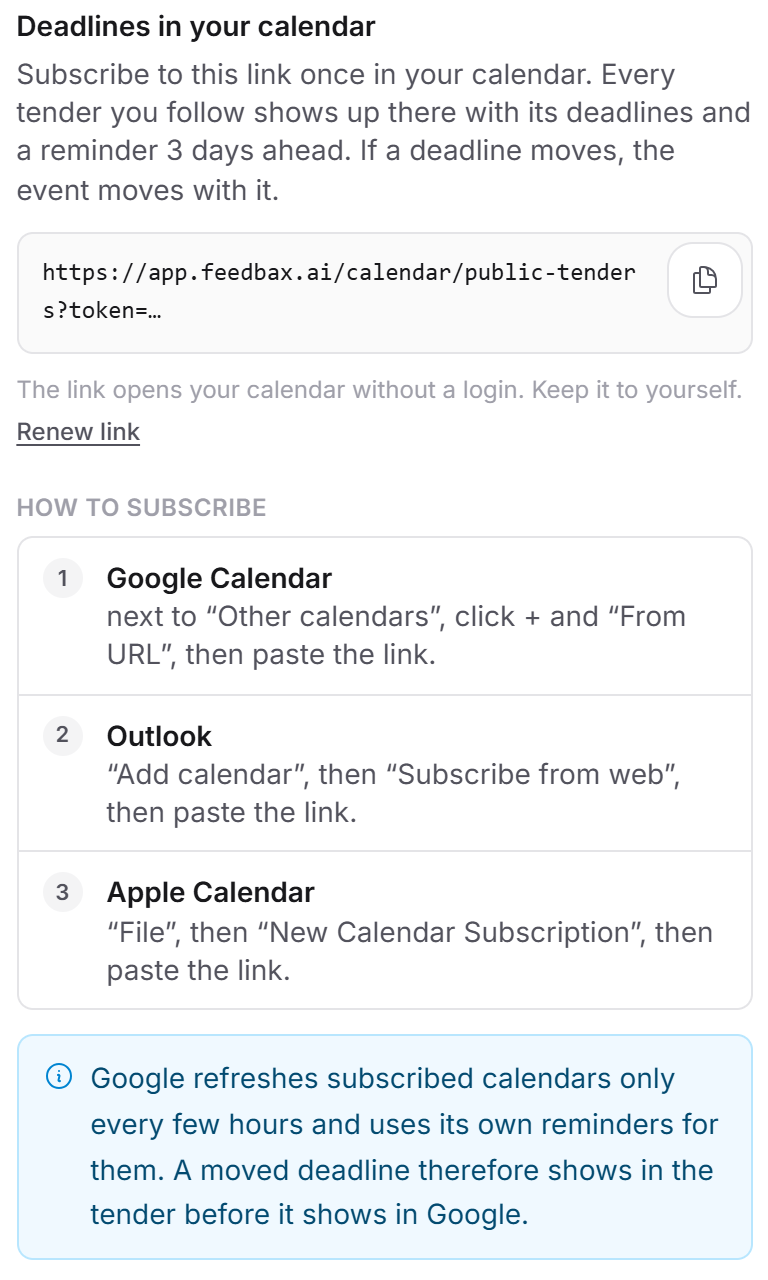
- Private: the link opens your calendar without a login. Anyone who knows it sees the entries. With Renew link you block the old link at once.
- Score: the calendar does not change your Feedbax score.
How it works
Behind the Calendar button is your personal calendar link. It points to a calendar that Feedbax puts together afresh on every request. Your calendar app fetches it regularly. The menu reads your subscription anew each time it opens: a subscription you have just booked shows up there at once.
The calendar is called “Feedbax: tender deadlines”. It holds only deadlines and dates you have to act on yourself. The entries do not block your time: your calendar shows you as free during them.
Which tenders and dates appear
Every tender you follow with the bell appears. The heart (favorite) is a plain shortlist and does not show in the calendar. If you follow another tender, its deadlines appear the next time your calendar app fetches the feed. If you stop following, they disappear again on the next fetch. Once a tender has expired, its events also disappear on the next fetch, even if you still follow it.
For each tender the calendar can hold these dates:
- Submission deadline or Participation deadline: the main deadline of the tender. It is called Participation deadline when the main deadline is a request to participate. For a provider list the entry is called Open admission until, because the date there is not a submission deadline but the end of the list.
- Deadline for questions: the date by which you can ask questions or request additional information.
- Site visit: the appointment on site.
- Meeting with the contracting authority: a presentation, negotiation, bidder interview, demonstration or information session.
- A later offer date, for example for a first, indicative or final offer. It carries the name used in the analysis.
The main deadline comes from the procedure data of the tender. Feedbax checks followed tenders at the source regularly and updates the deadline when it changes.
All other dates come from the AI analysis of the tender. Without a finished analysis there is therefore only the main deadline. A date from the analysis appears only if the analysis gives it with a readable date and you have to do something by then. Dates where you have nothing to do are not in the calendar: binding period, award, opening of the bids, publication, answers from the contracting authority, contract start and later project milestones. A date whose name cannot be matched to an action is left out rather than filling your calendar with dates that do not concern you. If a date from the analysis repeats the main deadline, for example with the old date after a postponement, or falls on the same day, it is not added a second time.
An event without a time of day is an all-day event. If the deadline has a time, the event has a time and lasts 30 minutes. Feedbax treats the time as German local time, and your calendar app converts it to your time zone.
What an event looks like
- Title: the name of the date, a colon and the title of the tender, for example “Submission deadline: title of the tender”.
- Description: the title of the tender and the link “View tender”. In the app it leads to that tender. The link is also in the event's URL field if your calendar app has one.
- Reminder: 3 days ahead, with the text “Submission deadline in 3 days: title of the tender”. Google has a special case, see below.
- Language: the link points to the address of the language you currently use the app in (app.feedbax.de, .ai, .fr, .nl or .es). The calendar speaks that language, and the tender title appears in it as far as a translation exists. If you want the calendar in another language, open the app in that language and copy the link there.
- Moved deadline: every event has a fixed identifier. If the deadline moves, the same event moves, and no second one is created.
Subscribing to the calendar
You subscribe to the link once in every calendar you want to use. After that everything runs by itself.
- Open the Public tenders page and click Calendar at the top right. On a phone the menu opens as a sheet at the bottom.
- The full link sits in a grey box. Click the copy button in its top right corner. Its label is Copy link, and after the click it reads Copied.
- Add the link to your calendar as a subscription. Under “How to subscribe” the menu shows the way:
- Google Calendar: next to “Other calendars”, click + and “From URL”, then paste the link.
- Outlook: “Add calendar”, then “Subscribe from web”, then paste the link.
- Apple Calendar: “File”, then “New Calendar Subscription”, then paste the link.
The names in your calendar app can differ by version and language. What matters is that you add the link as a subscription and do not import it as a file: only a subscription updates itself later.
How often the calendar refreshes
Your calendar app decides that, not Feedbax. Feedbax builds the calendar afresh on every request and asks Apple Calendar and Outlook, in the calendar itself, to check every hour. Whether and how often the app does so is up to the app.
Google Calendar refreshes subscribed calendars only every few hours and uses its own reminders for them, as the menu also says. A moved deadline therefore shows in the tender before it shows in Google. Check in Google which reminder is set for the subscribed calendar. If you need the current status of a deadline, open the tender in the app. It always shows the current deadline.
Renewing the link
Renew the link if it may have fallen into the wrong hands: forwarded, ended up in a chat or on a screenshot, or held by someone who has left the company.
- Open Calendar and click Renew link below the note on the link.
- A confirmation appears: “The current link stops working right away. Calendars subscribed to it get no more deadlines until you subscribe to the new link there.” Click Create new link. With Cancel everything stays as it was.
- The menu confirms: “New link created. Remove the old calendar and subscribe to the link above.” The field now holds the new link.
- In your calendars, remove the old subscription and subscribe to the new link as described above.
The old link stops working at once. When a calendar app fetches it, it gets no calendar, only the response “not found”. A calendar with the old link therefore receives no new or moved deadlines until you subscribe again.
You can renew as often as you like. Every renewal makes the previous link invalid. Without a renewal the link never expires by itself.
Security: how to protect the link
The link is like a key. It contains a signature that Feedbax checks, and it needs no login. Anyone who knows it sees all entries in their calendar: which tenders you follow, with title, deadlines and a link to the tender.
- Do not pass the link on. Do not post it in chats, tickets or screenshots.
- The calendar cannot be found publicly: it is not cached, and search engines are asked not to list it.
- A wrong or renewed link shows only the plain response “not found”. From outside, nobody can tell which links exist.
- The link belongs to your provider profile, not to a single person. Everyone with access to the dashboard sees the same link in the menu. If someone leaves the company, renew the link. You manage who has access under Account: contact person and access.
- The Feedbax team does not see the link either when it opens your dashboard for viewing.
Without a subscription and when the subscription ends
Without a subscription the Calendar menu shows no link, only the note: “With an active subscription, the deadlines of every tender you follow land in your calendar automatically, with a reminder 3 days ahead.” Even if you follow a tender through the trial access (What the free access includes), the calendar stays locked, because it depends only on an active subscription.
When your subscription ends, the link stays valid, but on its next fetch your calendar gets no more deadlines. Instead it holds a single all-day event that always falls on today: “Tender deadlines paused: no active subscription”. Its description reads: “The deadlines of the tenders you follow show up here again once your subscription is active:” followed by a link to the Public tenders page. That way you know why the deadlines are missing, and your calendar does not simply look empty.
When you have a subscription again, the deadlines return under the same link. You do not have to subscribe again.
Calendar and emails
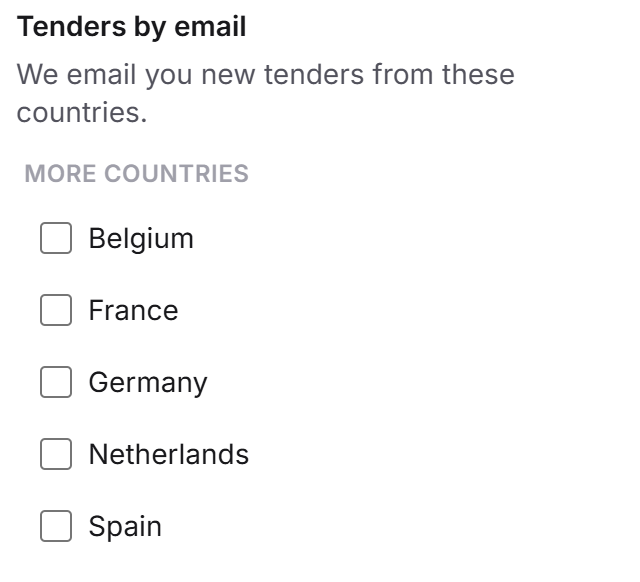
Next to Calendar is the Notifications button. It opens the menu “Tenders by email”, where you choose the countries for emails about new tenders. The two menus are independent of each other.
- Calendar: the deadlines of followed tenders as events, without any email. Needs an active subscription.
- Emails: new tenders from the chosen countries, change emails about followed tenders and further emails. Which ones exist and how you unsubscribe is in Emails about tenders. Feedbax does not send a reminder email before a deadline. That reminder comes from the calendar.
- If you switch the emails off, the calendar stays as it is, and the other way round.
If the deadline of a followed tender moves, you get the change email, and the event in your calendar moves with it. The two run independently of each other.
What your subscription includes
Feature | Without subscription (Starter) | With subscription |
“Calendar” menu with calendar link | only a note | yes |
Deadlines of followed tenders in your calendar | no | yes |
Reminder 3 days ahead | no | yes |
Renew link | no | yes |
Two ways lead to the calendar. A Feedbax subscription from Business includes it, without booking anything extra. The standalone Tender Access is a subscription for the tenders module only. Both ways are explained in Tender Access: booking, managing, cancelling, and the Feedbax subscriptions in What subscriptions does Feedbax offer? The benefit: you manage deadlines in one place, your calendar, and get notice in good time before a deadline runs out.
Feedbax score
The calendar does not change your Feedbax score. The same goes for following and favorites: they are private working tools and have nothing to do with your score or your visibility in the directories. Your tender fit (The tender fit: how your score is built) is not touched by the calendar either. What the score is is explained in What is the Feedbax Score?
Frequently asked questions
Do my favorites appear in the calendar?
No. Only tenders you follow with the bell. If you want the deadlines of a tender in your calendar, also set the bell.
How often does the calendar refresh?
That depends on your calendar app. Feedbax asks Apple Calendar and Outlook to fetch every hour, and Google Calendar refreshes only every few hours. The tender in the app always shows the current status.
I subscribed but see no events. What is wrong?
Check in order: is your subscription active? If not, the calendar holds the event “Tender deadlines paused: no active subscription” instead of the deadlines. Do you follow at least one tender with the bell? Does it have a deadline with a readable date? Did you renew the link and are you still using the old one? And sometimes your calendar app simply needs a few hours for the first fetch.
A date from the tender is missing in the calendar. Why?
The main deadline is always included. Further dates come from the AI analysis and appear only if you have to act by then and the analysis gives a readable date. The calendar deliberately does not show binding period, award, bid opening and contract start. You find all dates in the tender itself.
Do events of expired tenders stay in the calendar?
No. As soon as a tender’s deadline has passed or the tender has ended, Feedbax removes all its events from the calendar on the next fetch, even if you still follow it. An expired tender has no bell left to stop following it, so Feedbax does the cleanup itself.
Can I send the link to colleagues?
Everyone with access to the dashboard finds the same link in the Calendar menu themselves. Send it only to people who belong to your company anyway, and renew it when someone leaves.
In which language are the events?
In the language of the address the link points to. That is the language you used the app in when you copied it.
Does the calendar affect my Feedbax score?
No. Neither the calendar nor following changes your score or your visibility.
Do I need a subscription for the calendar?
Yes. Without an active subscription the menu shows only the note about the subscription, no link. The trial access is not enough.