

The Profile > Specializations page answers the question of who you work for. Your services say what you can do. Here you set which industries you have experience in and which client segments you serve, each with a percentage share. Besides technical expertise, clients also expect industry know-how.
The page can be used from the Business subscription. With Starter, you see a preview and a note about the subscription.
At a glance
You find the page in the provider dashboard under Profile > Specializations. The address ends in
?section=profile-specializations.Three blocks: Add industries, Added industries (with shares) and Client segments (with shares).
The shares of the industries must add up to exactly 100 percent. So must the shares of the client segments. So there are two separate sums.
At least one industry is required.
You save everything with one Save.
The area counts toward profile progress with up to 100 percent.
How it works
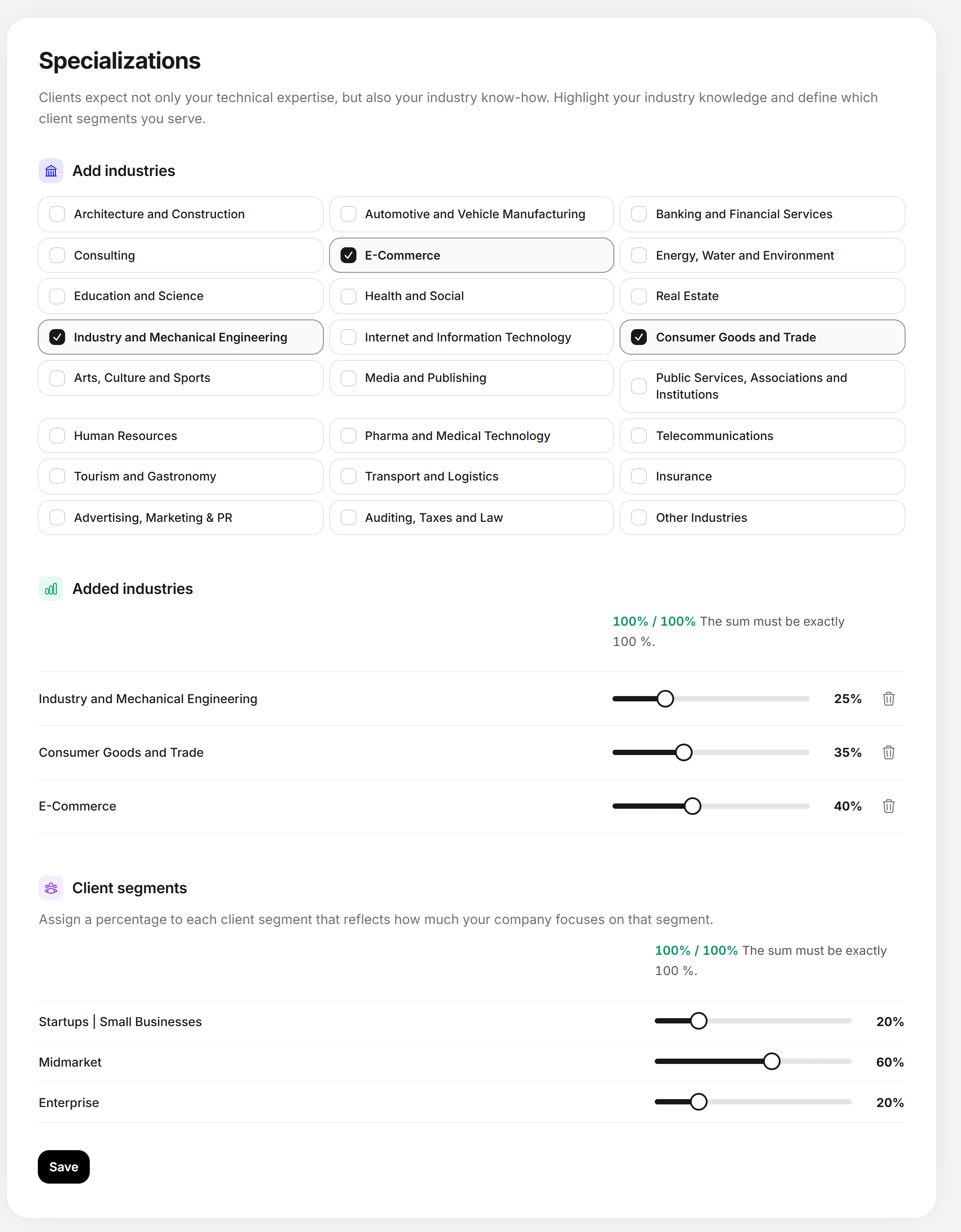
At the top is the note “Besides your technical expertise, clients also expect your industry know-how. Highlight your industry knowledge and set which client segments you serve.” The page first loads with placeholders, then the blocks appear.
Add industries
The block shows all industries as cards, for example architecture and construction, e-commerce, health and social care, or advertising, marketing & PR. A click chooses the industry, a second click takes it out again. The list is fixed, and you can’t create your own industries. If none fits exactly, choose the closest one or “Other industries”.
Added industries
Each chosen industry appears below with a slider. The slider runs from 0 to 100 percent in steps of five. A new industry starts at 0 percent. With Remove you take the industry out.
Above the sliders, a sum shows the status, for example “95% / 100%” with the addition “The sum must be exactly 100 %.” At 100, the number turns green.
A slider can’t be raised beyond what is left of 100 percent. First lower another share.
Weight by the actual share of your business. A profile with “insurance 40, banks 30, health 30” convinces an insurer more than 24 evenly distributed industries.
Client segments
The note reads “Assign a percentage to each client segment that reflects how strongly your company focuses on that segment.” The segments describe the size of your clients, for example startups and small businesses, mid-sized companies and enterprise. All segments always appear as a row with a slider, and there is no remove option. You leave segments you don’t serve at 0. Here too, the sum must be exactly 100 percent. With a focus on mid-sized companies, that could be, for example, mid-sized 80, enterprise 10, startups 10.
Saving specializations
Open Profile > Specializations.
In the Add industries block, choose the industries in which you can really show projects.
In the Added industries block, distribute 100 percent with the sliders.
In the Client segments block, distribute 100 percent across the segments.
Click Save. The button briefly shows “Saving …”, then “Saved.” appears.
If saving fails, the page marks the affected sum in red and scrolls to the first one. In that case, neither industries nor segments are saved.
Without the Business subscription
With Starter, a note “Business plan needed” lies over a preview, with the title “Not included in your plan” and the text “With the Business plan you can set your industry knowledge and client segments. Our directories can then be searched by them as a filter option.” The button View plans leads to the subscriptions. The preview shows sample values: the first industries of the list, three of them chosen at 50, 30 and 20 percent. You can’t change anything in it, and nothing is saved. The server also rejects saving without Business. All subscriptions are listed under Which subscriptions does Feedbax offer?.
Messages and special cases
| Message | Meaning and solution |
|---|---|
| The shares must add up to 100 %. | The sum of the industries or of the client segments is not 100. This also applies if no industry is chosen: choose at least one. |
| Please fill in this field. | The selection contains an industry that no longer exists, or a share outside 0 to 100. Reload the page. |
| Please check the highlighted fields. | Summary message when there is at least one error. |
| This area is available from the Business plan. | Saving was rejected because your subscription doesn’t include Business. |
| That did not work. Please try again. | A technical error. Try again. |
| The data could not be loaded. Please reload the page. | The page couldn’t read anything. Reload it. |
Where the details count
Profile and fit: The industries and client segments appear in your profile and show clients whether you fit them. The note in the dashboard mentions search: the directories can be searched by them as a filter option.
Directories: Which directories list you is decided by the services and focus areas, not by the specialization. See Services.
Profile progress: At least one industry brings 50 percent. The client segments bring another 50 percent.
Feedbax score
The specializations have only an indirect effect through profile progress: the area together brings up to ten points on the scale from 0 to 100, which go into the delivery part of your Feedbax score. Industries and client segments do not affect the directory placement.
Frequently asked questions
I only see a preview with a note. Why?
The page is unlocked from the Business subscription. With Starter you can view it, but not fill it in.
Why can’t I save?
Because one of the two sums isn’t exactly 100 percent or no industry is chosen. The page has two separate sums: one for the industries, one for the client segments. Both must be right.
We serve only one industry. What do we enter?
Set this industry to 100 percent. That is the sharpest form of specialization. For the client segments, you distribute the 100 percent across the segments you serve.
Can I create my own industries?
No, the list is fixed. If none fits exactly, take the closest one or “Other industries”.
Do industries and segments affect my directories?
Which directories list you comes from the services and focus areas, not from industries and segments. Industries and segments affect your profile and the fit with clients. The directories can also be filtered by them.
What happens if I leave an industry at 0 percent?
Saving accepts it as long as the sum is right. But an industry at 0 percent brings nothing. It is better to remove it.