

Feedbax credit is an account in euros that belongs to your company. In the “Credits” section you see your balance and top it up. Every top-up comes with a bonus, and the size of the bonus depends on your subscription. The higher the subscription, the more credit you get for the same amount.
At a glance
- Where: Area “Plan & account”, entry “Credits”.
- Subscription: You can only top up with an active paid subscription (Business, Premium or Enterprise). Without a subscription, you see your balance and the amounts, but the button is missing.
- Amounts: Four fixed options: €100, €250, €500 and €900. There are no custom amounts.
- Bonus: Business 20%, Premium 60%, Enterprise 100% on the top-up amount, booked right away.
- One-time: Each top-up is charged once and doesn’t repeat on its own.
- Payment: Through the payment method saved for your subscription (credit card or SEPA direct debit).
- Prices: 1 credit equals €1 net. All prices are net prices. VAT is added only for a billing address in Germany.
How the page is laid out
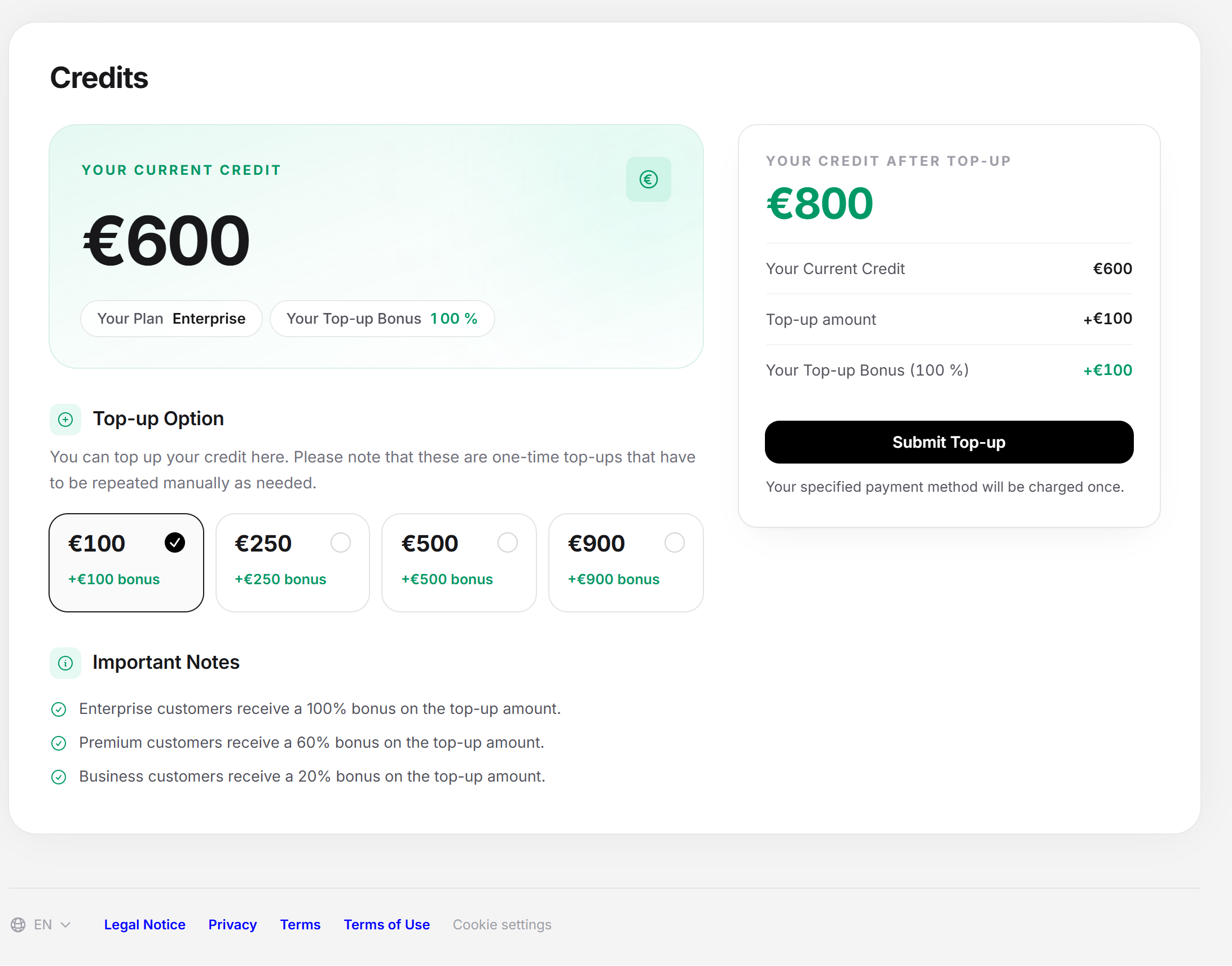
On the left are your balance and the selection, on the right the summary with the button.
Your Current Credit
The large number is your credit in euros. Two tags sit below it:
- “Your Plan”: the tier the bonus is calculated from.
- “Your Top-up Bonus”: the percentage (0, 20, 60 or 100%). It depends on the tier of your subscription as it is saved.
Top-up Option
Below that are four tiles to choose from: €100, €250, €500 and €900. The note reads: “Here you can top up your credit. Please note that these are one-time top-ups that you have to repeat manually when needed.” The selected tile has a check mark, and the first tile is preselected. If you have a subscription with a bonus, each tile also shows “+X bonus” in euros. The bonus is rounded down to whole euros.
| Top-up | Business (20%) | Premium (60%) | Enterprise (100%) |
|---|---|---|---|
| €100 | €120 | €160 | €200 |
| €250 | €300 | €400 | €500 |
| €500 | €600 | €800 | €1,000 |
| €900 | €1,080 | €1,440 | €1,800 |
The table shows how much credit you receive. You pay only the number in the first column each time.
Important notes
Below the tiles are three lines about the bonus: “Enterprise customers receive a 100% bonus on the top-up amount.”, “Premium customers receive a 60% bonus on the top-up amount.” and “Business customers receive a 20% bonus on the top-up amount.”
Your Credit After Top-up
The card on the right calculates before you pay. At the top is the large number “Your Credit After Top-up”. It changes with your selection. Below it are the line items:
- “Your Current Credit”
- “Top-up amount” with a plus sign
- “Your Top-up Bonus” with the percentage and a plus sign
The sum of all three items is the large number. This is the most important check on the page. If the expected value isn’t there, something is wrong with the tier of your subscription. Check it in the Plan section.
Below that are the button “Submit Top-up” and the sentence “Your specified payment method will be charged once.” If you don’t have an active subscription, a box appears in its place: “An active subscription is required to top up your credit.” The link in it leads to the Plan section. If you pay by SEPA direct debit, the text about the direct debit mandate with the notice of withdrawal (refund at the bank within 8 weeks) also appears at the bottom.
Topping up credit
- Open “Plan & account” and there “Credits”.
- At the top, check “Your Plan” and “Your Top-up Bonus”. They show which percentage is used.
- Under “Top-up Option”, choose one of the four amounts.
- Check “Your Credit After Top-up”.
- Click “Submit Top-up”.
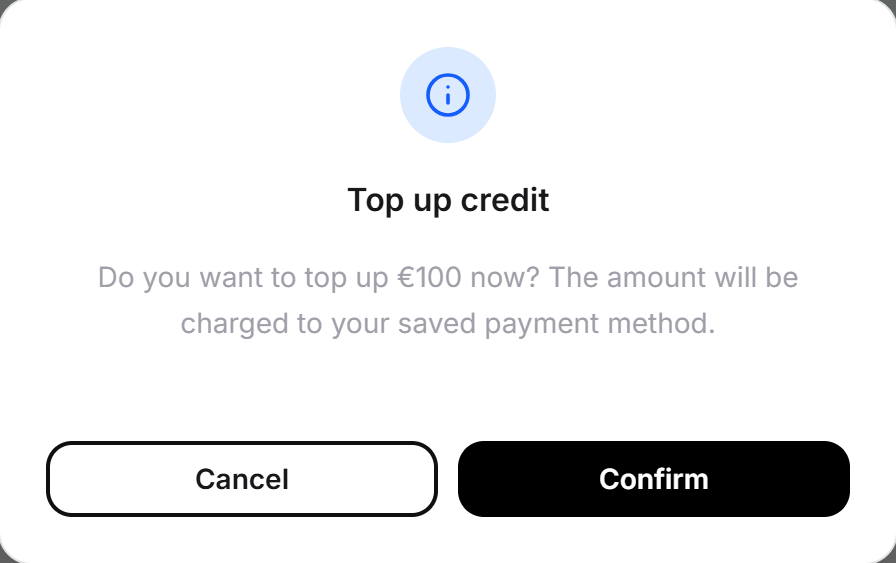
- A dialog “Top up credit” opens: “Would you like to top up X now? The amount will be charged to your saved payment method.” Click “Confirm” or “Cancel”. During the payment, the button says “Please wait” and is locked.
- On success, the message “Your credit was topped up successfully. As usual, you can find the invoice in the customer portal.” appears. The number at the top jumps to the new balance.
You find the invoice in the Plan section under “Invoices”.
If the top-up doesn’t work
The page reports the result in a message that fades in:
| Message | Cause and solution |
|---|---|
| “This feature is available with an active subscription.” | Your subscription isn’t active. Book or renew it in the Plan section. |
| “No payment method is saved for your account. Please add a credit card or a SEPA direct debit mandate in the customer portal, then you can top up your credit.” | Save a payment method via the Plan section, the Payment method tile, the Change button. |
| “The payment was declined. Please check your payment method or try again later.” | The bank or the card provider declined the payment. Check the payment method. |
| “We haven’t received a confirmation for your payment yet. With a SEPA direct debit, this can take a few days. We are checking it and will credit your account as soon as it is confirmed. Please don’t start a second top-up, or you will pay twice.” | The payment is still pending. Wait for the confirmation. The credit only arrives in your account after that. |
| “Unfortunately, topping up your credit failed. Please contact our support team.” | Another error occurred. Contact support and don’t start a second top-up without checking. |
If the page can’t be loaded, it says “The data could not be loaded. Please reload the page.” While loading, a grey placeholder holds the space.
Where credit comes from and what you use it for
Credit comes from several sources:
- Annual Bonus: Your subscription brings credit, when you sign up and with each paid period. Per year that is €200 for Business, €300 for Premium and €400 for Enterprise. With quarterly payment, a quarter arrives each quarter.
- Credit Top-up: Your top-ups from this section, with bonus.
- Refunds: Bids and sponsorship budget that are credited back to you.
It is used for these transactions:
- Bid Submitted: Bids on project requests. See Project requests.
- Lead contact purchased: Contact with a lead.
- Brief unlocked: Access to the full brief of a request.
- Sponsorship budget debited: The budget of the featured placement. See Featured placement.
- Tender analyses topped up: More analyses in the public tenders area.
- LeadWin credit topped up: More LeadWin conversations beyond the quota.
Credit is not a payout. You use it for services of the platform.
You can find an overview of credit as a whole in the article What is Feedbax credit?.
When topping up is worthwhile
- Save before the upgrade: The bonus depends on the subscription at the moment of the top-up. If you are switching to a higher tier, it pays to make the upgrade before the big top-up.
- Before a featured placement: The sponsorship budget is debited from your credit. See Featured placement.
Feedbax score
Topping up doesn’t change the Feedbax score. Credit buys visibility, not points. The route is indirect: credit funds the featured placement, it brings views and requests, and projects lead to reviews. Reviews are the strongest lever in the Feedbax score.
Frequently asked questions
Why don’t I see a button to top up?
Your subscription isn’t active. In its place is a note that an active subscription is needed, with a link to the Plan section. Book or renew your subscription in the Plan section.
Is the bonus credited right away?
Yes. The “Your Credit After Top-up” card shows the result with the bonus even before you pay. You don’t have to apply for anything.
Can I choose a custom amount?
No. There are four fixed options: €100, €250, €500 and €900. But you can top up several times in a row.
Does the top-up repeat on its own every month?
No. Each top-up is one-time. For the next one, you come back to this page.
Which payment method is charged?
The one saved in your account, the same as for your subscription (credit card or SEPA direct debit). There is no second payment form. You can change it in the Plan section.
Do I get more bonus if I upgrade first?
Yes. The subscription at the moment of the top-up counts. Switching from Business to Enterprise raises the bonus from 20 to 100 percent.
Does my credit expire?
No. Credit doesn’t expire. It stays in your account until you use it.
Can I have credit paid out?
No. It is credit within Feedbax, not cash.
What happens if the SEPA payment isn’t confirmed yet?
The page reports that the confirmation is still pending, and the credit is only credited after the confirmation. Don’t start a second top-up, or you will pay twice.