

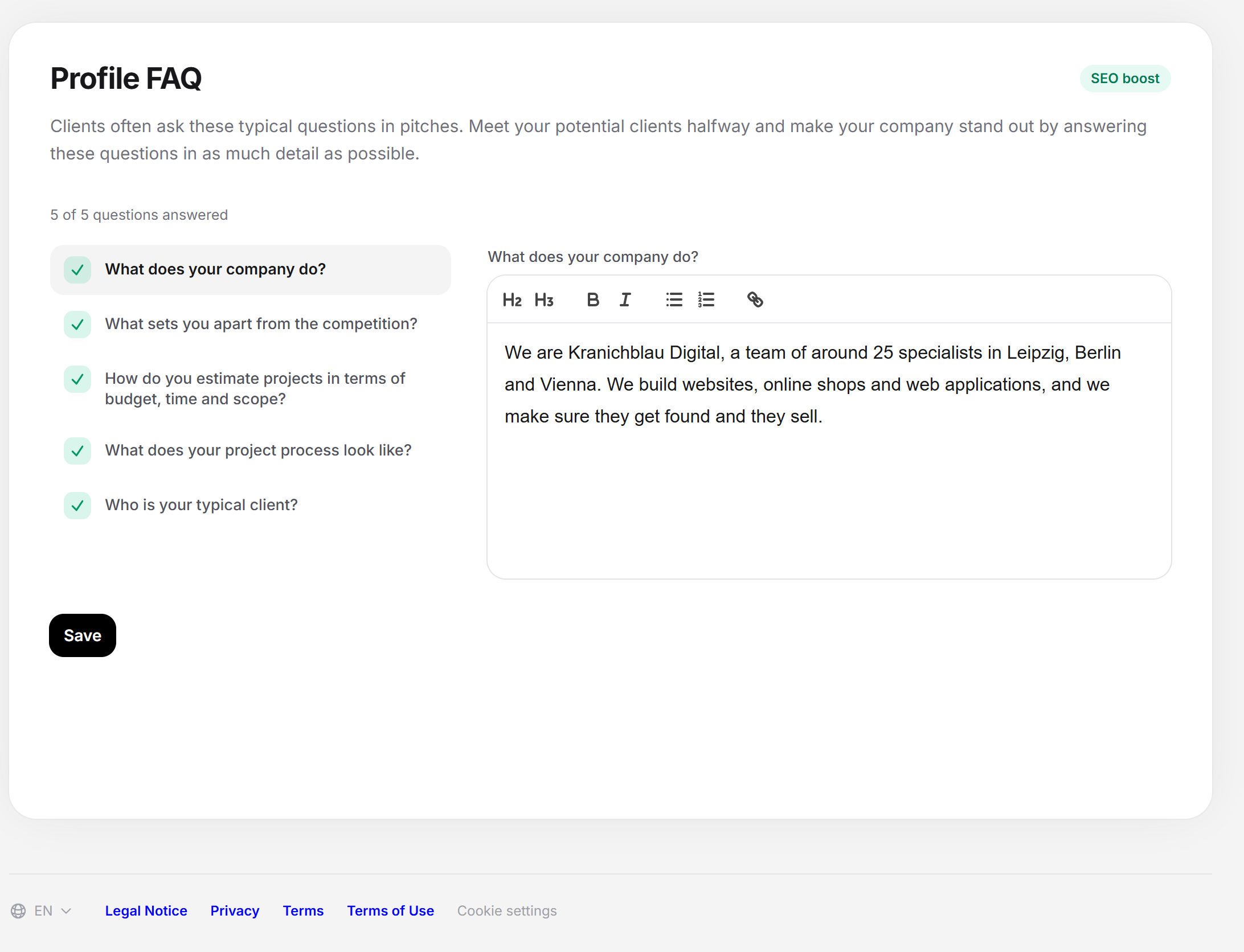
The Profile > Profile FAQ page collects your answers to the five questions clients ask most often in pitches. You answer them once in your profile. Clients read them beforehand and know from the first conversation how you work and what sets you apart.
The page can be used from the Business subscription. With Starter, you see the questions and a note about the subscription.
At a glance
You find the page in the provider dashboard under Profile > Profile FAQ. The address ends in
?section=profile-faq.Five questions, each with its own text editor. You always see one question open, and the others sit as a list next to it (above it on a phone).
All answers are optional. You can start with one and add the others later.
You save all five answers together with one Save.
Each answer has Improve with AI.
Next to the heading is the green note SEO boost. Each answered question counts toward profile progress with 20 percent.
How it works
At the top is the note “Clients often ask these typical questions in pitches. Meet your potential clients halfway and highlight your company by answering these questions in as much detail as possible.” Below it, a counter shows how far you are, for example “2 of 5 questions answered”.
On the left is the list of the five questions. A question without an answer carries its number, an answered one carries a check mark. A click on a question opens its editor and hides the previous one. The first question is active when you open the page. The editor carries the question as its label and a placeholder text with suggestions for what belongs in the answer.
Nothing is lost when you switch between questions. All five answers stay in the form until you click Save.
The five questions
| Question | What the suggestion in the field proposes |
|---|---|
| What does your company do? | Add a more personal introduction of your team to the company description. Clients prefer to work with providers they also get along with personally. |
| What sets you apart from the competition? | There are countless providers with similar qualifications. Highlight what you do differently and better. |
| How do you estimate projects in terms of budget, time and scope? | The most important question for every client. Describe a clear approach for turning client requirements into a binding estimate of time and budget. |
| What does your project process look like? | What happens next once you get the job? How do you keep clients up to date? Do you work in the classic waterfall way or agile with Scrum or Kanban? |
| Who is your typical client? | Do you tend to work with clients from certain industries? How large are your client companies usually? |
The order in the list is fixed. The suggestions disappear as soon as you start typing. They are not a requirement: write what is true for your company.
Two answers fit well with other pages. Your details under Specializations go with the question about the typical client. What you write about costs and process should match your Services and your Portfolio.
Saving the FAQ
Open Profile > Profile FAQ.
Click a question in the list and write the answer in the editor.
Repeat this for the other questions. The counter grows with each answer.
Click Save. The button briefly shows “Saving …”, then “Saved.” appears.
A question counts as answered as soon as there is text in the editor. An editor you emptied again doesn’t count. There are no required questions and no minimum length. The more detailed the answer, the more a client gets out of it.
Improving the answer with AI
Write a text first. If the editor is empty, Improve with AI stays locked.
Click Improve with AI. A box “AI suggestion” opens below the editor.
Adjust the suggestion in the box if needed.
Click Apply to put it into the editor. With Discard, your text stays as it was.
Then click Save. Only now is the answer saved.
The suggestion applies only to the question for which you requested it. If you switch to another question without applying it, the page discards it. The AI writes in the language set in the dashboard. The button is missing if the feature isn’t available right now or if a Feedbax administrator has opened your account to help you. The steps and messages are the same as for the description under Company details.
Without the Business subscription
With Starter, a note “Business plan needed” lies over the questions, with the title “Not included in your plan” and the text “With the Business plan you can answer prospective clients’ key questions in advance.” The button View plans leads to the subscriptions. Behind it, you see a preview of the five questions and an empty editor with the suggestion for the first question. You can’t enter anything, and nothing is saved. The server also rejects saving without Business. Which subscriptions there are is explained under Which subscriptions does Feedbax offer?.
Languages and translation
You write the answers in one language. Feedbax detects which one it is and translates each answer in the background into the other four profile languages (German, English, French, Dutch, Spanish). This can take a moment.
Each time you save, Feedbax translates all answers again. A translation that you changed yourself is overwritten in the process.
The page always shows you the version in the language of your dashboard.
If you empty an answer and save, only the version in the dashboard language is emptied. The other language versions stay in place.
Messages and special cases
| Message | Meaning and solution |
|---|---|
| This area is available from the Business plan. | Saving was rejected because your subscription doesn’t include Business. |
| That did not work. Please try again. | A technical error while saving. Try again. |
| The data could not be loaded. Please reload the page. | The page couldn’t read your answers. Reload it. |
| The suggestion could not be created just now. Please try again in a moment. | The AI did not answer. Your answer stays unchanged. |
Where the details count
Profile: The answers appear in your provider profile. The SEO boost note at the heading says that Feedbax makes the profile easier to find through technical measures when the area is filled in. The tooltip says: “Through technical measures on our side, your company profile gets an SEO boost when you fill in this area.”
Profile progress: Each of the five answers brings 20 percent, at most 100 together. It is enough if the answer exists in any language.
Feedbax score
The FAQ have only an indirect effect through profile progress: five answers together bring ten points on the scale from 0 to 100, which go into the delivery part of your Feedbax score.
Frequently asked questions
I only see a preview with a note. Why?
The page is unlocked from the Business subscription. With Starter you can view the questions, but not answer them.
Do I have to answer all five questions?
No. But for full progress of 100 percent in this area, you need all five.
How long should an answer be?
There is no requirement. A few connected sentences are enough. For the questions about estimating and project process, it can be more detailed, because clients ask about those most often.
Why does the counter show fewer answers than I wrote?
An editor that contains only empty paragraphs doesn’t count as an answer. Write text into it.
When are my answers saved?
Only when you click Save. When you switch between questions, all five answers stay in the form, but that doesn’t save them.
Can I change the questions or add my own?
No. The five questions and their order are fixed.
Why does my profile still show the old text?
The version in your dashboard language applies immediately. The translations into the other languages are created in the background and take a moment.