

Two parts of a tender take up the most work: the stack of procurement documents and the running bidder questions. Feedbax prepares both. This article explains what you find there.
Both sections are part of the subscription. Without one you see a preview; more on that in What the free access includes.
The documents section
At the very bottom of an opened tender sits the Documents section, with the file count in the heading, for example "26 files".
Feedbax downloads every one of these files from the source, extracts its text and produces its own breakdown. Twenty-six files in various formats thus become one searchable list with a consistent structure.
The groups
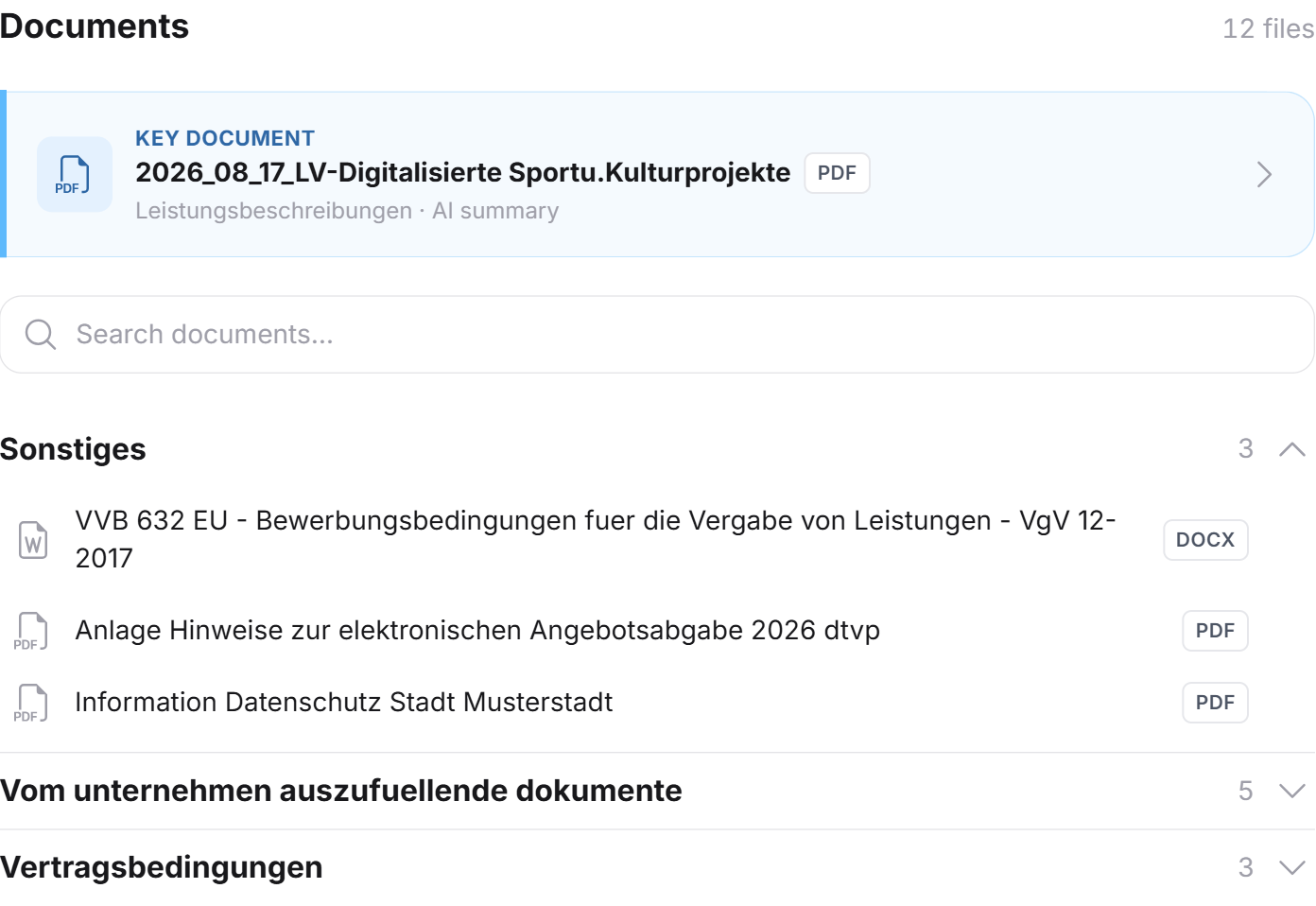
The files are sorted into two groups. That is the single most useful ordering, because it separates the work:
Information & reference documents: files you have to read. Specifications, contract terms, explanatory annexes.
Documents to be completed by your company: files you have to fill in and submit. Price sheets, declarations, questionnaires.
Anything that could not be assigned to either group sits under Other.
That second group is your workload. If you want to know how much effort an application really takes, count the files there.
The badges on a file
Per file you see the name and several badges:
KEY DOCUMENT: the most important document of the tender, usually the specification. Start here.
Mandatory document: this document must accompany the bid.
The file type, that is PDF, Word or Excel.
The category of the document, for example "Specifications" or "Contract terms".
AI summary: a breakdown exists for this document.
Not readable: the document is a scan without a text layer.
The document search
A search box sits above the list: Search documents…. It filters the list by file name. With 26 files or more, that is the fastest route to a specific annex.
If the search finds nothing, it reads No documents found.
The search is available with an active subscription only.
Opening a single document
A click on a file slides the document view in from the right. The tender stays behind it; Documents at the top left takes you back.
In the document view you find:
The header. The document's classification in capitals, the file name, the file type, the Mandatory document badge where applicable, and the analysis date.
The breakdown. For content-rich documents it is split into sections; for shorter ones it is a single text. Both come from the actual content of the file.
The key points. A blue box with a light bulb and a list of the document's most important statements. If you read only one thing per document, read this list.
Download original. The button at the top right opens the original file at the procurement platform. Feedbax does not store the files itself; the download always runs through the source.
The button is missing when the deadline has passed or the source is no longer reachable.
When a document could not be read
Some contracting authorities upload scanned paper documents, that is images without a text layer. Feedbax cannot extract those. They appear with the Not readable badge, and the document view carries a note: the document is only available as a scan, its content could not be read and was therefore not analysed, please open the original.
That is not a Feedbax fault but a property of the uploaded file. The button to the original still works.
Translating a document
The breakdown is created in German. If you open a document in another interface language, it is translated in the background where needed. A blue note sits above it while that runs. A document translated once stays translated for the session, so reopening it is instant.
The bidder questions section
Bidder questions are the most underestimated part of a procurement procedure. Other bidders ask questions, the contracting authority answers, and those answers are binding. They move deadlines and relax requirements.
The section's own intro says exactly that: answers to bidder questions often shift deadlines or relax requirements, and that is precisely what many providers overlook.
The section is called Current bidder questions & changes and appears only when there are any. It then also gets its own tab in the bar.
What a bidder question contains
Per entry you see the question, the contracting authority's answer, and a classification of what the answer does:
Deadline change: a date has moved.
Requirement relaxed: a specification was loosened. That can open up a tender that looked hopeless before.
Clarification: the authority clarifies without changing anything.
Other: everything else.
If the list is long, a button such as Show 3 more updates sits below it.
View on the tender platform
Next to the heading sits View on the tender platform. The link leads to the procedure's communication page, that is where the questions and answers stand in the original.
Feedbax sets this link only when such a page really exists. There is deliberately no substitute link to the general tender page: that is not a bidder-questions page, and a link that lands elsewhere would be misleading.
The link is part of the subscription.
Why this belongs with following
Bidder questions arrive after publication, often right up to the deadline. An analysis you read today can be out of date in a week.
That is why the communication page is one of the five things Feedbax monitors on followed tenders. If something changes there, you get an email, and the new questions are in it. See Favorites and following tenders.
Frequently asked questions
Does Feedbax store the procurement documents?
No. Feedbax downloads the files for the analysis but does not host them. Every download runs through the procurement platform. That is why the state there is always what counts.
Why does a document have no summary?
Either it is a scan without a text layer, in which case it carries the Not readable badge. Or it contains almost no usable text, for example an empty form.
Can I download the documents as a package?
Not through Feedbax. Procurement platforms usually offer a bulk download of their own, which you reach via the Go to procurement platform button.
What does "mandatory document" mean?
That the document has to accompany the bid. The badge comes from the analysis of the procurement documents. Verify completeness at the source before submitting anyway.
Are the bidder questions complete?
They are the state at the time of the last analysis. That date sits above the analysis. For today's state, use the link to the procurement platform or follow the tender.
I only see two bidder questions and two documents.
Then you are reading the preview without a subscription. With an active subscription you see the full lists, plus the document search and the jumps to the source.