

A fit analysis does not end with the score. It lists what could not be evidenced from your data and lets you put that right. The score rises immediately, without a new AI analysis being needed.
This is the most important working step in the fit drawer. This article explains it step by step.
The basics of the score are in The tender fit: how your score is built.
Two kinds of points
Open points sit with each of the four dimensions. They describe what was not visible for that dimension, for example "No visible evidence for Jira, Confluence or Microsoft Teams".
Exclusion risks sit in a section of their own further down. They are formal requirements of the tender: certifications, minimum turnover, professional indemnity insurance, a required number of references, team or company size, regional presence, project languages.
The difference matters for the score:
A confirmed open point raises the score.
A confirmed exclusion risk does not. It lowers the figure under CRITICAL RISKS.
Both matter. A high score with five critical risks is not a good starting position.
The note above the open points
Below the signals found for each dimension sits a sentence carrying the invitation: these open points could not be verified from your profile and website; if you meet them you can confirm them here, optionally with proof, and this feeds into the fit score.
That is the point. The AI is not saying you cannot do something. It is saying it could not see it.
Confirming an open point
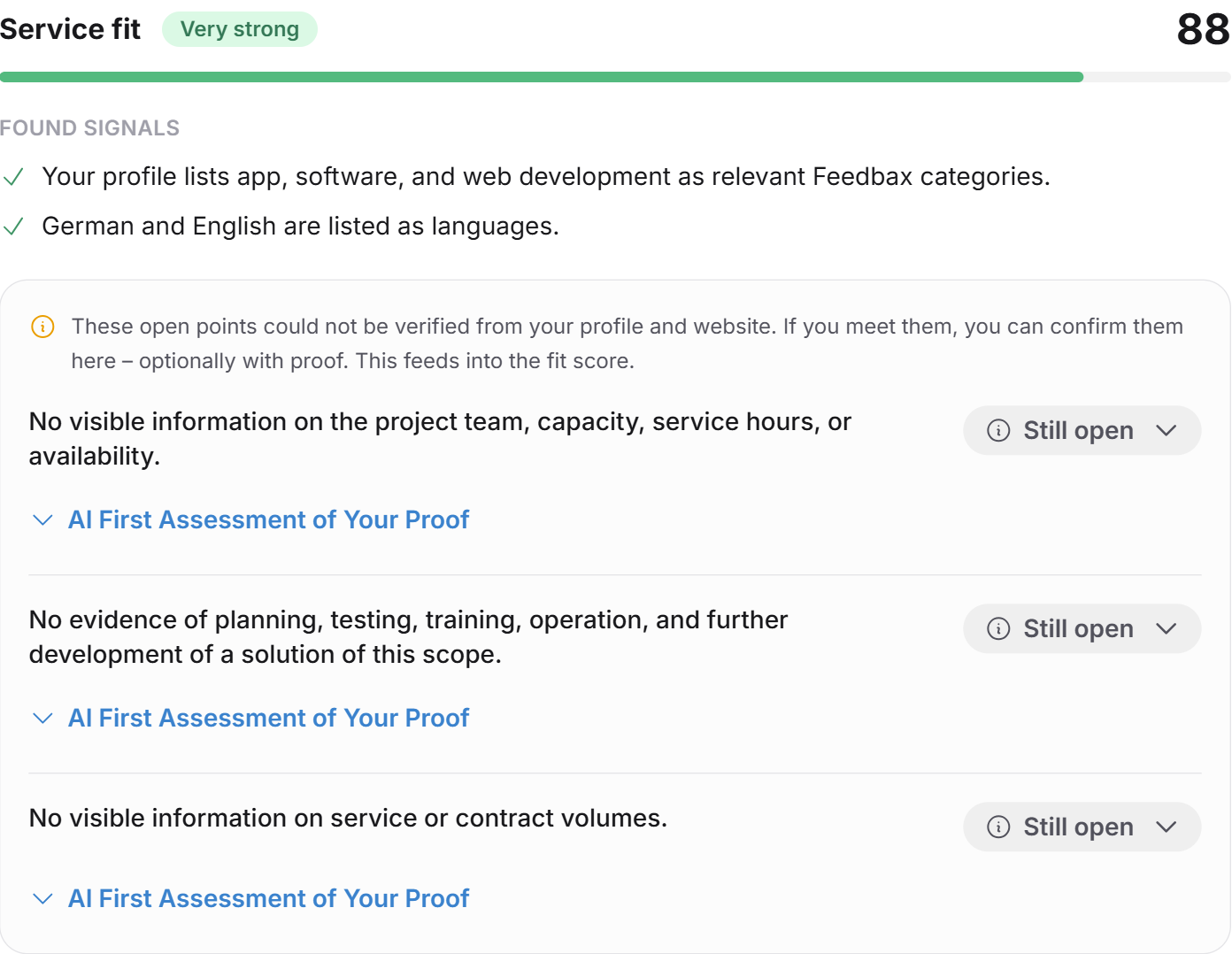
Every open point carries the status Still open. Via Adjust status you choose:
I meet this: you fully meet the requirement.
Partially: you meet it in part.
Use AI assessment: resets your choice back to what the AI assessed.
If you set a value yourself, Set by you appears next to it.
Exactly how the score rises
The calculation is simple and traceable:
Every dimension has an AI score and a number of open points.
Every confirmed point closes its share of the gap up to 100.
I meet this counts fully, Partially counts half.
The overall score rises by the average of the gains across all four dimensions.
An example. The reference fit stands at 60 and has three open points. You confirm one of them with I meet this. One third of the 40-point gap is closed, so the dimension rises to about 73. Confirm all three and the dimension reaches 100.
The overall value rises by a quarter of that gain, because four dimensions are averaged.
The score can only rise
A confirmation never lowers the score. The status labels are also only corrected upwards: a dimension that passes 75 points through confirmations becomes Strong, but the AI's original label is never downgraded.
On top of that, every confirmation with I meet this reduces the figure under OPEN PROOFS.
After the recalculation, a short message appears such as "Fit updated: 74/100 · 3 critical points open".
Uploading proof
Below every open point and every exclusion risk sits the block Initial AI assessment of your proof. It is explicitly optional.
A click unfolds a form:
Drag a document here or select one: a file as PDF, Word or Excel, at most 10 MB. Larger files are rejected with a note.
OR an address, for example the page on your website stating the certification.
The Have AI check it button starts the review.
Feedbax AI reads the proof and gives feedback: a rating and a short rationale. The ratings are Visibly met, Partially visible, Not visible and Not verifiable.
The result then sits under the point as Feedback from Feedbax AI, together with the file name or the address. Via Re-check proof you can submit a better one.
The AI review of a proof is non-binding too. The note sits right in the form: the binding review is done exclusively by the contracting authority.
When proof is worth it
Proof makes sense when you want more than a higher fit: when you want to check for yourself whether your evidence holds. The feedback tells you whether a document really covers the requirement or only touches it. That is a dry run of what the buyer will see later.
If you only want to correct the score, the status selection is enough. Proof is not required.
Exclusion risks
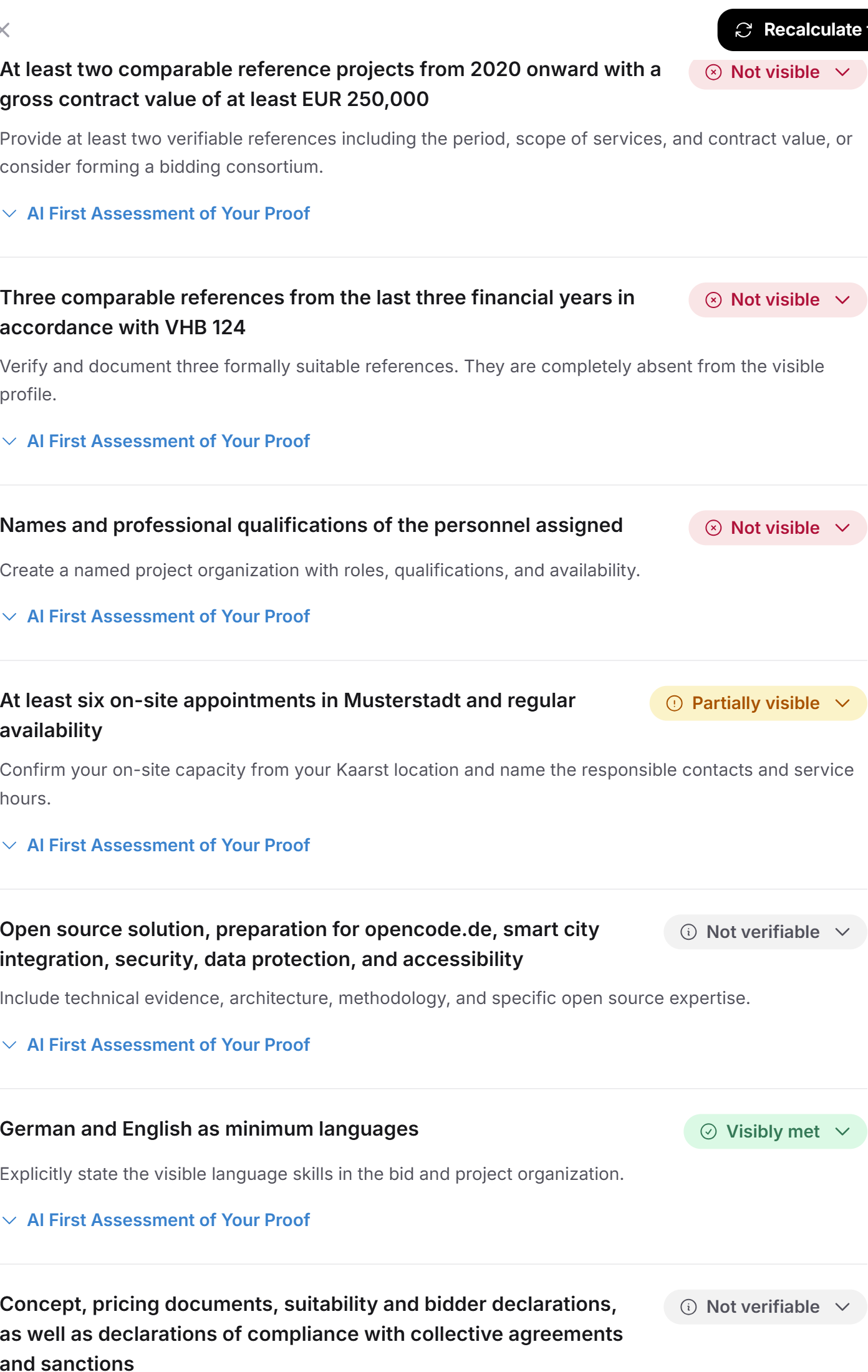
The Exclusion risks section carries a badge such as 5 not proven at the top. Per risk you see:
the formal requirement in plain words
the rating: Visibly met, Partially visible, Not visible or Not verifiable
an action, that is what concretely to do
The action is the most useful part. It reads, for example: check which lot fits the references you can evidence, and prepare the required annex with solid contacts.
Here too you can adjust the status and upload proof. The score is untouched, but the number of critical risks falls.
Recognized, open and critical
Between the dimensions and the exclusion risks sits a section headed RECOGNIZED, OPEN AND CRITICAL. In three to six lines it contrasts:
a signal recognized in your data
the matching open point
a risk level, usually Medium or High
That is the most honest view in the whole analysis. It shows where your strength ends and the risk begins.
What recalculating does to your confirmations
When you click Recalculate fit, a confirmation appears titled "Recalculate the fit?" with an explanation worth reading:
The AI creates a completely new analysis. The criteria may change, individual open points can be reworded, and your manual confirmations may then lose their match. The confirmations stay saved and keep counting wherever the wording still fits.
Practical consequence: confirm once you want to work with the analysis. If you recalculate afterwards, part of that work can come to nothing. And the other way round: if you extended your profile, recalculate first and confirm after.
Frequently asked questions
Do I have to upload proof to raise the score?
No. The status selection alone is enough. Proof is an additional option to have your evidence checked in advance.
Can I just confirm everything?
Technically yes, sensibly no. The fit is your own basis for a decision. Confirming things you do not meet means lying to yourself and entering a procedure with false confidence, where the buyer checks exactly this evidence bindingly.
Which file formats does the proof accept?
PDF, Word and Excel, up to 10 MB per file. Larger files are rejected with a note.
Why does the score rise so little after a confirmation?
Because it averages across four dimensions. A confirmed point in one dimension moves the overall value by a quarter of its gain. The effect becomes visible once you close several points across several dimensions.
Can I take a confirmation back?
Yes. Choose Use AI assessment on that point and the AI's assessment applies again.
Why does a confirmed exclusion risk not change my score?
Because the score deliberately reflects only the four substantive dimensions. Exclusion risks are formal hurdles. They do not decide how well you fit but whether you may take part at all. That is why they are counted separately.
Do my confirmations apply to other tenders too?
No. They are attached to the individual tender, because they relate to its specific requirements.