

With featured placement, you move your profile above the organic provider list in a directory. You set a monthly budget, choose up to three focus directories and see in a simulation where that puts you. The budget is deducted from your Feedbax credit.
At a glance
Where: in the dashboard under Visibility > Featured placement.
Subscription: Saving only works with an active subscription, Business or higher. Without a subscription the button is locked, with the note “This feature is available with an active subscription.”
Budget: €25 to €500 per month in fixed steps. It is deducted from your credit.
Places: at most 10 top places per directory. Focus: up to 3 directories.
Enterprise: €50 in credit per month as a gift, applied to featured placement automatically.
Score: The budget does not change your Feedbax score.
What featured placement gives you
Your company appears above the market leaders table and the organic provider list in that directory and in all the related location-based directories. That brings more potential customers, more profile views and more visitors to your website. The budget stays the same, no matter how many clicks your profile or website gets.
The page at a glance
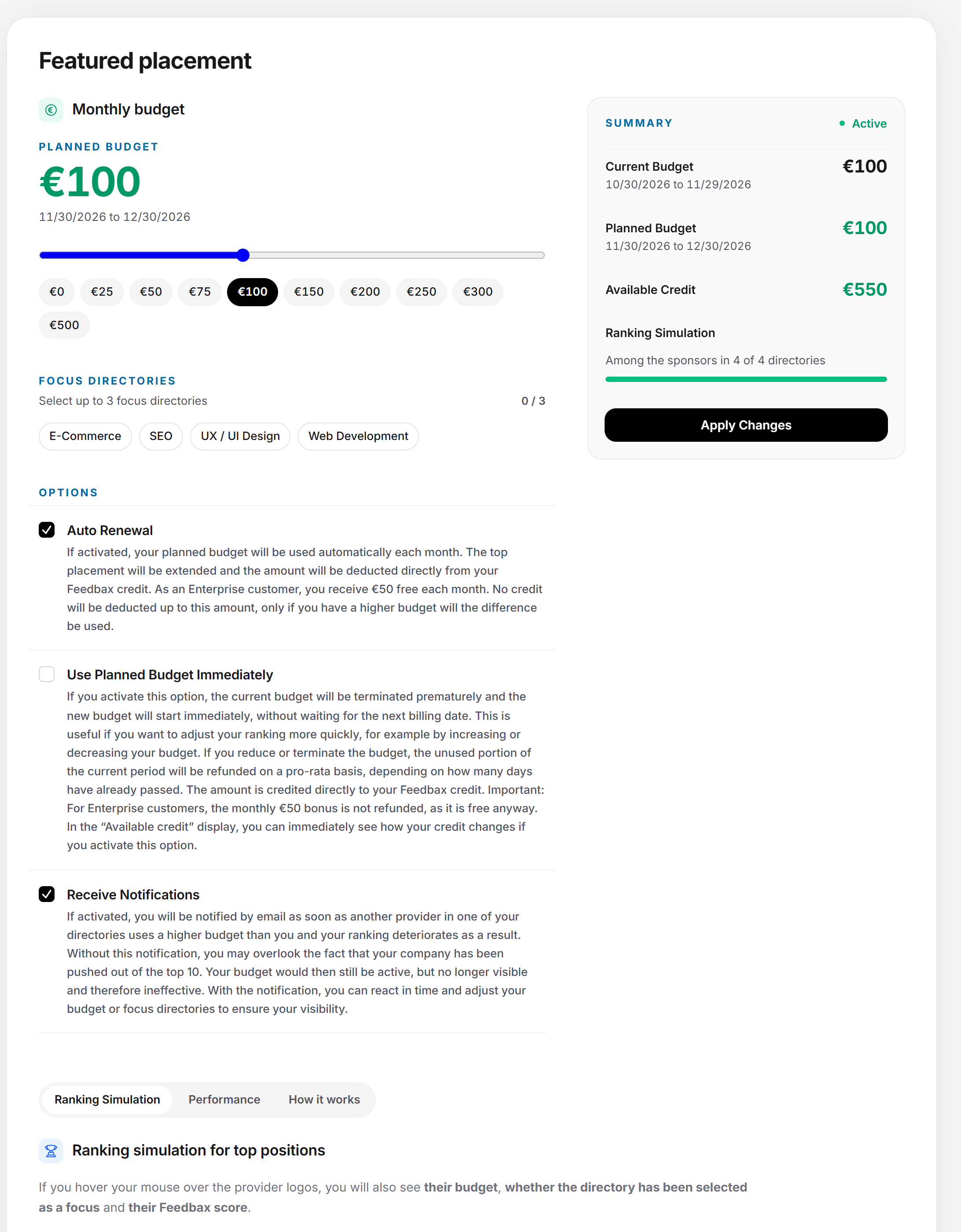
The settings are on the left, the summary with the save button on the right. In a narrow view, they are stacked. Below, you choose a tab: “Ranking Simulation”, “Performance” (only while a budget is running) and “How it works”.
The settings
Monthly budget
Under “Monthly budget” there is the field “Planned Budget” as a large number at the top, with its period below. You set the budget with a slider. Below the slider are buttons for the steps. Both set the same value. The steps are €0, €25, €50, €75, €100, €150, €200, €250, €300, €400 and €500. The slider knows all steps, the buttons show all except €400. The steps only go as high as your available credit. At €0 no featured placement runs. Anything above starts at €25 at least.
If you are an Enterprise customer, “Enterprise bonus: €50 in monthly credit!” appears under the slider as long as your budget is €50 at most.
Focus directories
Under “Focus directories” it says “Select up to 3 focus directories” with a counter such as “2 / 3”. Each directory is a selection field with a checkmark. Once you have chosen three, the rest are locked until you deselect one. The focus decides with equal budgets: then the provider who chose the directory as focus ranks first. So with the focus you improve your placement without paying more. You cannot choose the directory for online shops.
Options
| Switch | What it does |
|---|---|
| Auto Renewal | The planned budget is used automatically every month. The featured placement renews, and the amount is deducted directly from your Feedbax credit. As an Enterprise customer, no credit is deducted up to €50, and only a higher budget uses the difference. If you switch auto renewal off, the featured placement ends with the running period. As an Enterprise customer, the €50 stay active, and only the budget above it ends. |
| Use Planned Budget Immediately | Only appears when a featured placement is running. The current budget ends early and the new one starts immediately. The unused part of the running period is refunded to your credit proportionally, depending on how many days have already passed. The Enterprise bonus of €50 is not refunded. The field “Available Credit” immediately shows how your credit changes as a result. |
| Receive Notifications | You get an email as soon as another provider in one of your directories sets a higher budget and your placement gets worse as a result. If you switch the switch off, a dialog asks again: without the message, you could miss that you have been pushed out of the top 10. Your budget would then be active but no longer visible. |
The summary
The card on the right shows:
the status: “Active” if a featured placement is running, otherwise “Not Started”.
the budgets with period: “Current Budget” and “Planned Budget”. If “Starting Now” is active, “Manually Closed Budget” and the new budget with the period “Starting Now” until the date one month later appear instead. If auto renewal is off, no planned budget is shown anymore. Below the budget it then says “Ends on …, no renewal”. For Enterprise, the planned budget shows the included €50 and it says “Continues from … with the €50 included in your plan”.
the field “Available Credit” with the credit that remains after the planned budget is deducted.
the ranking simulation in a line such as “Among the sponsors in 3 of 5 directories” with a bar.
the save button.
Saving
The button is called “Start Budget Now” as long as nothing is running, and “Apply Changes” as long as a featured placement is running. A click opens a dialog with the text “Please confirm the planned budget.” and your budget. It has the buttons “Confirm” and “Cancel”. Only “Confirm” saves. Afterwards it says: “Your data has been successfully saved. Please continue with the next section.” While saving, the button shows “Please wait”.
If you do not have an active subscription, Business or higher, the button is locked and below it says: “This feature is available with an active subscription.” You can still look at the settings and the simulation.
Error messages
| Message | When it appears |
|---|---|
| Minimum planned budget is €25. | You are starting for the first time and chose €0. |
| The selected budget exceeds your current credit. Please top up your credit or choose a lower budget. | The budget is above your available credit. With Enterprise, only the amount above the included €50 counts. |
| This feature is available with an active subscription. | You do not have an active subscription, Business or higher. |
| Failed to save sponsorship settings. | Saving failed. Try again. |
How budget and renewal work
A period lasts one month.
The first start deducts the amount from your credit immediately.
A change without “Starting Now” takes effect from the next period. The running budget stays until its end. If auto renewal is off, no next period follows.
A change with “Starting Now” ends the running period now. The new budget starts immediately, and the unused part of the old one is refunded proportionally.
The renewal runs automatically if “Auto Renewal” is on. If your credit is not enough for it, Feedbax sets the budget to €0 and switches auto renewal off. If auto renewal is off, the featured placement ends at the end of the period, and nothing is deducted anymore. As an Enterprise customer, the €50 stay active, and only the budget above it ends. Without an active subscription, the featured placement ends as well.
The Enterprise bonus covers the first €50 of the budget. Only the difference is deducted.
How to top up credit is explained in Topping up credit and getting the subscription bonus.
Tab 1: Ranking Simulation
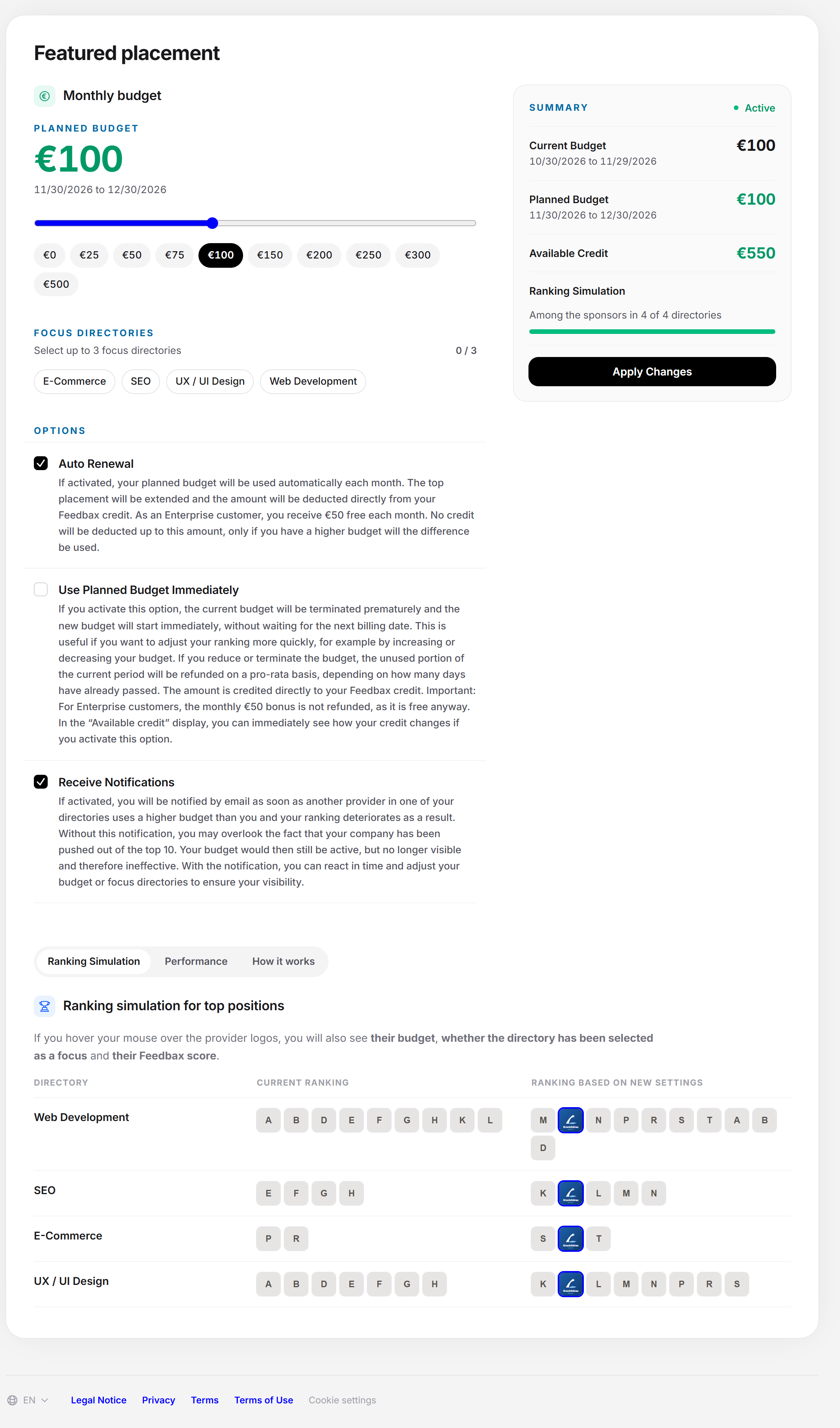
The tab shows you where you stand in the paid top places of each of your directories and how that changes with the new settings. The table does not show the organic ranking, only the paid places, at most 10 per directory. When you move the slider or choose a focus directory, the simulation updates by itself. Nothing is saved until you confirm.
There is one row per directory, with the columns “Current Ranking” and “Ranking Based on New Settings”. Both show the sponsors’ logos in their order. Your logo is highlighted.
If you move the mouse over a logo, you see the position, the budget, whether the directory is a focus directory, and the Feedbax score in that directory.
The order results from: first the budget (higher goes first), then the focus, then the Feedbax score.
If you are not listed in any directory, this shows instead of the table: “Add at least one service so we can work out your directories and simulate your ranking there.” The button Add services leads to the Services page.
Tab 2: Performance
The tab only appears while a budget is running. It shows what the featured placement has brought. It is called “Clicks in the last 30 days” and explains: you see the clicks on your Feedbax profile and on your website in the last 30 days. Clicks from another Feedbax profile come from you being listed there among the alternative providers.
Three counters: “Total”, “Website” and “Profile”.
A table with the clicks. Each row has “Timestamp”, “Browser”, “Device”, “Referrer” and “Destination” (“Profile” or “Website”). An unknown source is called “Unknown”.
Clicks from the dashboard itself do not count.
If there have been no clicks yet: “There have been no clicks on your profile in the last 30 days yet.”
Tab 3: How it works
The tab explains the same in short form. It has the heading “What top placement gives you”, an introduction with a note on the Enterprise bonus, three tiles with key figures and six questions with answers: “Where does a top ranking appear?”, “How does payment for top placement work?”, “What criteria are used to determine the ranking?”, “How many featured rankings are available per directory?”, “What are focus directories?” and “How does the ranking simulation work?”.
Effect on the Feedbax score
Featured placement does not change your Feedbax score. It is paid visibility above the organic ranking. Your score still plays a part, though: if two providers have the same budget and the same focus, the score decides. More in Can a profile with a lower Feedbax score be ranked higher?.
Frequently asked questions
Do I need a subscription for featured placement?
Yes, to save you need an active subscription, Business or higher. You can look at the page without one. Which subscriptions exist is explained in Which subscriptions does Feedbax offer?.
How many top places are there?
At most 10 per directory. Whoever pays more ranks higher.
When is the budget deducted?
Immediately at the first start, after that at every renewal. It is deducted from your Feedbax credit, see What is Feedbax credit?.
What happens if my credit is not enough?
At renewal, Feedbax sets the budget to €0 and switches auto renewal off. Top up your credit before the next renewal.
Do I get money back if I change the budget early?
Yes, if you use “Use Planned Budget Immediately”: the unused part of the running period comes back to your credit proportionally. The Enterprise bonus of €50 is not refunded.
When does a change apply?
Without “Starting Now” from the next period, with “Starting Now” immediately. If you switch auto renewal off, the featured placement ends with the running period.
What is the difference from the ranking?
The Ranking shows your organic placement. Featured placement is paid and sits above it.
What does the focus bring?
With equal budgets, the provider who chose the directory as focus ranks first. You can choose up to three.
How do I know whether a competitor has moved past me?
Switch on “Receive Notifications”. Then you get an email as soon as another provider sets a higher budget and your placement gets worse as a result.