

If you have already collected reviews on G2, you do not have to start from zero at Feedbax. The “G2” page in the dashboard connects your G2 profile with Feedbax, fetches the reviews and shows you what was imported. The imported reviews appear in your profile and count toward its total number and overall rating. They count toward the Feedbax score from the Premium subscription.
At a glance
- Where: in the dashboard under Reviews > Sources > G2.
- Subscription: Connecting requires at least the Premium subscription. Below that, the page is visible but locked.
- What you need: the address of your G2 profile or just its ID. Feedbax recognizes the ID in the address by itself.
- Amount: When connecting, Feedbax fetches the first page with up to 10 reviews. You load the rest with “Load more reviews”.
- Feedbax score: G2 reviews count toward the score from the Premium subscription.
- Update: automatically at the interval of your subscription (56, 28, 14 or 7 days) and at any time by hand with “Update reviews”.
How it works
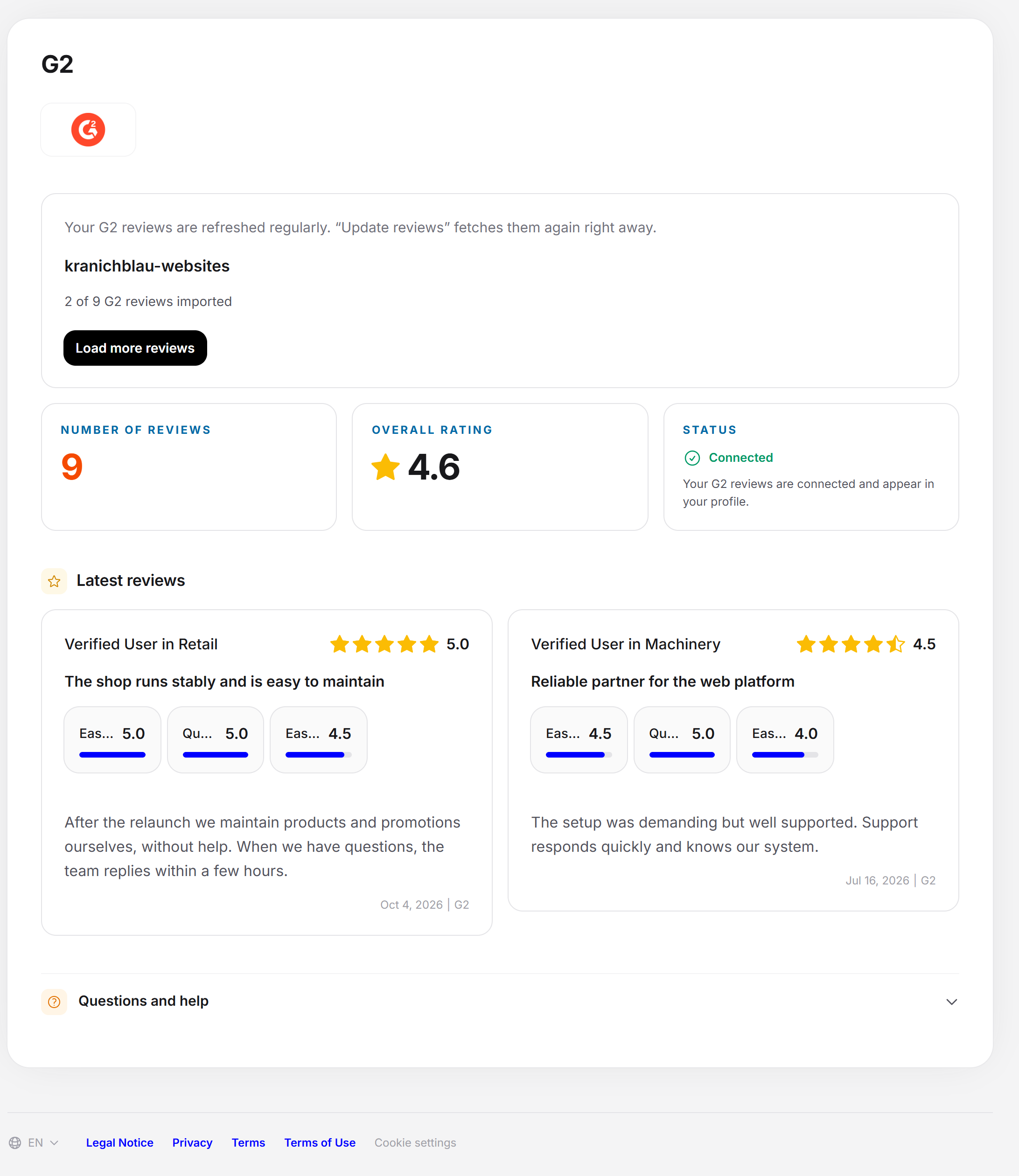
You give Feedbax the address or the ID of your G2 profile. Feedbax saves it and fetches the reviews. From top to bottom, the page shows:
- the G2 logo on a white field,
- the connection card with the input field and the buttons,
- three tiles: “Number of reviews”, “Overall rating” and “Status”,
- the Latest reviews: the ten most recent saved reviews as cards,
- the collapsible section Questions and help.
The number in the “Number of reviews” tile and the overall rating are the values that G2 itself reports. The number can be higher than the number of reviews that Feedbax has already saved. The cards below show only the ten newest saved ones. All saved reviews from all sources appear on the page Reviews overview in one list.
Feedbax does not import reviews with 0 or fewer stars from G2.
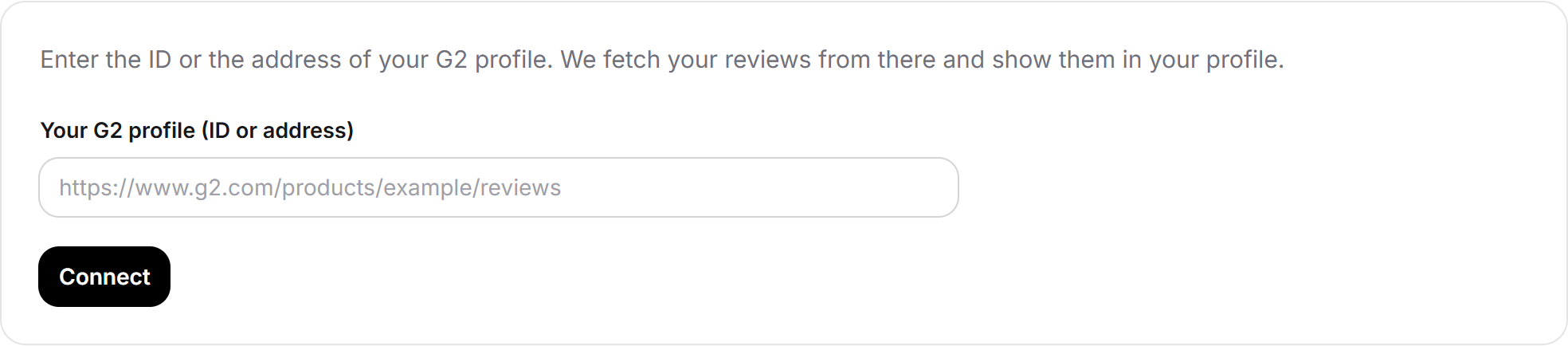
Connect G2
- Open Reviews > Sources > G2.
- In a second tab, open your G2 profile and copy the address from the address bar. You can also copy just the ID.
- Paste it into the field Your G2 profile (ID or address). A sample, https://www.g2.com/products/example/reviews, is shown there.
- Click Connect. While the reviews are being fetched, the button says “Please wait …”.
- A message tells you how it went. On success, the status is Connected, the tiles show the number and overall rating, and the cards show the latest reviews.
Where to find the G2 ID
Open your G2 profile. The address looks like https://www.g2.com/products/dein-produkt/reviews. The ID is the part between /products/ and the next slash, so the product name.
You do not have to extract the ID yourself. If you enter the whole address, Feedbax recognizes the ID. Feedbax saves it in lowercase. Feedbax does not recognize the company name alone as an ID.
What the messages after connecting mean
- Done: the G2 reviews were imported. The ID is correct, G2 delivered reviews, and they are saved.
- We found no reviews for this ID on G2. Check your entry. The status stays at “Not connected”. The ID stays in the field, and you can change it.
- Please enter the ID or the address of your G2 profile. The field was empty, or no ID could be read from what you entered.
- This is not included in your plan. Your subscription is not enough for this source.
- That didn't work, unfortunately. Please try again later. Wait a moment and try again.
If there are no reviews yet for the saved ID, the input field stays visible and holds the ID. You can correct it there yourself. If there are reviews, the page only displays the ID, and the input field is gone. Then the Feedbax team changes the ID. Write to us via the assistant or support, and we will replace it for you.
Reading tiles, status and cards
- Number of reviews: the total number that the portal reports.
- Overall rating: the average that the portal reports, with a star icon.
- Status: Connected (green) if an ID is saved and the portal has reported at least one review. It also says that your G2 reviews are connected and appear in your profile. Otherwise it says Not connected (red) with the note that G2 is not connected yet and that the reviews appear in the profile after connecting.
Each card under Latest reviews shows the name of the reviewer, the stars with the score, the date and the text. In addition come the partial ratings Ease of use, Quality of support and Ease of setup, as far as G2 provides them. Without a saved review, a yellow note says “No G2 reviews are stored yet.”
Load more reviews
G2 delivers the reviews in pages of 10. Connecting and updating therefore import only the beginning at first. If G2 has more reviews than are saved at Feedbax, the connection card changes:
- Below the input area it shows how many of how many have been imported, for example “20 of 89 G2 reviews imported”.
- The button is now called Load more reviews. It fetches the next page and adds it. Nothing is deleted.
- Click as often as needed until both numbers are equal. After that, the button goes back to being called Update reviews. If a click brings nothing new, the page says so, and the button likewise goes back to being called Update reviews, even if the numbers are not equal yet.
Update reviews
If there are reviews for the ID, the card shows the ID instead of the input field, and the sentence that the G2 reviews are updated regularly. With Update reviews you fetch the current state immediately. If there is nothing new, the page says “We found no new reviews on G2.”
Updating adds new G2 reviews and leaves the saved ones in place. A review that was deleted on G2 therefore stays at Feedbax. If it should disappear, write to us via the assistant or support.
In addition, Feedbax fetches the source again automatically if the last fetch was longer ago than the interval of your subscription: Starter 56 days (8 weeks), Business 28 days (4 weeks), Premium 14 days (2 weeks), Enterprise 7 days (1 week).
This automatic update is only available from the Premium subscription.
If an automatic fetch finds new reviews, Feedbax sends providers with at least a Business subscription an email to the admin address, or to the leads address as a fallback.
Every new ID and every update is also listed in your activity feed.
Questions and help on the page
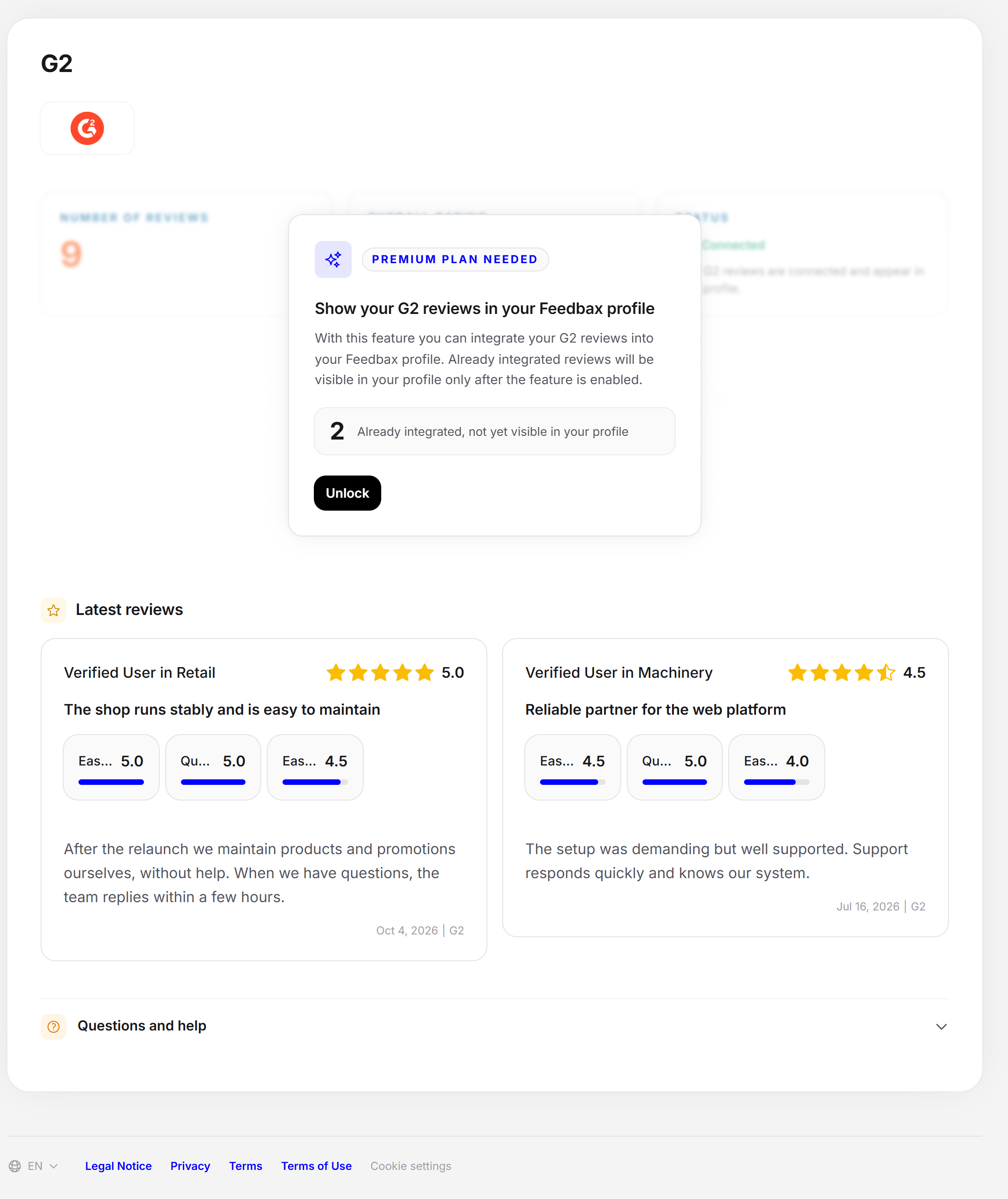
At the very bottom, the section Questions and help opens. On the left are questions with answers, on the right a card for Feedbax reviews.
The questions cover:
- what the G2 ID is
- whether you have to enter the whole address
- how to change the ID (answer: without reviews you do it yourself, with reviews the Feedbax team changes it)
- whether the reviews are updated automatically
The first question is open, and you open the others with a click. The answer about updating names the intervals Starter 8 weeks, Business 4, Premium 2 and Enterprise 1 week.
On the right, the card promotes Feedbax reviews. View Sample opens a complete sample review. Learn More explains in a window why Feedbax reviews are worthwhile. Both windows end with a button that leads to the page Request reviews.
Without the matching subscription
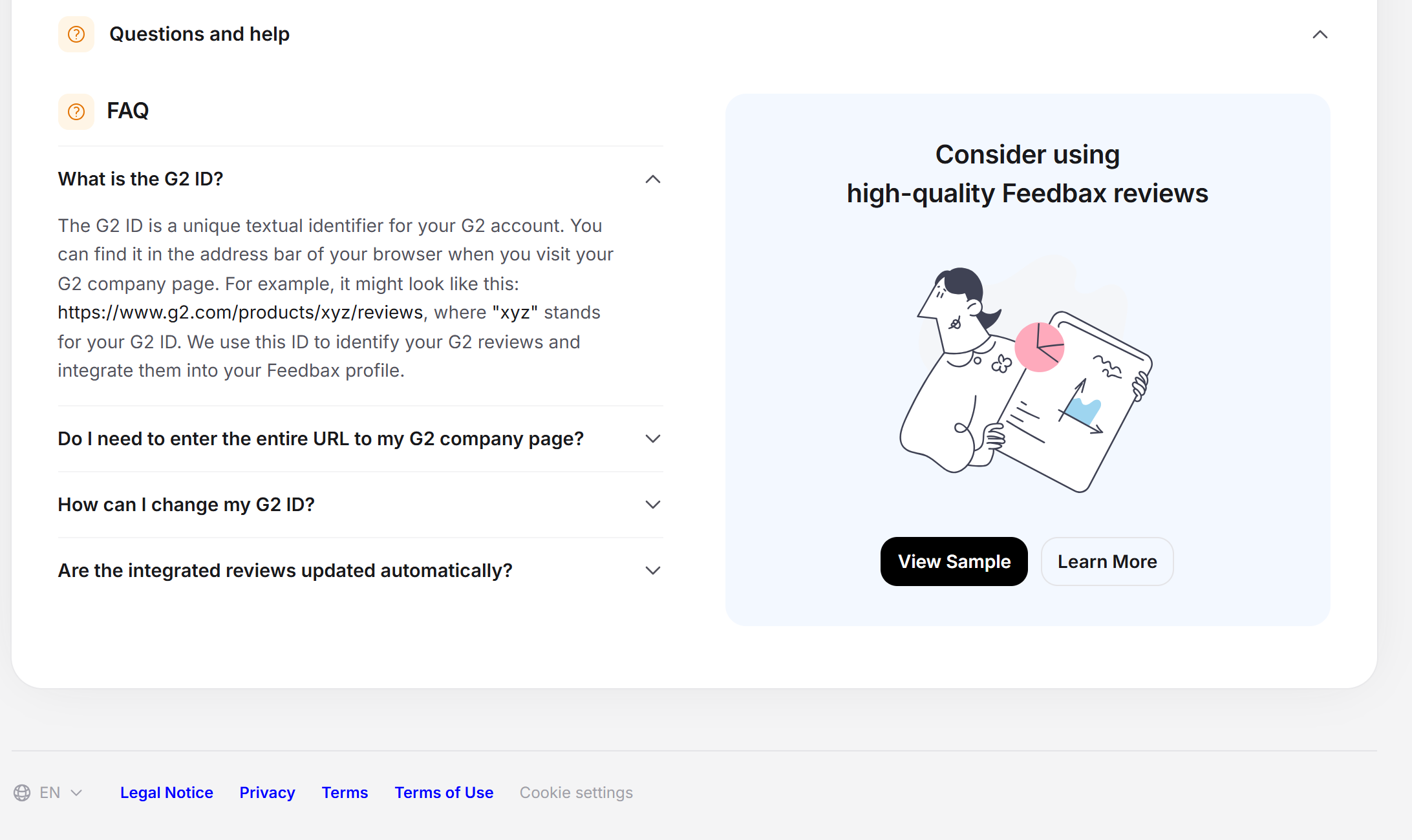
If you do not have a Premium subscription or higher, the page is locked. The input field and the buttons are missing. The three tiles and the Latest reviews stay visible. Above them is a card with the note Premium plan needed, the heading “Show your G2 reviews in your Feedbax profile” and the button Unlock. The button opens the section Plan in the dashboard.
If you have already saved reviews, the card gives their number with the addition “Already integrated, not yet visible in your profile”. This applies, for example, if you downgraded your subscription: the connection and the saved reviews stay, but they only appear in the profile again once your subscription unlocks the source.
What your subscription includes
| Subscription | Connect G2 | Counts in the profile (total number and overall rating) | Counts in the Feedbax score | Automatic update |
|---|---|---|---|---|
| Starter | No, the page is locked | No | No | No |
| Business | No, the page is locked | No | No | No |
| Premium | Yes | Yes | Yes | Every 14 days |
| Enterprise | Yes | Yes | Yes | Every 7 days |
The Premium subscription unlocks G2. A higher subscription also shortens the interval of the automatic update and unlocks further sources. What each subscription includes is explained in Which subscriptions does Feedbax offer?.
Feedbax score
G2 reviews count in the reputation part of the Feedbax score from the Premium subscription. Every review weighs less the older it is: a review from the current month counts twice as much as one that is twelve months old.
In the score, a Feedbax review weighs eight times as much as a review from another portal. If a profile has neither Feedbax nor portal reviews, the score deducts 50 points. So a connected source is worthwhile, but it does not replace your own Feedbax reviews. More on this: How does the ranking in the directories work? and How often is my Feedbax score updated?.
Frequently asked questions
Do I need a subscription for G2?
Yes, at least the Premium subscription. Below that, the page is locked.
My reviews do not appear. Why?
Usually the ID is wrong. Enter the address of your G2 profile or its ID, not the company name. If G2 reports no reviews for this ID, the status stays at “Not connected”. The ID then stays in the field, and you correct it yourself.
How often are the reviews updated?
Automatically, when the last fetch was longer ago than the interval of your subscription (Starter 56 days, Business 28, Premium 14, Enterprise 7). With “Update reviews” you can fetch the current state yourself at any time.
Can I change the ID later?
Yes, as long as there are no reviews for the ID yet: The input field stays visible, and you correct the ID yourself. If there are already reviews, the page only displays the ID. Then write to us, and the Feedbax team will change it.
Why does it say “20 of 89” for G2 and not all reviews?
Because G2 delivers the reviews page by page. Click “Load more reviews” until both numbers are equal.
I had a review deleted on G2. How does it disappear at Feedbax?
For this source, not by itself and not with “Update reviews”. Write to us, and we will remove the review.
Do G2 reviews count toward my Feedbax score?
Yes, from the Premium subscription. A Feedbax review does weigh eight times as much, though.
What happens if I downgrade my subscription?
The connection and the saved reviews stay. If your subscription is below Premium, the page is locked, the reviews no longer count in the profile and in the score, and they are missing from the list in the reviews overview.
Related articles
- Reviews overview: all reviews
- Request reviews: link and phone
- Review widgets on your website
- Review check: how Feedbax checks
The other sources: Google, Trustpilot, Trusted Shops, ProvenExpert, Clutch, GoodFirms, Sortlist, DesignRush.