

The “Top rated” page shows you the list of the best-rated providers as it appears on the page of your directory. You see whether you belong to it and at which place you stand.
At a glance
Where: in the dashboard under Visibility > Top rated.
Subscription: The page has no subscription lock.
List: the top 10 of a directory. It is updated once a week.
Requirement: Your profile is published and your overall rating is above 4.0.
Score: The page does not change your score.
How it works
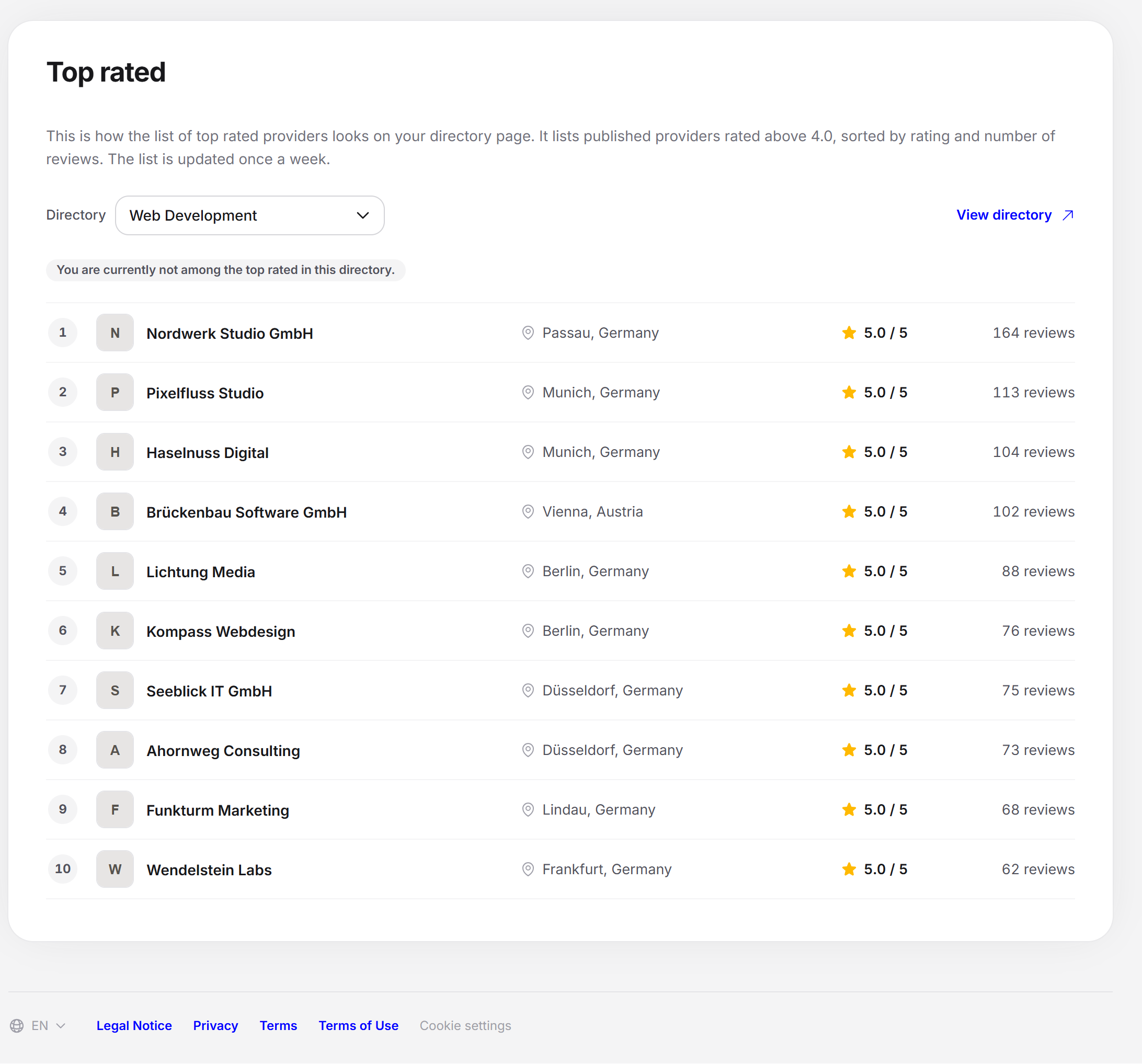
The explanation is at the top: “This is what the list of the top rated looks like on your directory’s page. It lists published providers with a rating above 4.0, sorted by rating and number of reviews. The list is updated once a week.”
Below it you choose a directory. The list is fixed anew every week. So a provider who gets a better rating today only appears after the next update.
Choosing the directory
The “Directory” field lists your directories. With more than 8 directories it has a search. If you only have one, only its name appears. When you switch, the new list fades in. The link “View directory” opens the public directory page.
The list
The list shows the first 10 providers. Each row has these details:
Place
Logo and name of the provider
Location: city and country
Rating: for example “4.9 / 5”
Reviews: for example “34 reviews” or “1 review”
If you are among the top rated, your row carries the label “You” and above the list it says, for example, “You are ranked 4.” If you are not, it says: “You are currently not among the top rated in this directory.”
Who makes it into the list
A list of 20 providers is stored per directory. The page shows the first 10 of them, ordered by current rating. If you are behind them, you are not among the top rated here. Your profile must be published, and your overall rating must be above 4.0. The overall rating includes your Feedbax reviews and the reviews from the connected platforms, depending on your subscription. The order follows the rating and the number of reviews.
Which providers qualify depends on the market of your dashboard language. For the German and English lists, your profile must also be verified and have at least one location.
German: the shared list, limited to providers with a location in Germany.
English: the shared list.
Dutch, French, Spanish: the list of the respective country. Your profile needs a location in that country for this.
Empty states and errors
| Situation | What the page shows |
|---|---|
| Your profile has no service | “Add at least one service so we can work out your directories.” with the link “Add services” |
| The directory has no top rated yet | “There are currently no top rated providers in this directory.” |
| The list is loading | “Loading the top rated …” with placeholders |
| Loading fails | “The top rated list could not be loaded. Please try again later.” |
Effect on the Feedbax score
The page does not change your score. The list follows only the rating and the number of reviews. More good reviews help you here and in the Reputation score. How to get them is explained in Request reviews.
Frequently asked questions
Do I need a subscription for the top rated?
No. The page has no subscription lock. The subscription only determines which platforms go into your overall rating.
Why am I not in the list although my rating is above 4.0?
The list is limited and only updated once a week. So a new review only takes effect with the next update. Also, your profile must be published. For the German and English lists, it must be verified too.
How often is the list updated?
Once a week.
Why do I only see German providers?
On the German side, the list applies to providers with a location in Germany. Change the dashboard language to see the list of another market.
Where does the list appear publicly?
On your directory’s page. The link “View directory” opens it.
How does the list differ from the ranking?
The list follows only the rating. The Ranking follows the Feedbax score, which also includes case studies and profile.