

The “Ranking” page shows at which place your profile stands in every directory you are assigned to. Below it, you see the top competitors of a directory with all key figures. That way you can tell who is ahead of you and why.
At a glance
Where: in the dashboard under Visibility > Ranking.
Subscription: The page has no subscription lock.
Two blocks: “Your ranking” (your places) and “Top competitors” (the top of a directory).
Requirement: You have at least one service in your profile. Otherwise Feedbax cannot work out directories for you.
Score: The page shows the Feedbax score but does not change it.
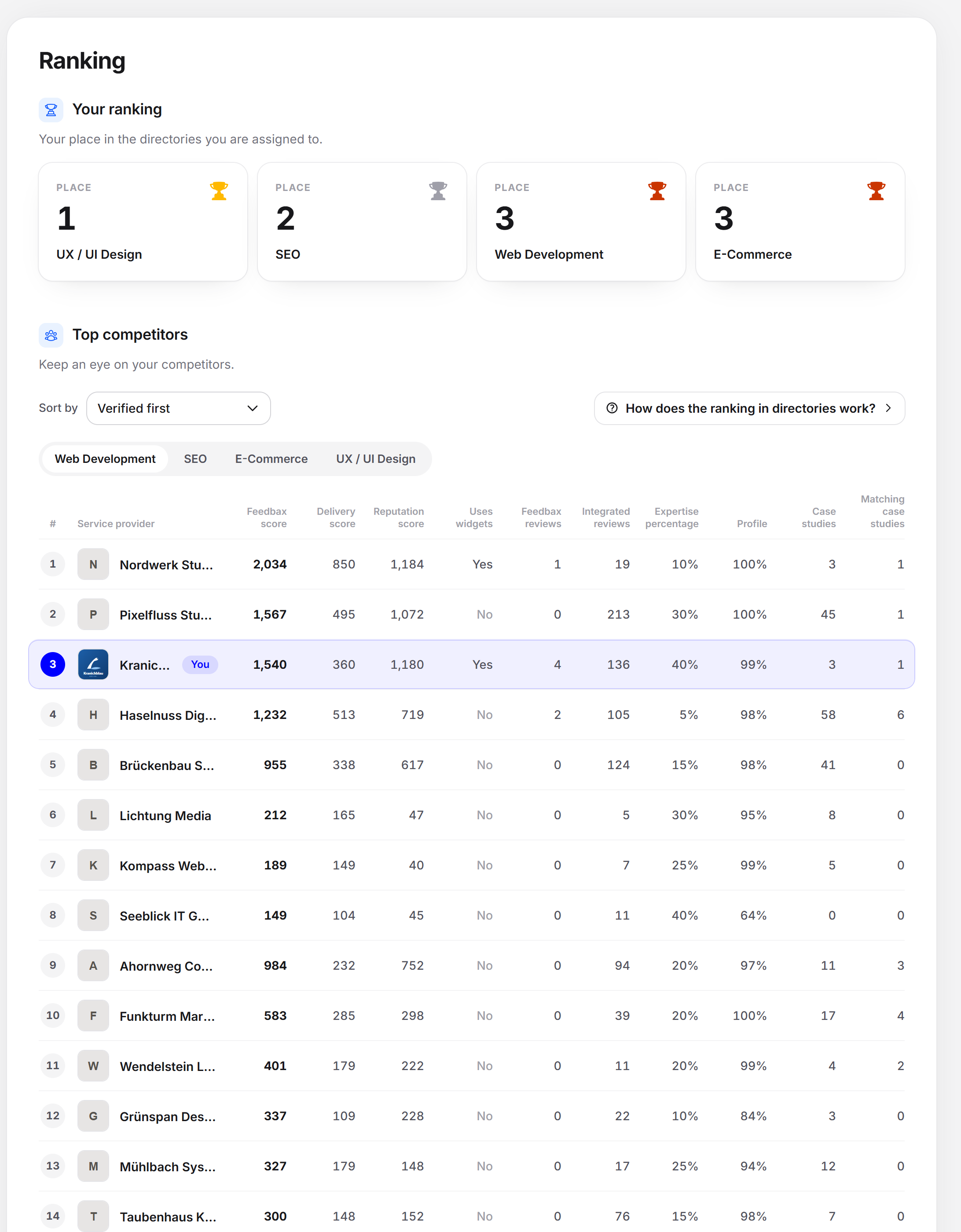
Block 1: Your ranking
The block carries the note “Your place in the directories you are assigned to.” For every directory there is a tile with the name of the directory, the word “Place” and your place.
Order: The best places come first. With the same place, the order follows the order of the directories.
Place “20+”: If you are behind place 20, the tile shows “20+” instead of an exact number.
Trophy: Anyone in the first 20 gets a trophy in the corner of the tile. Place 1 is gold, place 2 silver, place 3 bronze, places 4 to 10 blue and places 11 to 20 purple.
Click on a tile: opens the public directory page in a new tab. The arrow appears when you move the mouse over the tile.
At most 8 tiles are visible. If you have more directories, the button “View all rankings” expands the rest. “Show less” collapses them again.
Block 2: Top competitors
The block carries the note “Keep an eye on your competitors.” It shows the top of a directory as a list.
Choosing the directory
You choose a directory with the “Directory” tabs. Only one is visible at a time. When you switch, the new list fades in. If you only have one directory, only its name appears. Next to the sorting is the link “How does the ranking in directories work?”. It opens the help article in the dashboard.
The sorting
Under “Sort by” there are two options:
Verified first (preset): the verified providers come first, then by subscription level, then by score.
Feedbax score: purely by score. The top provider badge is also awarded by this sorting, but there only among the providers who meet all basic conditions.
Changing the sorting reloads the list. Until it arrives, the old list appears dimmed.
The list
The list shows the first 20 providers. If you are behind them, three dots follow, and then your own row. Your row carries the label “You”. A click on a provider opens their profile in a side panel. Each row has these details:
| Column | What it means |
|---|---|
| # | The position in the directory. |
| Provider | Logo and name. |
| Feedbax score | The overall score by which the directory is sorted. |
| Delivery score | The part for projects and specialization. |
| Reputation score | The part for reviews. |
| Uses widgets | “Yes” or “No”. |
| Feedbax reviews | Number of approved Feedbax reviews. |
| Integrated reviews | Number of reviews from connected platforms. |
| Expertise percentage | The share of the offering that falls on this directory. |
| Profile | How completely the profile is maintained. |
| Case studies | Number of case studies in the profile. |
| Matching case studies | Number of case studies that match this directory. |
If you have no service yet
Then the page shows a note instead of the blocks: “Add at least one service so we can work out your ranking and your top competitors.” Next to it is the link “Add services”. It leads to Services.
Loading and errors
While loading, it says “Loading the ranking …” and the page shows placeholders in the shape of the blocks. If loading fails, it says: “The ranking could not be loaded. Please try again later.”
The markets
Which ranking you see depends on the language of your dashboard. On the German and English side, you see the shared ranking. On the Dutch, French and Spanish side, you see the ranking of the respective country. For that, your profile needs a location in that country.
Effect on the Feedbax score
The page does not change your score. It shows it and its two parts. With the columns “Matching case studies”, “Feedbax reviews” and “Uses widgets”, you see where competitors are ahead. How the score comes about is explained in How does the ranking in directories work? and in What is the Feedbax score?.
Frequently asked questions
Why does it say “20+” for me?
You are behind place 20 of the directory. The page then gives no exact number. Only published providers in the directory’s country count. If you are not one of them, it also says “20+”, and the list shows no row for you.
Why do I see a different place in the badge than here?
The badge counts by the Feedbax score and only among the providers who meet all basic conditions. Here, all published providers are listed, and “Verified first” is preset. Set “Feedbax score” to get closer to the badge place.
What does “Uses widgets” mean?
“Yes” means a Feedbax widget was loaded on a website for the provider in the last 10 days. The same applies to the widget bonus in the score, see Review widgets.
Why is a directory missing from the tiles?
The page only shows directories your profile is assigned to through its services. Add services to get more.
How often does my place change?
The score is recalculated regularly, see How often is my Feedbax score updated?.
Can a profile with a lower score rank higher?
Yes, for example through the sorting or paid top places. Details in Can a profile with a lower Feedbax score be ranked higher?.
How do I move further up?
Look in the list at what the providers ahead of you have: more matching case studies, more reviews, a more complete profile. Those are the levers of the score.