

The tender fit is the heart of the module. It answers the one question that precedes every application: is the effort worth it, and what do you need to clarify first?
Feedbax compares a specific tender with what is publicly visible about your company and gives you an initial assessment with a score, a rationale and a recommendation.
The fit is part of the subscription. How to get it is in Tender Access: booking, managing, cancelling.
How to open it
There are three routes:
Click the fit tile on a card in the overview.
In an opened tender, click Check tender fit at the top right.
In an opened tender, click the Does this tender suit you? card.
The fit drawer lays itself over the tender. The first analysis takes a moment; meanwhile it reads "Your tender fit is being calculated …".
What feeds the analysis
Feedbax assembles six things for the AI:
The tender, with summary, requirements, required evidence, award criteria and risks.
The matched Feedbax services with their relevance scores.
Your complete Feedbax profile: services, focus areas, industries, company size, locations, languages.
Your reviews from 4.0 stars upwards.
Up to 10 case studies, selected from a pool of 50 by relevance to this tender.
The content of your website, up to 12,000 characters.
If your website is missing or the retrieval fails, the analysis does not abort. It only lowers the data confidence.
What follows from that: the fit is only as good as your profile. It cannot assess what is written nowhere. That is exactly the subject of Improving your tender fit.
The head of the analysis
At the very top sit the title Tender fit and a sentence framing it: the assessment is based on your Feedbax profile and publicly visible website data; formal proofs and current capacity must be verified separately.
Below that:
Last analyzed, with date and time.
Your quota line, usually Unlimited fits. Details in Analysis quota and Feedbax credit.
Two tabs: Current fit and History.
The Recalculate fit button at the top right.
The liability note
Before the result sits a box headed Initial AI analysis with the badge NON-BINDING: this is an initial assessment by Feedbax AI, the binding eligibility check is performed solely by the contracting authority.
That is not boilerplate. The fit is a decision aid, not proof of eligibility.
The result card
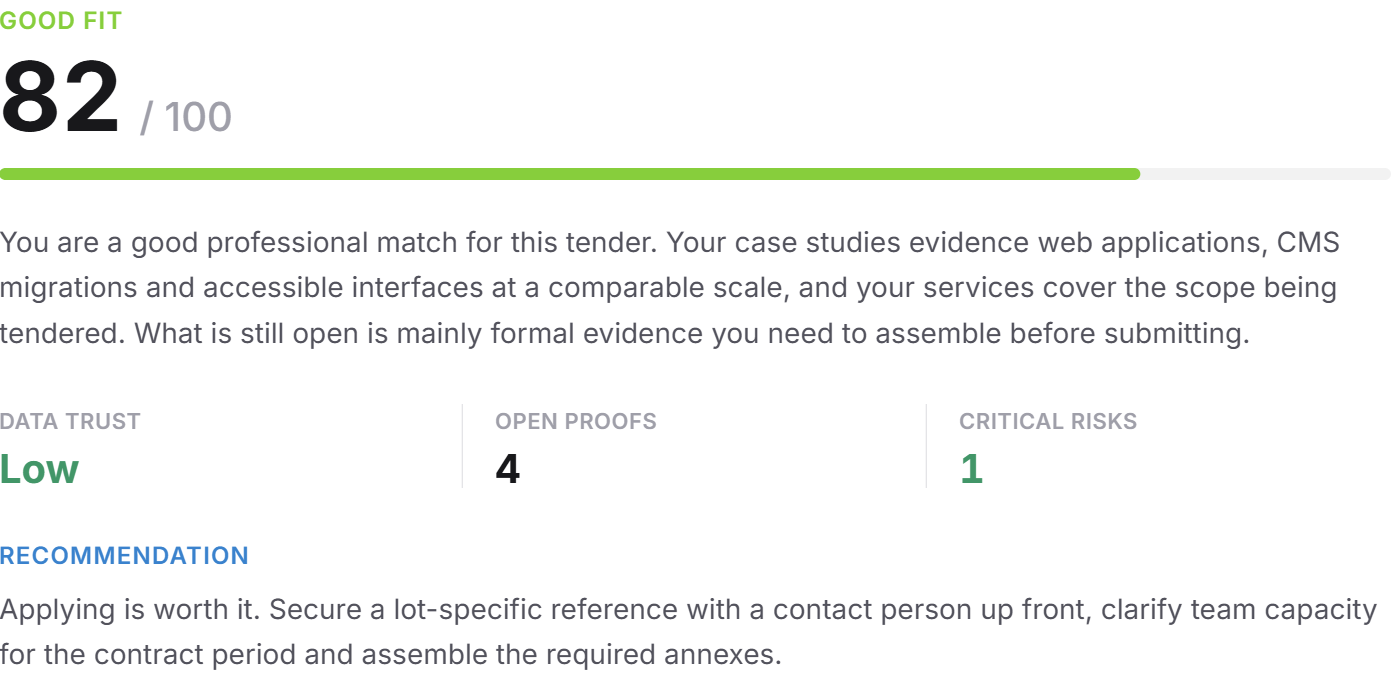
The finding itself sits in a card with five pieces of information.
The category in capitals, for example POSSIBLE FIT, and below it your score as "66 / 100".
Score | Category |
--- | --- |
85 to 100 | Very good fit |
70 to 84 | Good fit |
50 to 69 | Possible fit |
below 50 | Weak fit |
no basis for assessment | Not assessable |
The summary, a paragraph justifying the category: where you are visibly strong and where it stalls.
DATA CONFIDENCE, with the levels high, medium or low. This is not a rating of your company but a rating of the data: could the website be read, is the profile complete, are there case studies and reviews?
OPEN PROOFS, the number of required proofs not visible in your data.
CRITICAL RISKS, the number of formal requirements that are demanded but not evidenced.
RECOMMENDATION, one sentence with the concrete next move.
The four dimensions
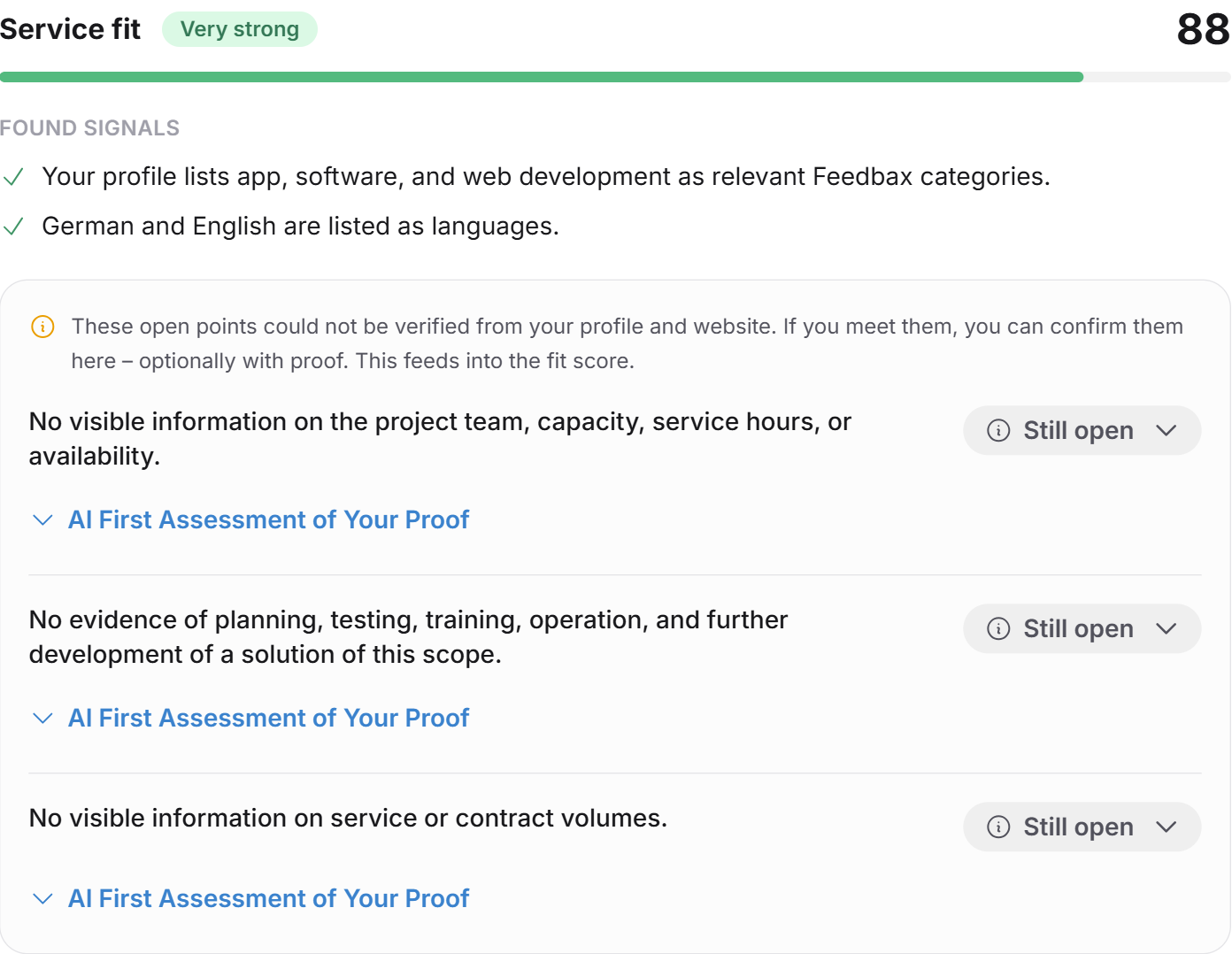
Under the heading WHY THIS ASSESSMENT? sit four blocks. The overall score is derived from these four and nothing else.
Dimension | What it measures |
--- | --- |
Service fit | Does your range of services cover what is being tendered? |
Technology & method fit | Do you master the required technologies, systems and methods? |
Reference fit | Do your case studies evidence comparable contracts? |
Industry fit | Do you have experience in the buyer's industry? |
Per dimension you see:
a score from 0 to 100
a status: from 85 very strong, from 75 strong, from 50 medium, below that weak
SIGNALS FOUND: what in your data supports it, quoted concretely
the open points: what could not be evidenced from profile and website
Case studies are the strongest visible signal here. They feed the reference fit directly and, depending on their content, support the other three dimensions as well.
Two rules that are often misread
Not visible does not mean not met. Anything missing from your data is carried as open, never as negative. The AI is not allowed to turn it into a defect.
Missing data lowers the data confidence, never the fit. An unreadable website depresses data confidence; it does not deduct points.
What does not feed the score
Your reviews. That is a deliberate decision. Reviews say something about the quality of your work but nothing about the formal match with a specific tender. They therefore appear separately as the quality signal from reviews, with the level, the number of reviews and the recurring themes. Below it stands the sentence: reviews are a quality and trust signal, not formal proof of eligibility.
Company size, locations and languages. These are not fit dimensions either but eligibility and capacity attributes. They are checked as an exclusion risk, but only when the tender explicitly demands them or when scope, contract value or duration clearly exceed your visible capacity. Absent both, no risk is created and the score is untouched.
The link to the Feedbax score
The tender fit does not change your Feedbax score and has no effect on your ranking in the directories.
The other direction does hold: the same things that carry your Feedbax score also carry your fit. A complete profile, well-maintained case studies and reviews from 4.0 stars upwards feed every fit analysis. Anyone maintaining their profile for visibility automatically improves every future fit.
Recalculating
Recalculate fit sits at the top right. A click asks for confirmation, then a fresh AI analysis runs. While it runs, a note "Fit score is being recalculated" appears at the bottom.
That is worth doing in two cases: you extended your profile, or the tender itself changed.
Only this action consumes an analysis from your quota. Reading an existing analysis and confirming open points are free.
The History tab
The second tab shows every analysis you have had created so far, with the tender concerned and the date. It also states whether an analysis was paid from the monthly quota or from a top-up, and which packs you purchased.
A click on an entry opens the corresponding tender.
Frequently asked questions
Why is my score lower than I expected?
Because what is visible is assessed, not what you can do. Look at the open points per dimension. In most cases case studies with matching details or focus areas in the profile are missing.
Can I raise the score without a new analysis?
Yes. Confirm the open points you actually meet. That recalculates the score immediately, without a new AI analysis. How to do it is in Working through open points and exclusion risks.
Why do my strong reviews not count towards the score?
Because they measure something else. An excellent review says nothing about whether you hold the required certification. Reviews therefore stand separately as a quality signal.
What does "not assessable" mean?
That the data is insufficient for a rating. Usually the profile is largely missing, or the tender contains too little usable content.
Does the buyer see my fit?
No. The tender fit is exclusively for you. It is transmitted neither to the buyer nor to other providers.
Does the fit apply to my whole team?
It applies to your company. Everyone with access to your Feedbax account sees the same analysis.
I have two tenders with the same score. Which do I take?
Look at CRITICAL RISKS and OPEN PROOFS. Two tenders at 72 points are very different when one has a single critical risk and the other has five.