

The page Company Profile > Expertise is the most influential page in your whole profile. It decides which directories you are listed in at all, which project requests you receive, and whether you qualify for badges and market leader lists.
The hint says it plainly: "By assigning services, your company will be listed in the respective directories. We recommend the assignment of 2 to 6 services. Clients prefer providers with a clear focus on the services they need."
The page is usable on every subscription.
Step 1: pick your services
Under "Add services" you choose from five areas:
Development · IT & Consulting · Marketing · Design · Other
Each area unfolds a list of concrete services, for example software development, app development, web development, AI development. Every selected service appears below under "Added services".
Every assigned service places you in the corresponding directory. Without a service you are nowhere.
Step 2: distribute the percentages
The hint reads: "Assign a percentage to each service area that reflects how much your company focuses on that area of work."
Two fixed rules apply:
The sum must be exactly 100 percent. A counter at the top right shows the current state and the text "The sum must equal exactly 100%". As long as it does not say 100, you cannot save.
No value may be 0. A service at 0 percent makes no sense: either you do it, in which case it gets a share, or you remove it.
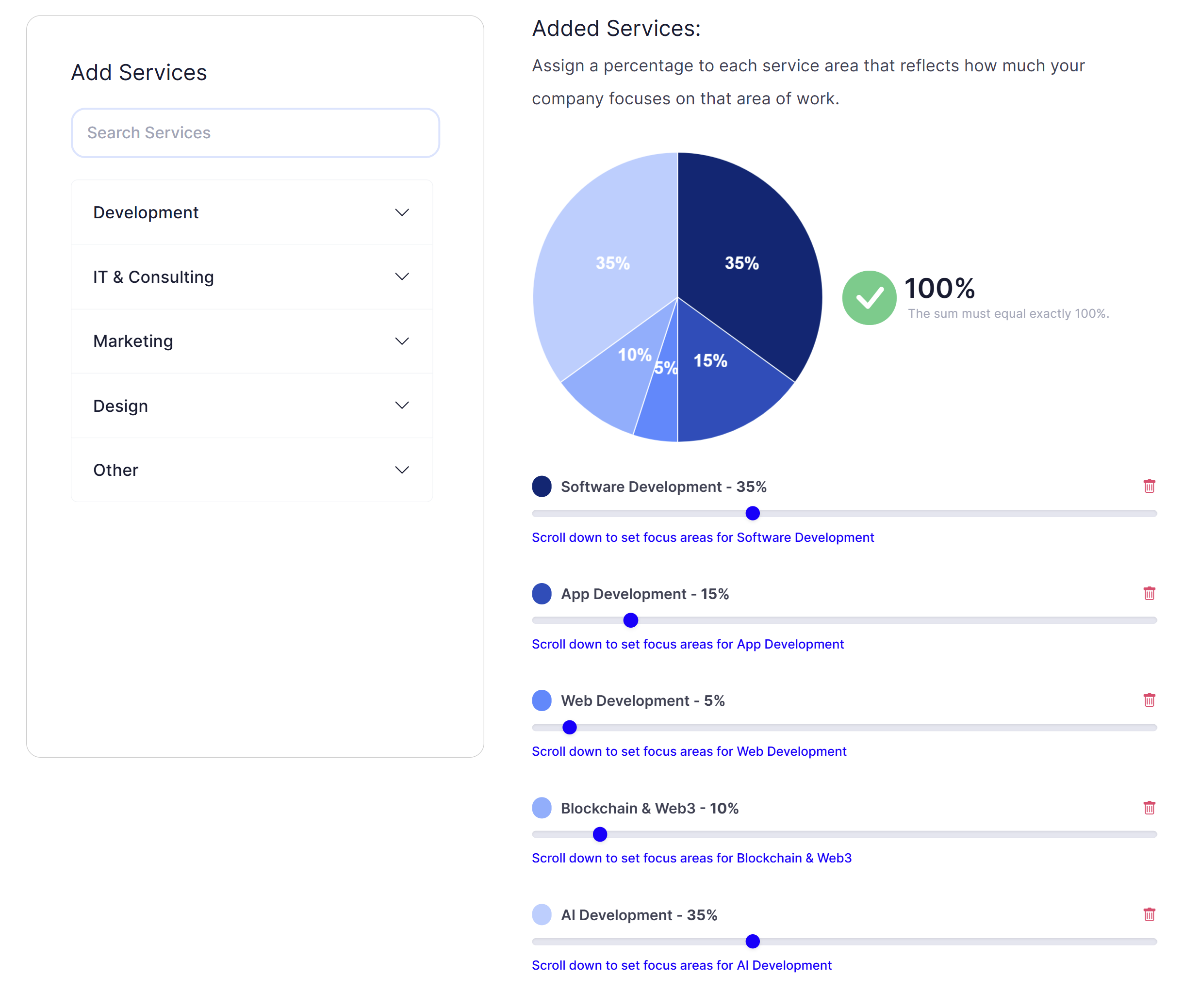
Step 3: focus areas per service
Scrolling further, you can set focus areas per service. The hint reads: "Deepen your expertise by highlighting your areas of focus. Clients prefer providers with a clear focus on the required areas of expertise."
App development for instance carries focus areas such as application platforms, frameworks, artificial intelligence, mobile OS or low code development. Focus areas are also weighted by percentage, and there too the sum has to add up.
Focus areas have their own directories. On the dashboard home page you see this in entries such as "React", "Python" or "Machine Learning" next to the broad areas.
The two percentage thresholds you need to know
This is the point most people miss. Two fixed thresholds decide your chances:
10 percent for badges and market leaders. One of the five conditions for the top company badge is a share of at least 10 percent in the service or focus area of that directory. The same applies to entering the market leaders matrix. If your service sits at 5 percent, you are out there, however good your score is.
20 percent for applications. The application wizard checks in its first step: "You have assigned at least 20% of the expertise you are looking for to your profile." If that check fails, you cannot apply.
A clear recommendation follows: do not spread across ten services at 10 percent each. It looks versatile but puts you below the 20 percent threshold everywhere, and therefore out of every application.
Two to four services at 20 to 40 percent work far better. That is exactly why the page itself recommends 2 to 6 services.
A worked example
A provider focused on software development who also does apps and web:
Software development: 40 percent
App development: 25 percent
Web development: 20 percent
AI development: 15 percent
Sum: 100. For the first three services they are above 20 percent and can apply for matching requests. For all four they are above 10 percent and therefore qualify for badges and market leader lists.
For comparison, the same firm with a scattered profile: eight services at 12.5 percent each. Result: not a single application possible, because 20 percent is never reached.
How this feeds into your profile progress
The Expertise section splits like this:
at least one service: 50 percent
at least one focus area: 25 percent
more than one focus area: another 25 percent
The traffic light is red below 50 percent, orange below 100 percent and green only at a full 100 percent. So for green you need at least two focus areas.
Frequently asked questions
Why can I not save?
Almost always because the sum is not exactly 100 percent. Look at the counter above the list. If it says 95 or 105, correct a value. Also check whether any service sits at 0.
I get requests that do not fit us at all. What do I do?
The matching runs on exactly this page. Remove the services you do not actually offer and distribute the freed percentages across the rest. Fewer services mean fewer, but better matching requests.
We are a full service firm and really do everything. Should we not show that?
Understandable, but it hurts you several times over. First you miss the 20 percent threshold for applications. Second, ranking within a directory sorts by focus. Third, according to the hint on this very page, clients explicitly prefer providers with a clear focus. Set your two to four strongest services high and leave the rest out.
What is the difference between a service and a focus area?
A service is the broad discipline, for example "app development". A focus area refines it, for example "frameworks" or "mobile OS". Both have their own directories, and both are weighted by percentage.
Do my case studies count towards my services automatically?
No. Case studies must be assigned to a service or focus area individually. Only then do they appear in the "Matching Cases" column and count for badges and applications. See Create compelling case studies to clearly and convincingly demonstrate your expertise.