

The reviews overview shows at a glance what clients and review portals say about you: three key figures, one tile per source, and below them all reviews in one list. You filter the list by stars and sources. That way you see where your reputation is strong and which source is still missing.
At a glance
- Where: in the dashboard under Reviews > Reviews overview. This is the first page in the Reviews area.
- Subscription: The page is open to everyone. Which sources count and appear in the list depends on your subscription (table below).
- Key figures: “Total reviews”, “Overall rating” and “Sources”, the same numbers as on the start page of the dashboard.
- List: all approved Feedbax reviews and all saved reviews from your sources, newest first.
- Filter: by stars and by sources. The distribution and the criteria above the list do not change as a result.
- Comment: you comment on Feedbax reviews directly in the list, from the Business subscription.
How it works
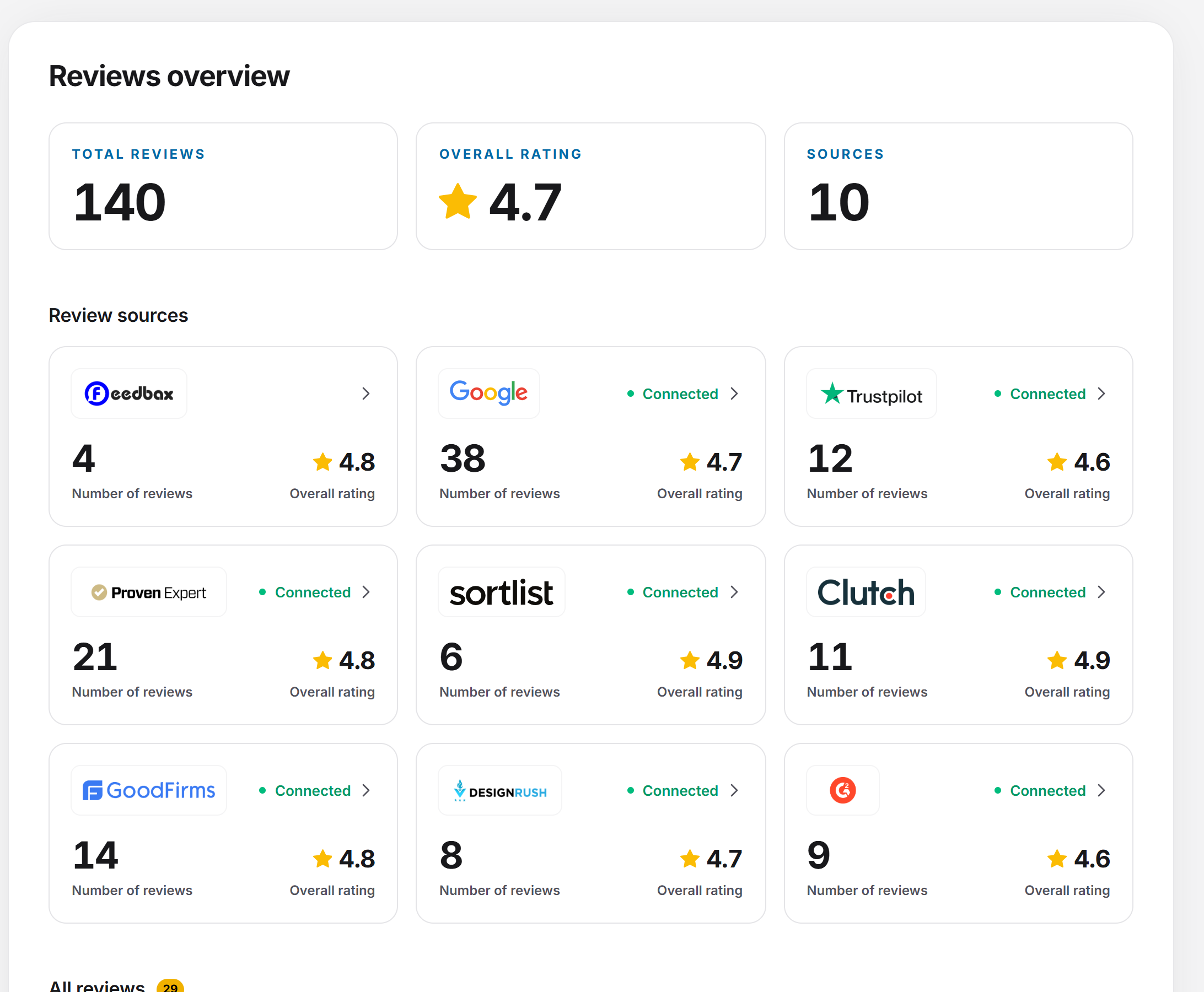
The three key figures
- Total reviews: the approved Feedbax reviews plus the reviews of the sources that your subscription counts. For the sources, the number is the one the portal reports.
- Overall rating: the average across all these reviews, with one decimal place and a star. With no reviews, a dash is shown.
- Sources: how many sources with reviews go into the numbers. Feedbax counts as one source as soon as it has a review.
Which sources are included depends on the subscription: Google and Trusted Shops always, Trustpilot and ProvenExpert from Business, Sortlist, Clutch, GoodFirms, DesignRush and G2 from Premium. While the numbers load, placeholders are shown. If they could not be loaded, the tile shows a dash.
The source tiles
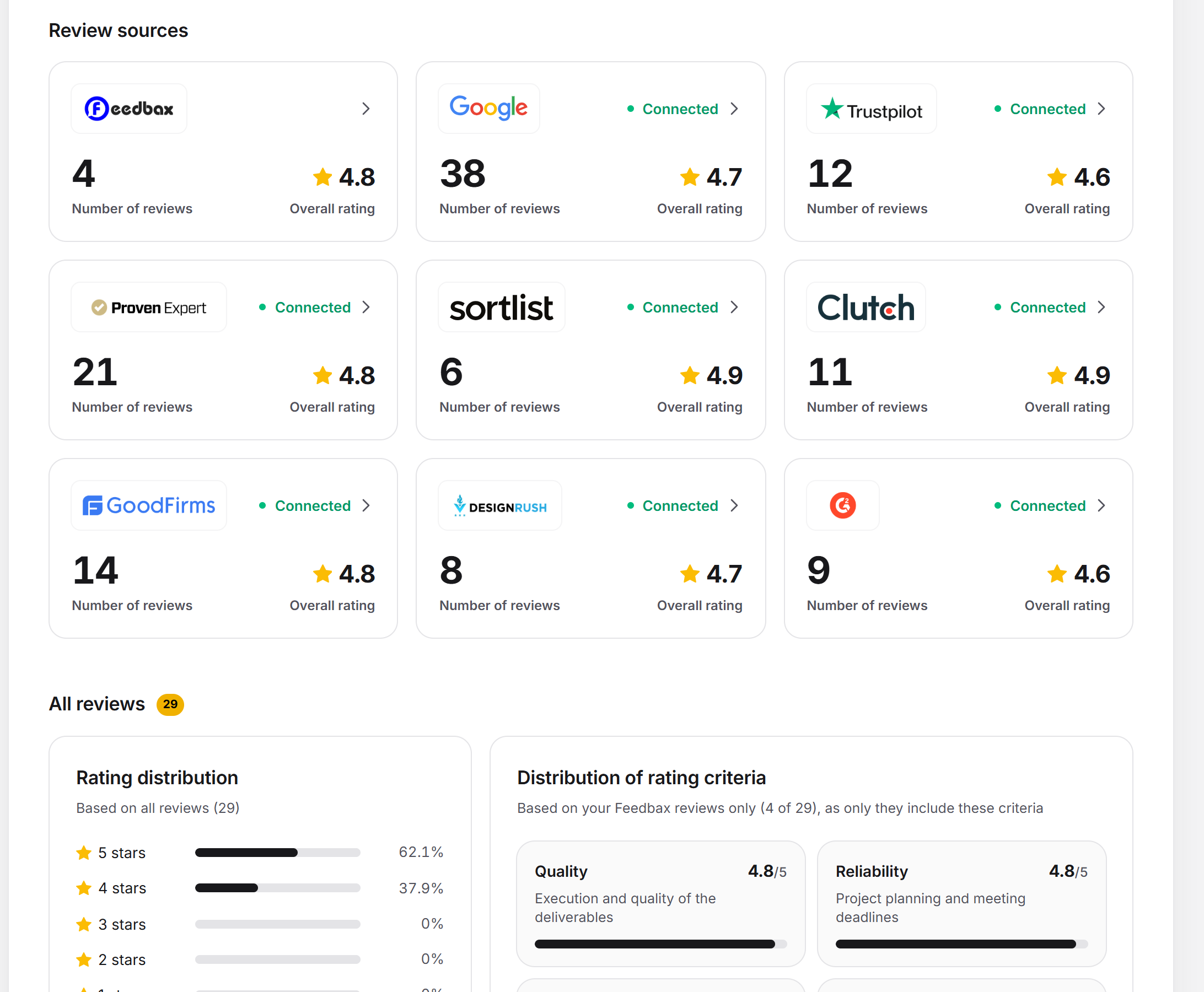
Under the heading Review sources there is one tile per source. The first is Feedbax, followed by Google, Trustpilot, ProvenExpert, Sortlist, Clutch, GoodFirms, DesignRush and G2. Each tile shows the logo, the status, the Number of reviews and the Overall rating. If the source has no review yet, it says “No rating” instead of a score. A click opens the page of the source.
- Connected (green): an ID is saved and the source has reported reviews.
- Not connected (gray): no ID yet, or the source reports no reviews.
- Business plan needed or Premium plan needed (orange): your subscription does not unlock the source.
The Feedbax tile has no status, because Feedbax needs no connection. It shows the number of your approved Feedbax reviews and their average. If the list of your Feedbax reviews cannot be loaded, this tile is missing. The tiles of the other sources load one after another. Until a tile is there, a gray placeholder takes its place.
There is no tile for Trusted Shops here. You reach the Trusted Shops page via the sidebar under Sources.
All reviews
The list All reviews with the number of entries contains:
- all approved Feedbax reviews (the date is the day of submission),
- all saved, visible reviews of the sources that your subscription unlocks.
The newest one is at the top. If two reviews have the same time, Feedbax comes before the portals, and the portals follow in a fixed order. That way the list does not jump around when you reload.
A Feedbax review shows stars and score, the name (or “Anonymous”) with position and company, the project details (Verified, location, project costs, project duration, industry, company size, services), the four individual scores Value for money, Reliability, Quality and Recommendation, and the summary. Below it is your comment area. A review from a source shows stars, author, date, text and, as far as the portal provides them, partial ratings, recommendation, likes, pros and cons, and your reply on the portal. The name of the source is at the bottom of the card.
If there is not a single review yet, a yellow notice replaces the list. It has the heading Collect high-value Feedbax reviews. The button Collect Feedbax reviews button opens Request reviews. If the list could not be loaded, it says “The page could not be loaded. Please reload it.”
Reading the distribution and criteria
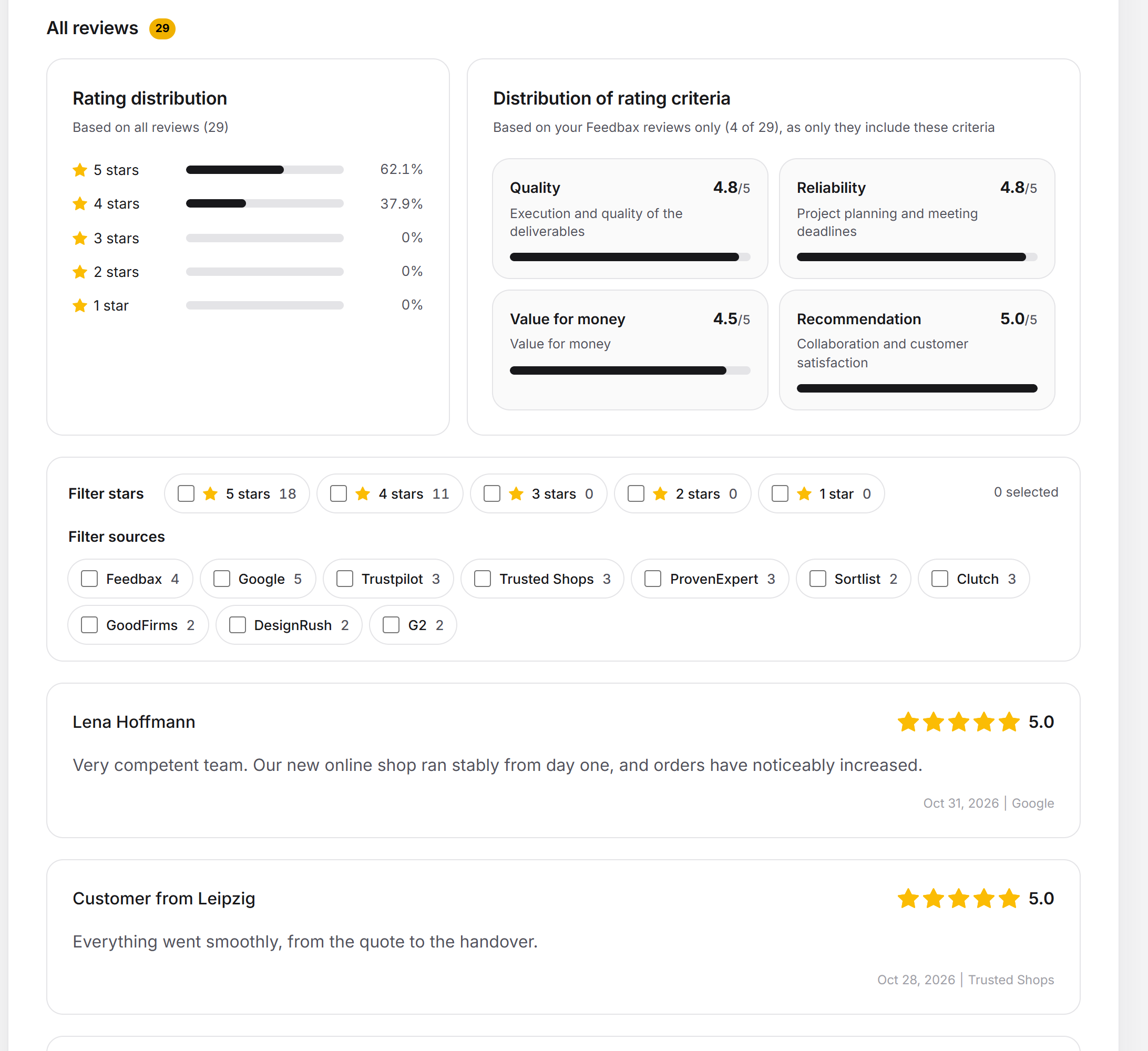
Above the list there are two blocks. Both calculate with all entries of the list, not with the key figures at the top. A filter does not change them.
- Rating distribution: five rows from 5 to 1 star, each with a bar and a share in percent. Above it, “Based on all reviews” appears with the number. A review belongs to the whole number of stars it has reached: 4.5 counts as 4 stars, only 5.0 as 5 stars.
- Distribution of rating criteria: four tiles with the average out of 5, a bar and an explanation: Quality (execution and quality of the results), Reliability (project planning and meeting deadlines), Value for money (value for money) and Recommendation (collaboration and client satisfaction).
The four criteria exist only in Feedbax reviews. The “Based on” line therefore says how many of your reviews go into the average (“x of y”). A review that did not rate a criterion does not count there as the lowest score. If you have no Feedbax review, the block is missing and the distribution takes the full width.
Filtering the list
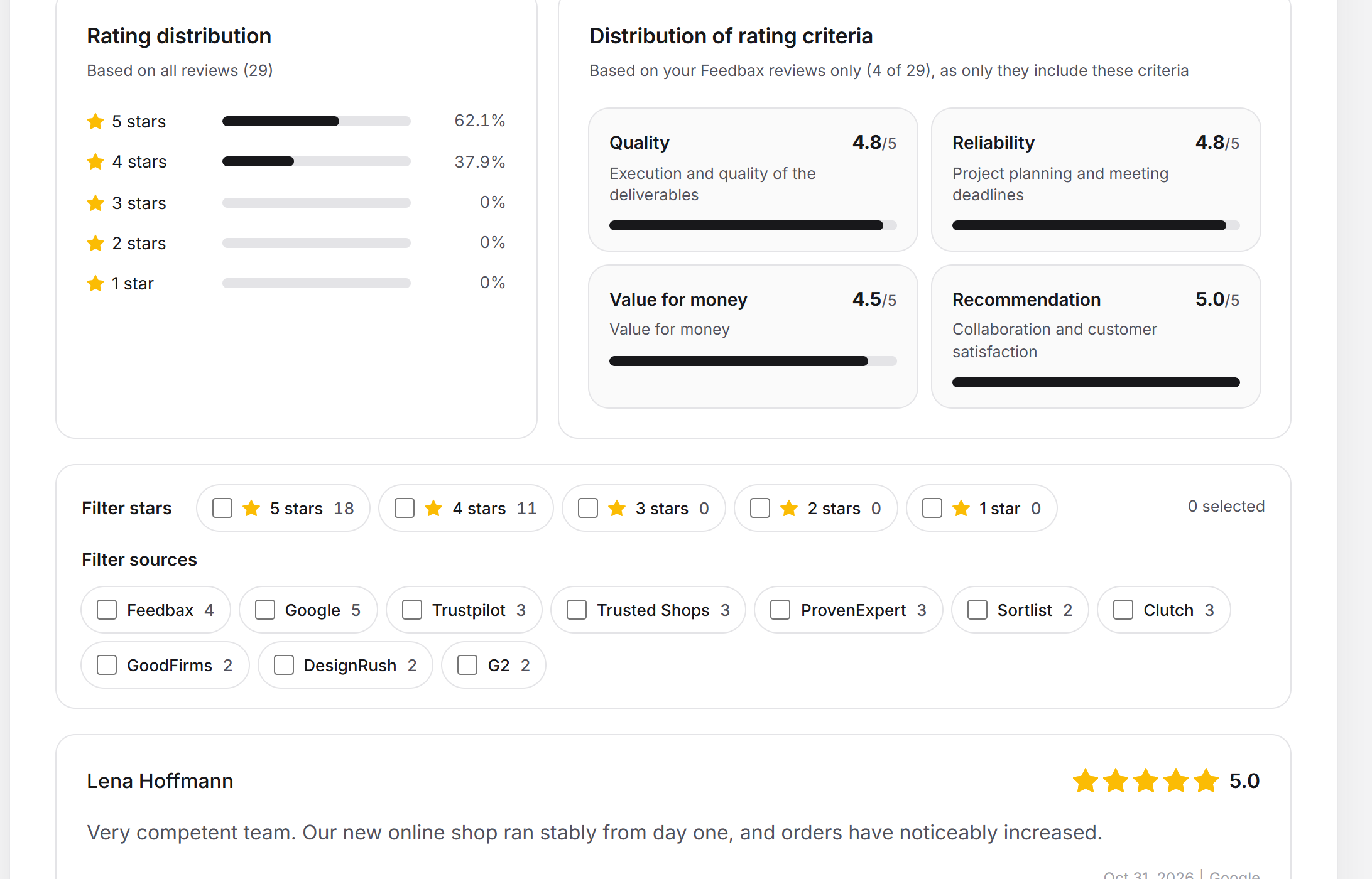
Below the blocks there is a filter bar. Each filter is a checkbox with the number of matching reviews next to it.
- Filter stars: “5 stars” to “1 star”.
- Filter sources: one option per source that has at least one review in the list. This group appears only if the reviews come from at least two sources.
- On the right it shows how many filters are active (“2 selected”). As soon as one is active, Reset.
appears. Both groups narrow the list together: a review has to match a selected number of stars and a selected source. Within a group, one of the selected options is enough. If nothing is selected in a group, it lets everything through. Matching cards stay, the others collapse. If none match, it says “No review matches the selected filters.”
Commenting on Feedbax reviews
You can reply publicly under every Feedbax review. How that works, which subscription it needs and what you cannot change is explained in Reading and commenting on Feedbax reviews. The same applies to the Feedbax page under the sources.
Which source for which subscription
You connect all sources on their own page under Reviews > Sources. Without the matching subscription, the page is visible but locked.
| Source | Connect | Counts in the Feedbax score | Update |
|---|---|---|---|
| Feedbax | no connection needed | always, approved reviews only, eight times the weight | Feedbax page |
| without a subscription | without a subscription | automatic, without a subscription | |
| Trustpilot | from Business | from Business | automatic from Business |
| Trusted Shops | without a subscription | never | automatic, without a subscription |
| ProvenExpert | from Business | from Business | automatic from Business |
| Clutch | from Premium | from Premium | automatic from Premium |
| GoodFirms | from Premium | from Premium | manual only |
| Sortlist | from Premium | from Premium | automatic from Premium |
| DesignRush | from Premium | from Premium | manual only |
| G2 | from Premium | from Premium | automatic from Premium |
The interval of the automatic update depends on the subscription: Starter 56 days (8 weeks), Business 28 days (4 weeks), Premium 14 days (2 weeks), Enterprise 7 days (1 week). You can update manually at any time on the page of the source. Feedbax never fetches GoodFirms and DesignRush automatically.
Special cases
- Numbers differ: The key figures and tiles show the numbers the portals report. The list shows only reviews that Feedbax has already saved. For sources that load page by page, the list can be shorter until you have clicked “Load more reviews”.
- Subscription downgraded: The source stays connected, its page is locked, and its reviews are missing from the list and the profile until the subscription unlocks it again.
- Review still waiting for approval: It is not shown here. You can see the status under Request reviews.
- Deleting or hiding a review: There is no function for this in the dashboard. If you had a review deleted on a portal, it disappears at Feedbax with “Update reviews” on the page of the source. For Clutch, GoodFirms, DesignRush and G2 this works only through support.
What your subscription includes
| Subscription | Sources | Commenting on Feedbax reviews | Automatic update |
|---|---|---|---|
| Starter | Google and Trusted Shops | No, locked | after 56 days |
| Business | plus Trustpilot and ProvenExpert | Yes | after 28 days |
| Premium | plus Sortlist, Clutch, GoodFirms, DesignRush and G2 | Yes | after 14 days |
| Enterprise | all sources | Yes | after 7 days |
What else each subscription includes is explained in Which subscriptions does Feedbax offer?. You can unlock it in the Plan section of the dashboard.
Feedbax score
The reviews on this page make up the reputation part of your Feedbax score. All approved Feedbax reviews count, as do the reviews of the sources that your subscription counts (table above). Every review loses weight with age: one from the current month counts twice as much as one that is twelve months old. Trusted Shops counts in the profile, but not in the score.
In the score, a Feedbax review weighs eight times as much as a review from another portal. If a profile has neither Feedbax nor portal reviews, the score deducts 50 points. More on this: How does the ranking in the directories work? and How often is my Feedbax score updated?.
Frequently asked questions
Why does “Total reviews” show a different number than the list?
The key figure uses the numbers that the portals report. The list shows the reviews saved at Feedbax. Load more reviews at the source, and the two get closer.
Why is a source missing from the list?
Either it is not connected, or your subscription does not unlock it, or no reviews have been saved yet. Its tile shows which case it is.
Why is there no tile for Trusted Shops?
The overview leaves this tile out. The page exists anyway, under Reviews > Sources > Trusted Shops.
Why does a tile say “Premium plan needed”?
Because this source needs at least the subscription named. With “Unlock” on the page of the source you get to the Plan section.
Why is the “Filter sources” group missing?
It appears only when the list contains reviews from at least two sources.
Does a filter change the distribution and the criteria?
No. Both always calculate with all entries of the list.
Can I change or delete a Feedbax review?
No. The review belongs to your client. You can only comment on it.
Where do I see reviews that are currently being checked?
Not here. The list shows only approved Feedbax reviews. You can see the status of your requests under Request reviews. How the check works is explained in Review check: how Feedbax checks.
Related articles
- Request reviews: link and phone
- Reading and commenting on Feedbax reviews
- Review widgets on your website
The pages of the sources: Google, Trustpilot, Trusted Shops, ProvenExpert, Clutch, GoodFirms, Sortlist, DesignRush, G2.