

The Awards page shows who won public contracts in software and IT, websites, marketing, design, and film and video, at what value and against how many competitors. You see what public buyers pay for services like yours, how tough the competition is and who gets the contracts. The figures come from award notices that the buyers have published themselves.
At a glance
- You find the page in the area Leads under Public tenders. The arrow next to Public tenders unfolds the sub-entries Qualification profile and Awards.
- The page is open to every account. You see the four figures, the search by title and buyer, the filters and the value bands even without a subscription.
- With a tender subscription (a Feedbax subscription from Business, or Tender Access) you also see the winner, the exact award value and the link to the award notice.
- The list contains awards from Spain, Germany, Belgium and the Netherlands. Feedbax reads them in again every night.
- The list is sorted by award date, newest first. One page shows 25 awards.
- The page does not change your Feedbax score.
How it works
Feedbax reads the award notices automatically from four public sources and stores every award with its lot, winner, value, number of tenders received and date. The page is a market overview, not a personal list. The page does not filter by your profile. It shows all awards in the five service areas, and you narrow them down to your field with the filters.
Where the awards come from
- Spain: PLACSP, the public procurement platform (contrataciondelestado.es).
- Germany: oeffentlichevergabe.de, the federal notice service. Every public buyer in Germany reports its notices there, whichever platform it tenders on.
- Belgium: publicprocurement.be (BOSA), the federal procurement platform.
- Netherlands: TenderNed, the Dutch procurement platform.
Feedbax does not read other countries yet. The country filter therefore offers exactly these four countries. Which countries Feedbax covers for tenders is described in Public tenders on Feedbax: the overview.
Which awards make it into the list
Only awards that belong to one of the five service areas are included: Software and IT, Websites, Marketing and advertising, Design and Film and video. The assignment follows the main code (CPV) of the notice. Awards for goods or for other fields do not appear. If a lot has two or more winners, each winner has its own row. If a lot ended without an award, for example because no suitable tender came in or the buyer withdrew the procedure, it is in the list too and marked as such.
How current and how far back
- The import runs every night at 5 a.m. German time, after the tender import at 3 a.m. A new award therefore appears the morning after it is published at the earliest.
- Every run reads the notices of the last 7 days again. If a buyer corrects a notice, Feedbax takes over the new version.
- On the first run of a source, Feedbax reads back up to 180 days so that the list has a history from the start. For Spain it is at most 30 days, because the platform’s data is very large. Awards from before that are not in the list. After that the list grows every day.
- The date in the list is the date of the award, not of the import. Feedbax only knows an award once the buyer has published it. When that happens is up to the buyer.
- If a source fails during a night, the others keep running. The failed source is read again the next night.
The four figures
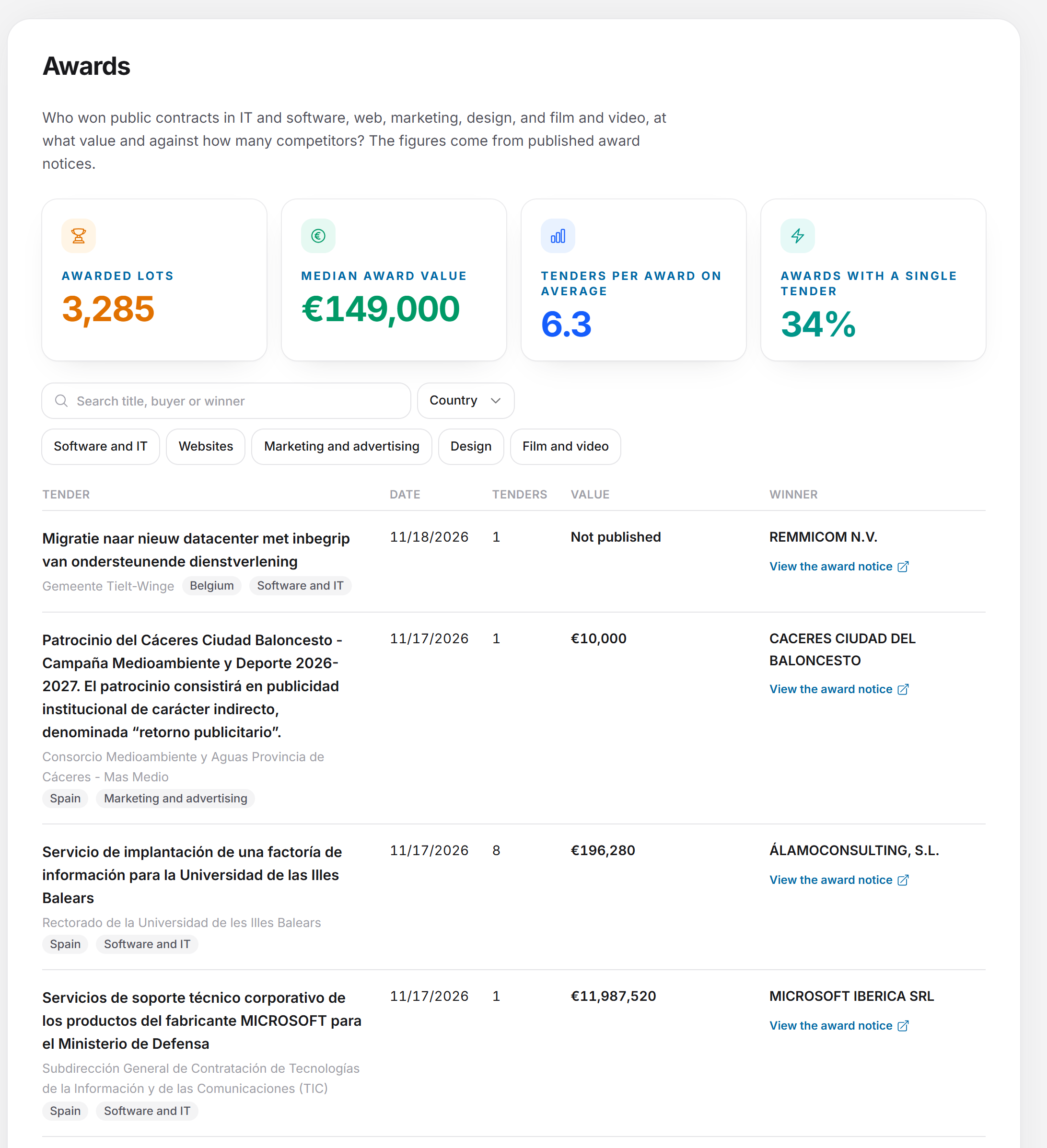
The four tiles above the list calculate over all awards that your search and filters currently match, not only over the page you see. Without a filter they count all awards of the five service areas. If you set a chip, a country or a search word, they recalculate. The figures are visible even without a subscription, because they are numbers and not names.
- Awarded lots: the number of lots with a winner. Each lot counts once, even if it has two winners. Lots without an award do not count. That is why this number is smaller than the total below the list, which also contains lots without an award and counts each winner separately.
- Median award value: the median of the award values. Half of the awards lie below it, half above. A single huge contract therefore does not distort it. Only awards with a winner and a published value in euros count. Awards without a value and amounts in other currencies are left out. For a framework agreement its maximum amount counts, because the buyer publishes nothing more.
- Tenders per award on average: the average number of tenders received per award, with one decimal place, for example 6.3. Awards with a winner count where the notice states the number of tenders and it is greater than 0.
- Awards with a single tender: the share of awards that received exactly one tender, in whole percent, for example 34 %. It is based on the same awards as “Tenders per award on average”. A high share means that many contracts were awarded without real competition.
If there is no matching value for the selection, a dash stands in place of the number with “no data” below it. If nothing matches the selection at all, Awarded lots shows 0. Here is how to use the figures: the median award value shows the typical contract size in your field. The average number of tenders shows how many competitors to expect. The share with a single tender shows how open the market is.
Searching and narrowing down awards
- Type a search word in the search field. With a tender subscription it reads “Search title, buyer or winner”, without one “Search title or buyer”. The list loads as soon as you pause typing for a moment.
- Click Country and choose one or more countries. When countries are chosen, the button shows how many. All countries clears the selection.
- Click one or more chips: Software and IT, Websites, Marketing and advertising, Design, Film and video. An active chip is highlighted, a second click takes it back. If no chip is active, the list shows all five areas.
- With Reset filters you clear the search word, countries and chips at once. The button only appears once at least one filter is set.
This is how search and filters work in detail:
- Search words: Several words separated by spaces must all appear. Words with only one character are ignored, and only the first five words count.
- Where it searches: in the tender title, the lot name and the buyer name. With a tender subscription also in the winner name, but only for winners whose name you may see (see “Name not shown” below). Without a subscription the search finds no winner names.
- Country: you can choose Spain, Germany, Belgium and the Netherlands. The filter works on the buyer’s country. If you choose several countries, you see the awards from all of them.
- Service areas: If you choose several chips, you see the awards from all chosen areas.
- Reloading: Every change jumps back to page 1 and recalculates the figures. While the list loads, the old rows stay on screen, faded.
The same idea for the tenders themselves is described in Searching and filtering tenders.
Reading the table
The table has five columns: Tender, Date, Tenders, Value and Winner. On narrow screens the details of a row are stacked, each with a small label.
- Tender: the title in bold, below it the lot name if there is one. Next come the buyer and two chips with the country and the service area. If Feedbax has the matching tender, the row is clickable (see “Awards and tenders”).
- Date: the date of the award in the format of your interface. If the notice gives no date, or only a placeholder date (anything before the year 2001), the field stays empty.
- Tenders: the number of tenders that were received. If the notice gives no number, the field stays empty. A 0 is possible, for instance for a procedure without an award.
- Value: the award value, exact with a tender subscription (in whole euros, for example €196,280), as a value band without one.
- Winner: the name of the company or public body that won the award, and below it the link to the notice.
The value: exact, as a band or “Not published”
With a tender subscription the exact amount is shown. Without one you see a value band: under €25,000, €25,000 to €100,000, €100,000 to €250,000, €250,000 to €1M or over €1M. The bands apply to euros.
If the column says Not published, there is no usable value. There are three reasons:
- The buyer gave no value in the notice.
- The buyer entered a placeholder. Feedbax treats amounts of 1 euro or less, for example €0.01, as “not published”, because they are not a real award value.
- Without a subscription: the value is not stated in euros. Then there is no euro band. With a subscription the amount is shown with its currency code.
For a framework agreement the note “Maximum of the framework agreement, not the actual contract value” appears below the value. The amount is then the ceiling up to which orders may be called off. What is actually called off can be well below it. For awards without a winner the value column stays empty.
The Winner column
- Name with link: With a tender subscription the name is shown, below it the link View the award notice with an arrow icon. It opens the notice on the source’s platform in a new tab. The link appears on every row for which the source provides an address of the notice, even when the name stays hidden or the lot was not awarded.
- Visible with a subscription: Without a tender subscription a lock with “Visible with a subscription” stands here. The link is missing too.
- Name not shown: possibly a sole trader: Feedbax names only companies and public bodies. If Feedbax cannot tell from the name or the tax number that it is a company (for example from a legal form such as GmbH, S.L. or B.V.), the name stays hidden for privacy reasons. This applies with a subscription too. For a bidder consortium the name is shown only if every member is a company. The names of several members are then separated by a slash.
- No award: the procedure ended without a winner: The lot went to nobody. There is no value here. With a tender subscription the link to the notice still appears below it if the source provides one.
Sorting and paging
- The list is always sorted by award date, newest first. For the same date the award imported later comes first. Awards without a date come last. There is no other sorting, such as by value.
- One page shows 25 awards. Below the list it says where you are, for example “1 to 25 of 4,056”, next to Previous and Next. Previous is disabled on the first page and Next on the last page.
- If there are 25 awards or fewer, the bar is missing. The number after “of” counts all rows of the selection, so also lots without an award and every winner separately.
Awards and tenders
The awards belong to the tenders that Feedbax shows you on the page Public tenders, but they are a separate set of data. Feedbax stores every award, whether the matching tender is at Feedbax or not. A considerable share of the awards therefore has no tender at Feedbax. That is intended: the page shows the market and not only the procedures that Feedbax has prepared for you.
After every nightly import Feedbax matches the awards to the tenders, using the procedure’s file number at the same source. If Feedbax finds the tender, the row in the Tender column is clickable, and the title shows “Open tender” on hover. A click opens the tender in the drawer, as you know it from the overview. A click on the link in the Winner column opens the notice at the source instead. A row without a matching tender is not clickable.
As soon as there is an award, the drawer shows the section Award (with several lots Awards). For each lot it shows the winner under “Awarded to”, the Award value, the Tenders received, the date under “Awarded on” and the link to the notice. The same rules apply as on the Awards page. If a winner is hidden behind the subscription, it says “You see who won the award with the tender subscription.” with the button Unlock this tender. A tender that you unlocked with the trial access shows the winners even without a subscription. The Awards page, in contrast, goes only by your subscription. How the drawer is built is explained in The tender in detail, what works without a subscription in What the free access includes.
Special cases
- No hits: If nothing matches the selection, it says “There are no awards for this selection.” The figures show 0 and dashes.
- Loading fails: Then it says “The awards could not be loaded. Please try again later.” Reload the page later.
- Just booked: If you book a subscription through the View subscription button, the page reloads the list and shows the winners right away. You do not have to log in again.
- Missing award: If an award you know is missing, it is probably not yet at the source, lies in a country that is not covered, or belongs to none of the five service areas. More in the questions below.
What your subscription includes
Without a subscription you see the market in numbers. With a tender subscription you see who serves it. The benefit: you learn which companies win in your field, can place prices accurately and check in the notice itself how the buyer decided. The pricing matrix calls the feature “Awards with winners and exact contract values”.
Feature | Without a subscription (Starter) | With a tender subscription |
Awards page | Yes | Yes |
Four figures | Yes | Yes |
Country and service area filters | Yes | Yes |
Search | Title and buyer | Title, buyer and winner |
Award value | Value band | Exact amount |
Winner | “Visible with a subscription” | Name (companies and public bodies only) |
Link to the award notice | No | Yes |
Without a subscription, a box with the heading “See who won” stands above the filters, with the text “With the tender subscription you see the winners, the exact award values and the notices. You already see the figures and value bands.” The View subscription button opens the window with Tender Access and the Feedbax subscriptions. Two routes lead to access: a Feedbax subscription from Business, or the standalone Tender Access. Both are explained in Tender Access: booking, managing, cancelling, the tiers at a glance are in What subscriptions does Feedbax offer?.
Feedbax score
The Awards page does not change your Feedbax score. It feeds neither into the score nor into your placement in the directory nor into the tender fit. Feedbax also does not match the winners to any Feedbax profile. Awards are market data about other companies. Your profile improves your result in the tenders, but not on this page. What makes up the score is explained in What is the Feedbax Score?.
Frequently asked questions
Do I need a subscription to see the page?
No. The page, the four figures, the search by title and buyer, the filters and the value bands are visible with every account. A tender subscription unlocks winners, exact values, the search by winner name and the link to the notice.
Why do I see awards that do not match my services?
Because the page does not filter by your profile. It shows all awards of the five service areas. Narrow the list down to your field with the chips, the country filter and the search.
Why is an award I know missing?
Possible reasons: The buyer has not published the award yet, or it appeared after the last nightly import. The country is not Spain, Germany, Belgium or the Netherlands. The procedure belongs to none of the five service areas. The award lies before the start of the import, for Spain more than 30 days before. Or the notice names neither a winner nor a value and was not taken over.
Why does an award say “Not published”?
The buyer gave no value or entered only a placeholder of 1 euro or less. Without a subscription it also says “Not published” when the value is not stated in euros.
Why does it say “Name not shown: possibly a sole trader”?
Feedbax shows only the names of companies and public bodies. If the winner could also be an individual, the name stays hidden, even with a subscription. The award still counts in the figures.
Why is the award value so high?
If the note “Maximum of the framework agreement, not the actual contract value” stands below the value, it is the ceiling of a framework agreement. Such amounts also count in the median award value, so it can be higher than a typical single award.
Why can I not click a title?
Then Feedbax does not have the tender for this award. The award is still in the list, but there is no drawer for it.
Why is “Awarded lots” smaller than the number below the list?
The number below the list counts all rows, including lots without an award and each winner separately. “Awarded lots” counts only lots with a winner, each lot once.
How current are the awards?
The import runs every night at 5 a.m. German time and rereads the last 7 days. The date in the list is the date of the award.