

The page Reviews > Phone Collection is where you submit a project reference. Feedbax then calls your client and writes the review.
How the procedure works and why it pays off is covered in How does the collection of reviews by telephone work? and What are the advantages of collecting reviews by phone? This article describes the dashboard page.
The form and the reference list are unlocked from the Business subscription. On Starter you see the page including the explanation and the sample review, but an overlay sits over the list and the submission area.
The menu entry only appears when your dashboard is set to German or English.
What is on the page
From top to bottom:
Your benefits. Four points: highest quality, personal, minimal effort, top visibility.
Voices from clients who have already been through the interview.
A complete sample review. It shows what a finished Feedbax review looks like, with star ratings in four categories, a summary, details about the reviewer and the detailed sections background, challenge, solution and results. Read it once in full and you will see why a Feedbax review is worth more than one sentence on a review portal.
How it works, in four steps.
The reference list with every reference you have already submitted.
The button "Add project reference".
The four steps of the procedure
"Select a satisfied customer for whom you have implemented a successful project and name the contact person. Please also give us a short description of the project."
"An experienced industry expert from us arranges a short phone call with your customer. Your customer determines the time of the interview."
"During the short and pleasant telephone interview, our expert will write a high-quality and meaningful customer recommendation for you. Your customer does not have to type a single word himself and can sit back and relax."
"The personally developed customer recommendation is then formulated, optimized and published as a verified customer recommendation in your company profile."
Your effort therefore ends after step 1.
The "Add project reference" form
The button opens a dialog with two blocks.
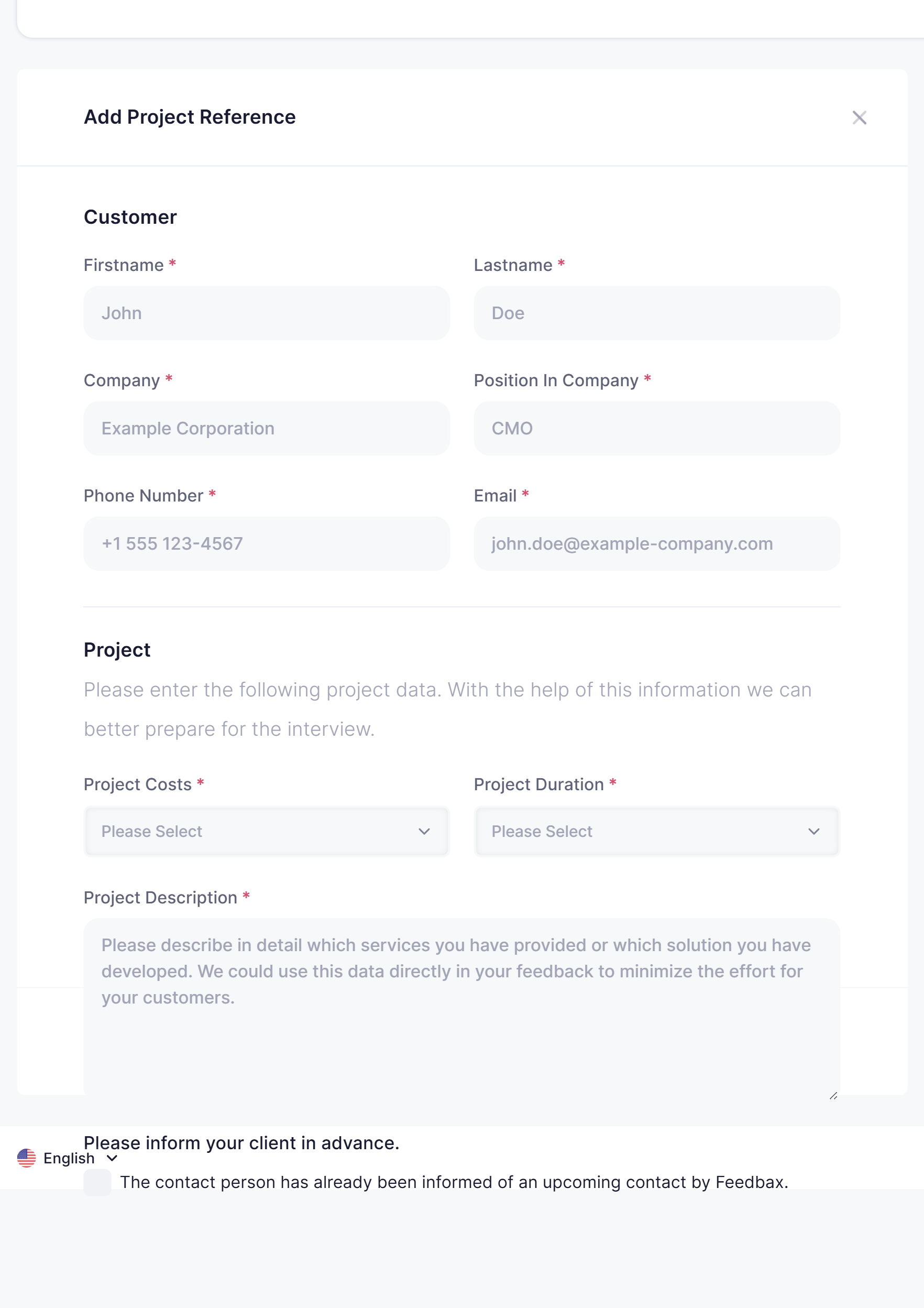
Customer
All fields are required:
First name
Last name
Company
Position
Phone number
Email
The position matters more than it looks. A review from a head of marketing reads differently from one from procurement, and Feedbax prepares the conversation accordingly.
Project
The hint reads: "Please enter the following project data. With the help of this information we can better prepare for the interview."
Project cost, chosen from ranges
Project length, also a choice
Project description. Its hint is the most important instruction in the whole form: "Please describe in detail which services you have provided or which solution you have developed. We could use this data directly in your feedback to minimize the effort for your customers."
Take that last point seriously. The more precisely you describe the project, the less your client has to explain during the call, and the shorter and more pleasant the conversation is for them.
The switch at the end
Below the form sits "Please inform your client in advance." with a switch to confirm it. Then follows "Submit project reference".
This advance notice is not a formality. A client who knows a call is coming answers it and makes time. A client who does not know declines. A short email of two sentences is enough.
The reference list
Every submitted reference sits in a table with these columns:
Company · Name · Email address · Phone number · Date · Status · Actions
Top left you search the list through a search field. Under Actions sits the entry "Edit", which lets you correct a reference afterwards, for example a wrong phone number.
The status tells you where the reference currently stands: submitted, in conversation or published.
Next to Phone Collection in the menu there is also a number, which is your reference count.
The quota per subscription
Phone collection is included in your subscription but limited in volume:
Starter: not included
Business: 1 review
Premium: 3 reviews
Enterprise: 6 reviews
If you need more, you can buy additional interviews individually. That price also depends on your subscription:
Business: €149 per review
Premium: €129 per review
Enterprise: €99 per review
Why this pays off
A Feedbax review counts eight times in your reputation score, an imported review from another portal once. Four reviews collected by phone therefore weigh as much as thirty-two imported ones.
On top of that come two thresholds you reach with them: from the sixth review you meet one of the five conditions for the top company badge, and from ten reviews with an average of at least 4.5 stars the top rated badge unlocks.
Frequently asked questions
I only see an overlay on top of the list. Why?
Phone collection is included from Business. On Starter you can read the page but not submit a reference.
Why can I not find the menu entry?
It only appears when your dashboard is set to German or English. Switch the language at the top right and it appears.
How long does it take from submission to publication?
That depends mainly on your client, because they determine the time of the interview. The earlier you inform them, the faster it goes.
Can I read the review before it is published?
The review is written up after the interview, optimised and then published on your profile. With a Business subscription or higher you can comment on published Feedbax reviews.
My client has no time for a call. Is there an alternative?
Yes. Your clients can also leave a review themselves, through the button on your profile or through one of the review widgets on your website. See Embedding review widgets on your website.
What happens if my client does not answer the call?
That is why the switch "Please inform your client in advance." is in the form. An announced call is almost always answered, an unannounced one often is not.