

A click on a card opens the tender in a drawer that slides in from the right. The list stays behind it, so you do not lose your filters.
What you read here is the AI analysis of the procurement documents, not the documents themselves. Feedbax downloads the files from the source, extracts their content and turns it into a structure that is always built the same way. Same sections, same order, no matter which platform the tender came from.
Documents and bidder questions have their own article: Documents and bidder questions.
The header bar
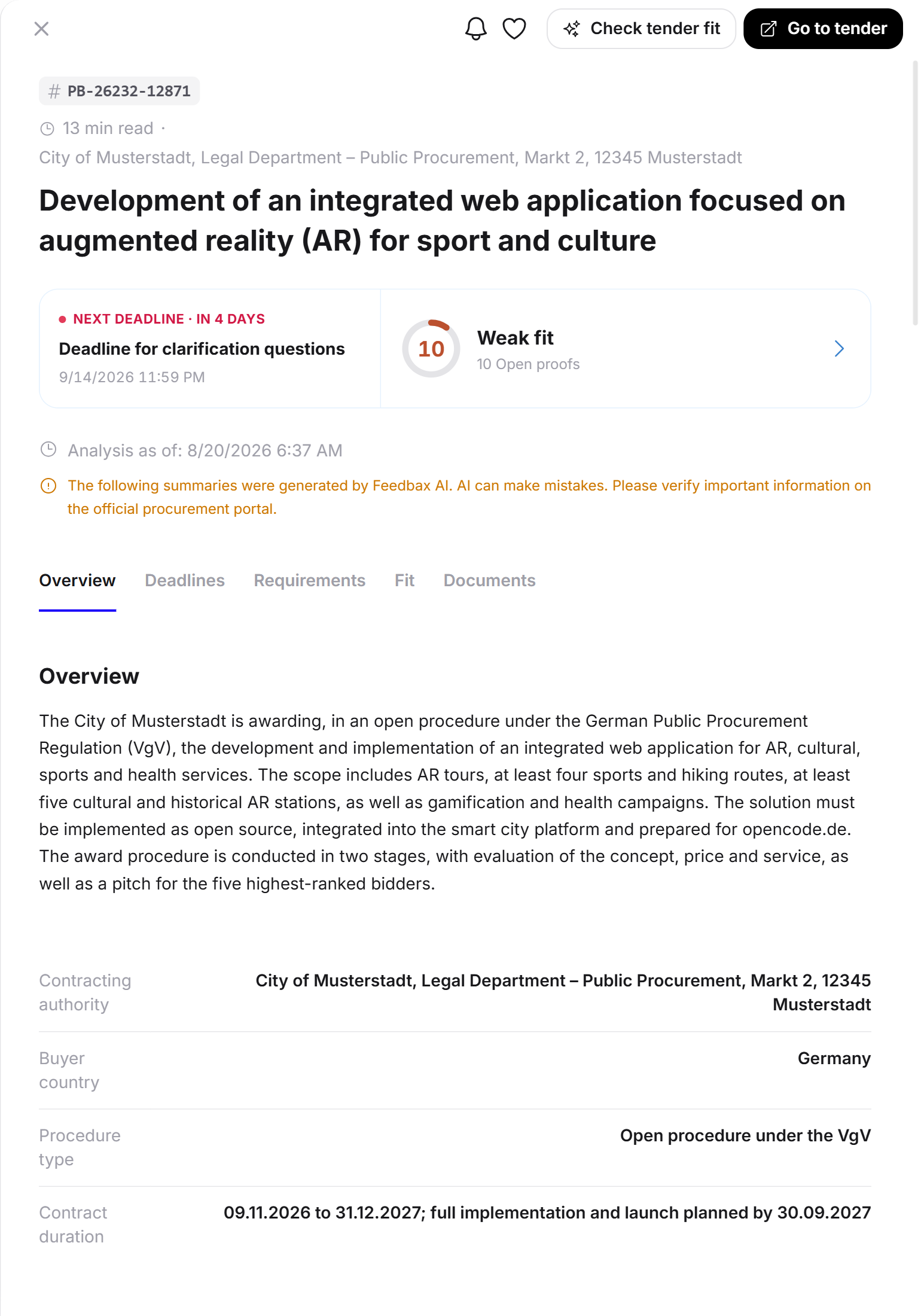
A bar of buttons sits at the very top. From left to right:
Bell and heart: follow and favorite, see Favorites and following tenders.
Check tender fit: opens the fit analysis as a second drawer on top.
Go to tender or Go to procurement platform: the jump to the source.
The last button is the most important one, and its label tells you something. Go to procurement platform appears when the link points at the national procurement portal where the procedure actually runs. Go to tender appears when the link leads to the tender page at the source.
The jump is missing in two cases:
The deadline has passed. The header then reads Expired.
The source is no longer reachable, the page is gone there. A note naming the source appears instead.
The analysis stays fully readable in both cases.
The banner on expired tenders
Once the deadline has passed, an amber banner sits above the content: the tender has expired, the analysis stays available for orientation, and the original documents may no longer be accessible at the source.
The head of the content
Below it sits the tender number, then a line with two facts:
The reading time, for example "18 min read". It estimates how long the analysis will take you, which is a good indicator of the size of the procedure.
The contracting authority, that is the buyer with its address.
The tender's headline follows.
The two cards above the analysis
Before the analysis starts, two cards sit side by side.
On the left, the next deadline. A colored dot, the label "NEXT DEADLINE" with the time remaining, below it the name of the deadline and the exact date. Important: this is the next deadline, not necessarily the submission deadline. The deadline for clarification questions often falls considerably earlier, and that is exactly the one people miss.
On the right, the tender fit. Without an analysis it carries the invitation "Does this tender suit you?" with the note that the assessment is based on your profile and your website. With an analysis it shows your score as a ring, the category and the number of open proofs. A click opens the fit drawer.
The analysis date and the AI note
Below that it states when the analysis was created, for example "Analysis as of 06/07/2026 11:39".
Right next to it sits an amber note: the summaries were created by Feedbax AI, AI can make mistakes, and you should verify important information on the official procurement portal.
Take that sentence seriously. The analysis exists so you can decide quickly. It does not replace reading the procurement documents before you submit a bid.
The tab bar
A bar of tabs follows. It stays at the top while you scroll and always highlights the section you are in. The tabs are:
Overview · Deadlines · Requirements · Fit · Documents
If a section does not occur in this tender, its tab is missing as well. If there are bidder questions, an additional tab appears for them.
Overview
Short summary. A paragraph explaining the tender in plain words: what is being awarded, under which procedure, with what duration and what particularities.
The key facts. A table with up to five rows. Each appears only when the analysis found the value:
Contract value, often as an order of magnitude
Contracting authority
Buyer country
Procedure type
Contract duration
Key points at a glance. A list of short items that matter for the decision. This is where the things live that you otherwise only find on page 40: "6 lots, but only one lot per bidder", "award on price 30% and quality 70%", "no minimum purchase quantities".
Scope. What exactly has to be delivered, in more depth than the short summary.
Deadlines
A list of every date stated in the documents. Per row: a colored dot for urgency, the name of the deadline, a remaining-time badge and the date.
Typical entries are the deadline for clarification questions, the submission deadline, the opening date and the binding period.
This list is one of the most useful parts of the analysis. In the procurement documents these dates are spread across several files; here they sit together.
Requirements
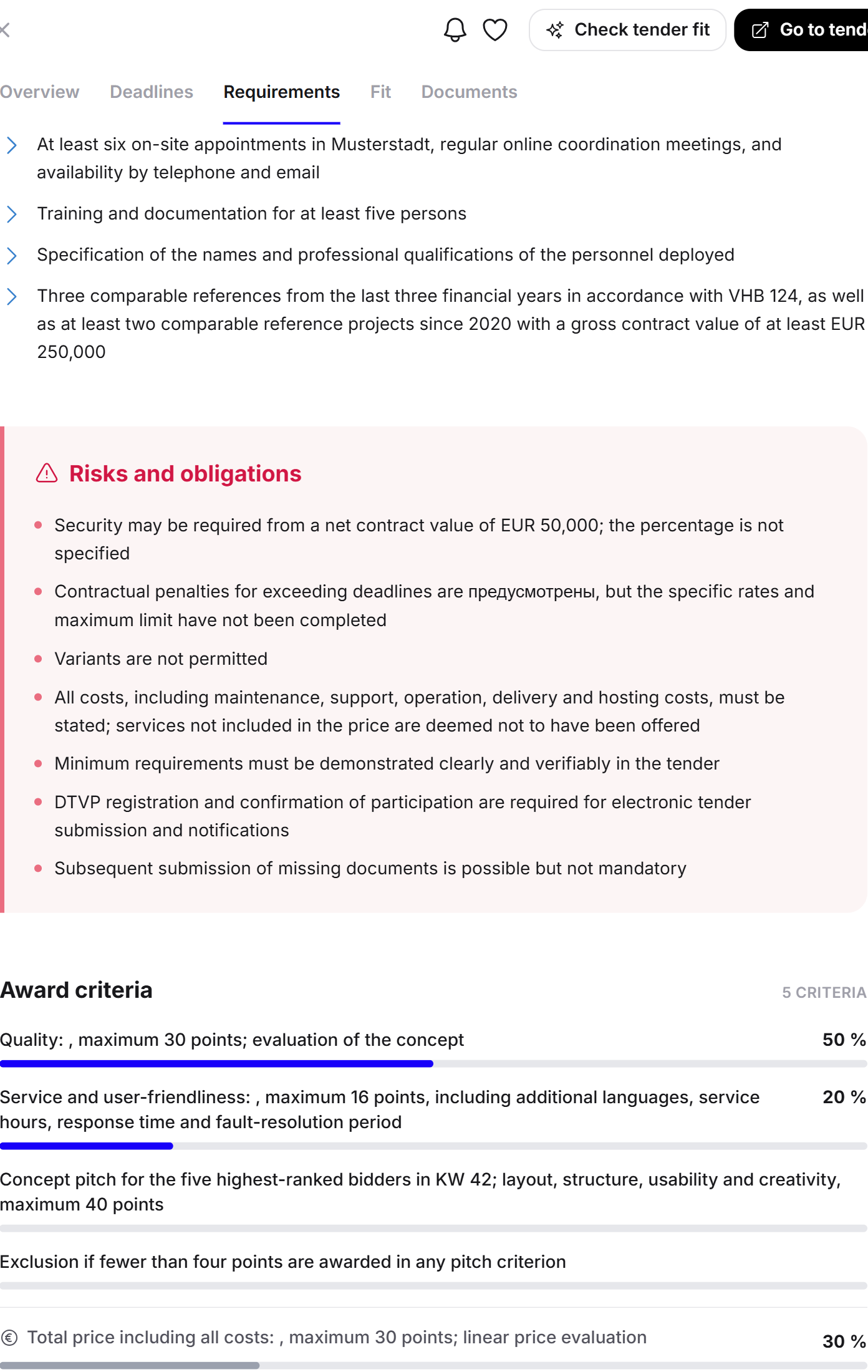
The section bundles four blocks.
Requirements. What the buyer expects from a bidder: experience, knowledge, certifications, language levels, references and declarations.
Pitfalls and obligations. The points where applications fail. Deadlines, exclusion grounds, binding contract components and formal rules.
Award criteria. What the contract is awarded on, with weighting in percent. The number of criteria sits above the block. This is the answer to whether price or quality decides.
Required evidence. The list of annexes and documents that must accompany the bid. If the list is long, a button such as Show 5 more items of evidence sits below it.
Match with Feedbax services
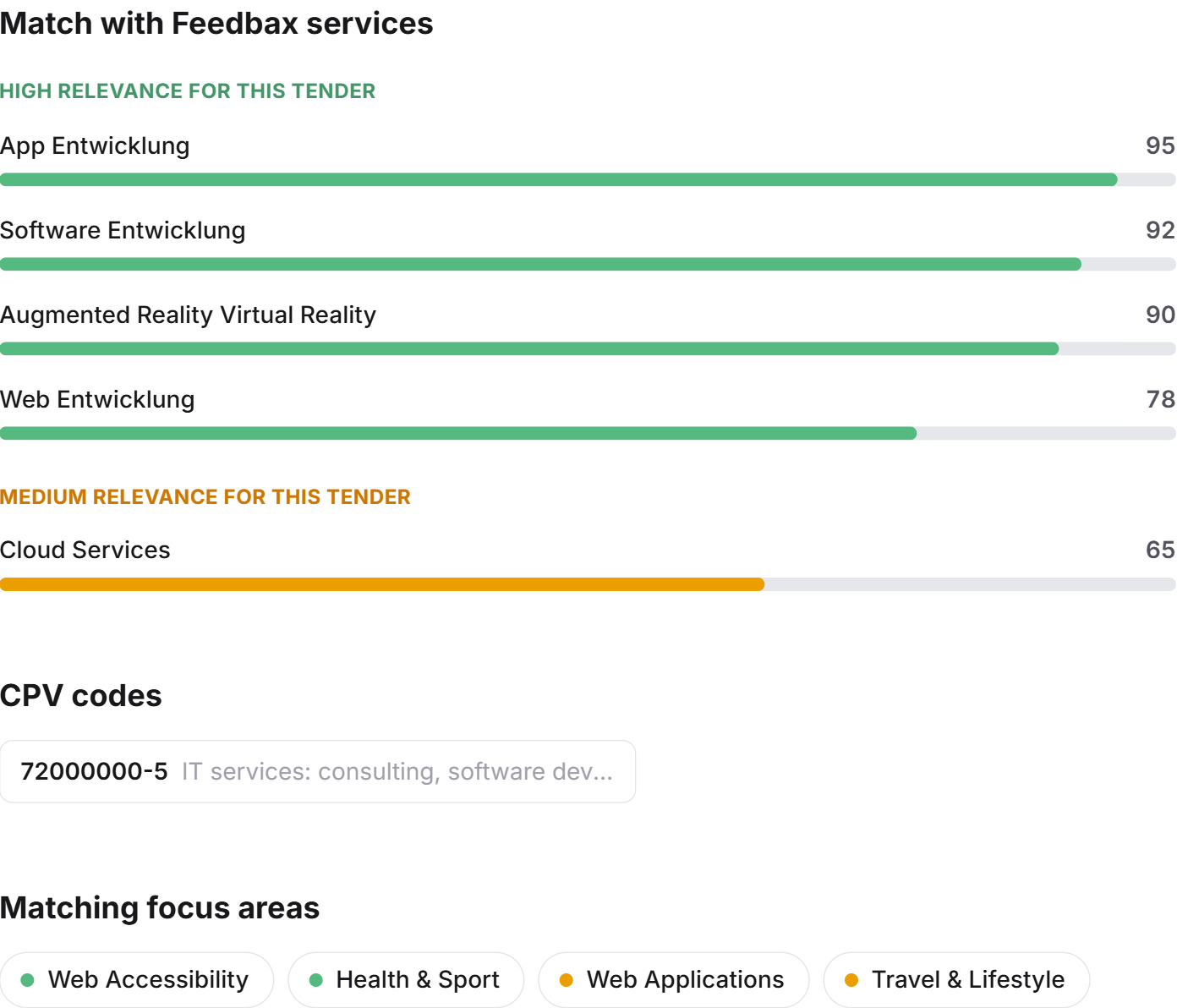
This section shows how Feedbax classified the tender.
Services with a relevance score. Two groups, "HIGH RELEVANCE FOR THIS TENDER" and "MEDIUM RELEVANCE", each service with a value from 0 to 100. These are Feedbax services, that is the same catalogue your profile is listed in.
CPV codes. The official European procurement codes of the procedure, with number and label. If you work with CPV codes, this is your link to other sources.
Matching focus areas. Finer keywords such as "TYPO3", "Web accessibility" or "UX strategy". They come from the same catalogue as the focus areas in your profile.
This section is instructive for your own profile too. If focus areas you master keep appearing here without being listed in your profile, you are losing matches and fit points.
Documents
The last section lists every file of the tender, with the count in the heading, for example "26 files". A click on a file opens the breakdown of that one document. Everything about it is in Documents and bidder questions.
The footnote
At the very bottom sits a small line about the source: the information comes from the named platform and was authoritative at the time of the analysis. Feedbax deliberately hosts no original documents.
When the language does not match yet
The analysis is created in German. If you open a tender in another interface language for which no translation exists yet, it is translated in the background. While that runs, a pill with a note floats at the bottom of the drawer. Wait a moment and the text appears in your language.
What you see without a subscription
Without an active subscription this view is anonymized and shortened: the buyer is reduced to a sector and a rough region, the exact deadline date is missing, the lists show only the first entries, the document list is reduced to a preview and the jumps to the source are missing. Details are in What the free access includes.
Frequently asked questions
Where does the information in the analysis come from?
From the procurement documents themselves. Feedbax downloads the files from the source, extracts their content and summarizes them. What is not in the documents is not in the analysis either.
Why is a whole section missing on some tenders?
Because the source offers nothing on it. If no award criteria were published, the block is dropped instead of showing an empty heading.
Can I rely on the analysis?
As a basis for a decision, yes. As a legal basis, no. Before submitting a bid, the original state on the procurement platform always applies. That is exactly what the note above the analysis points out.
What does "next deadline" mean?
The chronologically next date from the deadline list, not necessarily the submission deadline. It is often the deadline for clarification questions, which ends earlier.
The tender has expired. Why can I still read it?
Because the analysis remains valuable as orientation: you see common requirements, weightings and orders of magnitude in your field. You can no longer apply, which is why the jump to the source is missing.
Can I print or export the analysis?
There is no dedicated export. Use your browser's print function or pass the address with ?tender= on to a colleague.