

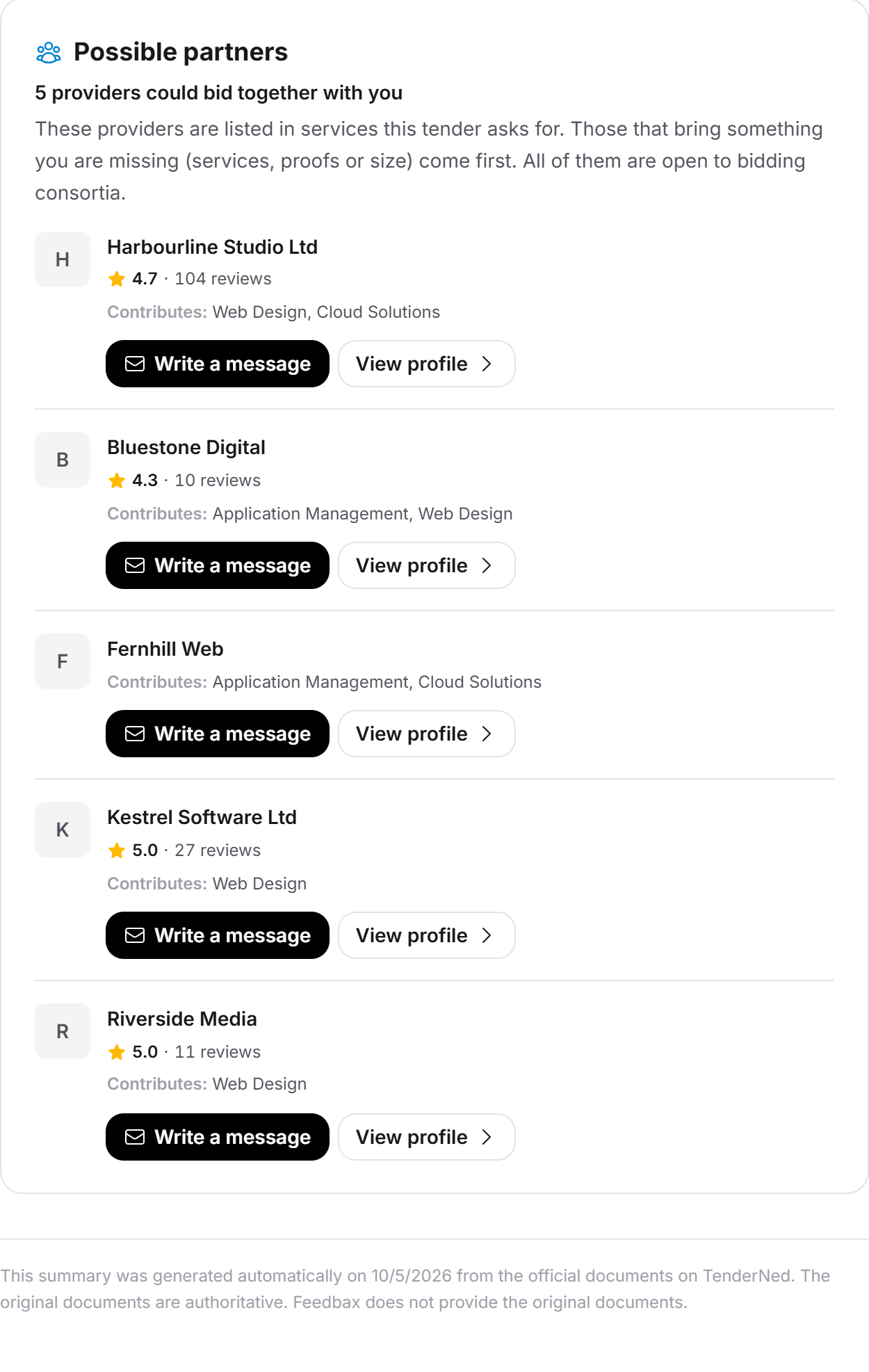
Some tenders are too big for you alone, or they ask for something you lack: a service, a proof, a minimum size. At the end of the tender, Feedbax therefore shows you up to five providers that could bid together with you. You see what each of them brings and write to them in a few clicks. That way you form a bidding consortium instead of skipping a tender.
At a glance
Where: at the very bottom of the opened tender, in the Possible partners block, after the Documents section. See also The tender in detail.
Subscription: you see the block with the tender subscription or a Feedbax subscription from Business up. Without one of them it does not appear, not even for a tender you unlocked for free.
How many: up to five providers. They are based in the contracting authority's country and listed in a service the tender asks for, and the block only appears when you are missing something.
Writing: one message per provider and tender, up to 2,000 characters, at most 10 messages in 24 hours. It costs no credit.
Who finds you: every registered provider is open to bidding consortia by default. Whoever does not want that switches it off with the link in the email or in the qualification profile.
Feedbax Score: the feature has no effect on it.
How it works
The block works without any AI call. Feedbax compares four things it already knows: the services the analysis of the tender asks for, the services in which providers are listed in the Feedbax directory, your qualification profile and your tender fit. A service counts as asked for when it has a relevance value of 60 or more out of 100 under Match with Feedbax services.
The list is loaded when you open the tender. If you recalculate your fit, Feedbax recalculates the partners too, because the open points of the fit can change your gaps.
When the block appears
The block only appears when all of this is true:
You have full tender access: the tender subscription or a Feedbax subscription from Business up. A single tender you unlocked for free is not enough.
The tender is still open. Once the deadline has passed the block is gone, because nobody needs a partner for a bid any more.
The analysis found at least one service with a relevance value of 60 or more.
You are missing something (see below).
There is at least one suitable provider that accepts requests.
You are missing something when one of these cases applies:
The tender asks for a service in which you are not listed.
You are listed in a service the tender asks for, but your tender fit names it as an open point: its name appears in an open point of the dimension Service fit or Technology & method fit. This case only applies if you already have a fit for the tender.
The tender sets a requirement that you explicitly do not meet. That is the case when your qualification profile clearly misses it or your own confirmation of it in the fit reads Not met. A criterion you have not answered counts as met.
The tender asks for a minimum size (employees or annual revenue) that you do not reach alone.
If you miss nothing, the block stays away. The more complete your qualification profile and the more current your fit, the better the suggestions. Gaps that Feedbax does not know about, it cannot fill. How to clear open points in the fit is described in Working through open points and exclusion risks.
Who appears in the list
A provider is only considered when all of this is true:
It is a registered provider on Feedbax, and its profile is published, approved and not blocked. A profile that nobody manages does not appear.
It is listed in at least one service the tender asks for. How the listing comes about is described in Services: weighting your expertise.
It has a location in the country where the contracting authority is based. If the tender names no country, this filter does not apply.
It has not switched off Open to bidding consortia.
The checkbox Open to bidding consortia is ticked by default for every provider, even one that never opened the qualification profile. It is the only consent the list needs. The provider needs neither a tender subscription nor a filled-in qualification profile. You yourself and the Feedbax profile never appear in your list.
The provider also needs an email address under Contact for leads, because that is where your request goes. Without one, the provider does not appear in the list. So you can write to every provider you see. How to store the address is described in Contact for leads: contact person and CTA.
In which order
Feedbax reads up to 60 suitable providers, sorts them and shows the best five. The order follows the benefit for your bid, in three groups:
Providers that bring something you are missing and could not bid alone themselves: they do not cover all services the tender asks for, or they explicitly miss a requirement themselves. For them, the consortium is the point.
Providers that bring something you are missing and could also bid alone.
Providers that are listed in services the tender asks for but take nothing off you that you are missing.
Within a group, the provider that closes more of your gaps comes first (services and requirements together). After that the better rating counts, then the larger number of ratings. On a tie a fixed order decides, so the list does not jump every time you open it.
For size, Feedbax adds the lower bounds of the entries in both qualification profiles (employees, annual revenue). If your profile and the provider's profile together reach the required tier, that counts as a closed gap.
What you see for each provider
Logo and name. If the provider has no logo, a grey letter takes its place.
Rating. The overall rating with one decimal and the number of ratings, for example "4.7 · 104 reviews". The line is missing while the provider has no rating.
Contributes: what the provider adds to your bid. The services it covers and you are missing come first, strongest demand first. After them come the areas of your qualification profile in which it takes something off you, with the title of the area, for example "Liability insurance", "Revenue" or "Team". For providers of the third group, this shows the services the tender asks for in which they are listed.
Write a message and View profile. If you have already written to the provider about this tender, Message sent replaces the first button.
Above the list it says how many providers Feedbax found, for example "5 providers could bid together with you", and for exactly one "1 provider could bid together with you". The block itself shows no email address of the provider.
Write to a provider
Open the tender and scroll to the end, to the Possible partners block.
If you want to get to know the provider first, click View profile. Its profile opens in a drawer above the tender.
Click Write a message at the provider you want. A form unfolds under its row.
Read the text in the Your message to field with the provider's name. Feedbax prefills it: a greeting, a paragraph with the question whether the provider wants to bid together, and a closing line. The text is in the language of your interface and you can change it freely. It does not name the tender, because the email shows it anyway, with its title and a link.
Add what makes the decision easy for the provider: who you are, what you bring, what you are missing and by when you need an answer. The prefilled text says that the provider covers services you are missing. If that does not fit your case, change the sentence.
Read the note under the field: "We send your message to … by email. So that … can reply, we pass on your email address."
Click Send. The button is grey while the field is empty or Feedbax is sending.
The form closes. The provider's row now says Message sent. It stays that way when you open the tender again later.
Cancel closes the form without sending. The text is not kept: if you open the form again, the prefilled text is back.
The limits when writing
A message may be up to 2,000 characters long. The field stops there. An empty message cannot be sent.
You write to a provider once per tender. For another tender you may write to it again.
You may send at most 10 messages within 24 hours, across all tenders and providers together. The count runs from the time of each message, not from midnight. After that you see: "You have already sent 10 messages to possible partners in the last 24 hours. You can write again once the oldest one is 24 hours old."
A message that does not arrive does not count against the limit.
The message costs neither credit nor analysis quota.
These messages can appear under the field:
"Messages to possible partners need the tender subscription and a tender that is still open." Then you lack tender access, the tender has expired, or the message is empty or too long.
"This provider is not taking requests for bidding consortia right now." The provider has switched the option off in the meantime, is no longer visible, has no email address stored or has no location in the contracting authority's country.
"The message could not be sent. Please try again." The email did not go out, or your account has no address the provider could reply to.
What the provider receives
The provider gets an email at the address of its main contact under Contact for leads. It comes from Feedbax, not from your mailbox, and it is written in the language the provider set under notifications (otherwise by the ending of its email address). Your message text stays in the language you wrote it in. The email contains:
the subject "… would like to bid together with you" with your company name,
a greeting with the first name of the main contact, otherwise "Hello,",
a sentence saying that you found the provider on Feedbax as a possible partner for a public tender and suggest a bidding consortium,
a Provider line with your company name and the link to your Feedbax profile,
a Tender line with the title and a link,
the The message section with your text in a grey box, line by line, without formatting,
the note that the provider can simply reply to the email and the answer goes straight to you,
a link to your profile,
the View the tender button, which opens the tender in Feedbax,
at the very bottom, in the footer, the note "You get this email because you are open to bidding consortia on Feedbax." and the link Stop getting consortium requests.
Replies go to the email address you sign in to Feedbax with, and your company name is the reply name. If your account has no sign-in address, Feedbax uses the address under Contact for leads.
The title of the tender depends on the recipient. If it has full tender access itself, the real title is in the email, translated into its language if needed. Otherwise the anonymized short title appears, as in every tender email to providers without access, or failing that the tender number. More about the emails is in Emails about tenders.
Stop getting requests
Using the link in the email. You need no account and no login for this:
In the email, click Stop getting consortium requests.
A page opens with the question "No more consortium requests?". It explains: other providers will then no longer see you as a possible partner for public tenders and can no longer send you consortium requests. Opening the link changes nothing yet. That is how Feedbax protects against mail scanners that open every link of an email.
Click Stop requests.
The page "Done" confirms it.
The link is valid for twelve months from the day the email was sent and switches off this one setting only. If it is invalid or expired, the page says "That didn't work" and tells you to use the link in the most recent email.
What this switches off: only Open to bidding consortia. Other providers no longer see you under Possible partners and can no longer write to you, not even from a list they already have open. All other emails, your profile, your fits and your subscription stay unchanged.
Switching it on and off by hand:
In the provider dashboard, open Leads and there Qualification profile. The qualification profile is open to every provider, with or without a tender subscription.
Scroll to the Collaboration block.
Tick or untick Open to bidding consortia. The option takes effect at once.
Privacy: what is shared
The provider gets from you: your company name with a link to your Feedbax profile, your email address as the reply address, the text of your message and the tender with title and link.
The provider does not get: your tender fit, your gaps, your qualification profile and whether you follow the tender.
You get from the provider: name, logo, rating, services and areas, as described above. The block does not show its email address, your message goes through Feedbax. If the provider replies, its address is in the sender of the reply. What its profile shows publicly is up to the provider.
Of your qualification profile, others only see the title of an area in which you would take something off them, for example "Liability insurance". Answers, figures, proofs and references stay with you.
What is stored is that you wrote to a provider about a tender: tender, sender, recipient and time. That is how Feedbax prevents duplicate messages and counts the limit. Feedbax does not store the text of the message.
Who sees the list: only providers with full tender access.
What your subscription includes
Finding and writing to partners is part of full tender access. The benefit: a tender for which you lack a building block does not stay on the shelf. In a minute you find a partner that has it.
| Subscription | Find and write to partners | Be found as a partner |
|---|---|---|
| Starter | No | Yes |
| Tender Access | Yes | Yes |
| Business | Yes | Yes |
| Premium | Yes | Yes |
| Enterprise | Yes | Yes |
You can be found and receive requests in every subscription as long as your profile is published and approved. What subscriptions does Feedbax offer? compares the subscriptions, Tender Access: booking, managing, cancelling explains tender access. What works without a subscription is described in What the free access includes.
Feedbax Score
The partner feature does not affect your Feedbax Score. A request sent or received and the checkbox Open to bidding consortia do not enter the score, your tender fit or your place in the directory. Only indirectly: next to each provider stands its existing rating, and with equal benefit the better one comes first. How the score is built is described in What is the Feedbax Score?.
Frequently asked questions
Why do I not see the Possible partners block?
One of the conditions is missing: you have no full tender access, the tender has expired, the analysis found no service with a relevance value of 60 or more, you are missing nothing, or there is no suitable provider in the contracting authority's country that still accepts requests. A fit with more open points and a filled-in qualification profile make gaps visible.
Why are providers in the list that have the same services as me?
Those are providers of the third group. They come last because they take nothing off you that you are missing, but they fill the list when there are too few complementary providers. The block still only appears when you are missing something.
How often can I write to a provider?
Once per tender. After that Message sent stands at its row. For another tender you may write to it again.
How many messages may I send?
At most 10 within 24 hours, across all tenders and providers. Messages that did not arrive do not count.
Does a message cost credit?
No. It needs full tender access, but it costs neither credit nor analysis quota.
Does the provider see my email address? Do I see theirs?
The provider sees your email address so that it can reply. The note under the field says so. In the block you do not see its address. It appears only in the sender of its reply, unless it is public in its profile anyway.
How do I find out whether the provider replied?
The reply arrives as an email in your mailbox. Feedbax shows no read status and no reply in the app. The conversation continues by email from there.
Does Feedbax check whether the tender allows bidding consortia?
No. Feedbax suggests partners by services, requirements and size. Whether the contracting authority allows a consortium is stated in the tender documents. Check it before you spend time on an arrangement, for example under Key points at a glance and Requirements. Feedbax does not set up the consortium and does not submit a bid for you.
I do not want to be found as a partner. What can I do?
Switch off Open to bidding consortia in the qualification profile (Leads, Qualification profile, Collaboration block) or use the link at the bottom of a request email. After that you no longer appear in any list.