

The performance table answers the question that matters in the end: what did my budget achieve? It shows every single click of the last 30 days, with time, origin and destination.
You will find it in the dashboard under Top placement > Directories in the tab "Performance", right next to the ranking simulation.
The tab only appears once your top placement is active. As long as no budget is running there are no clicks to analyse and the tab stays hidden.
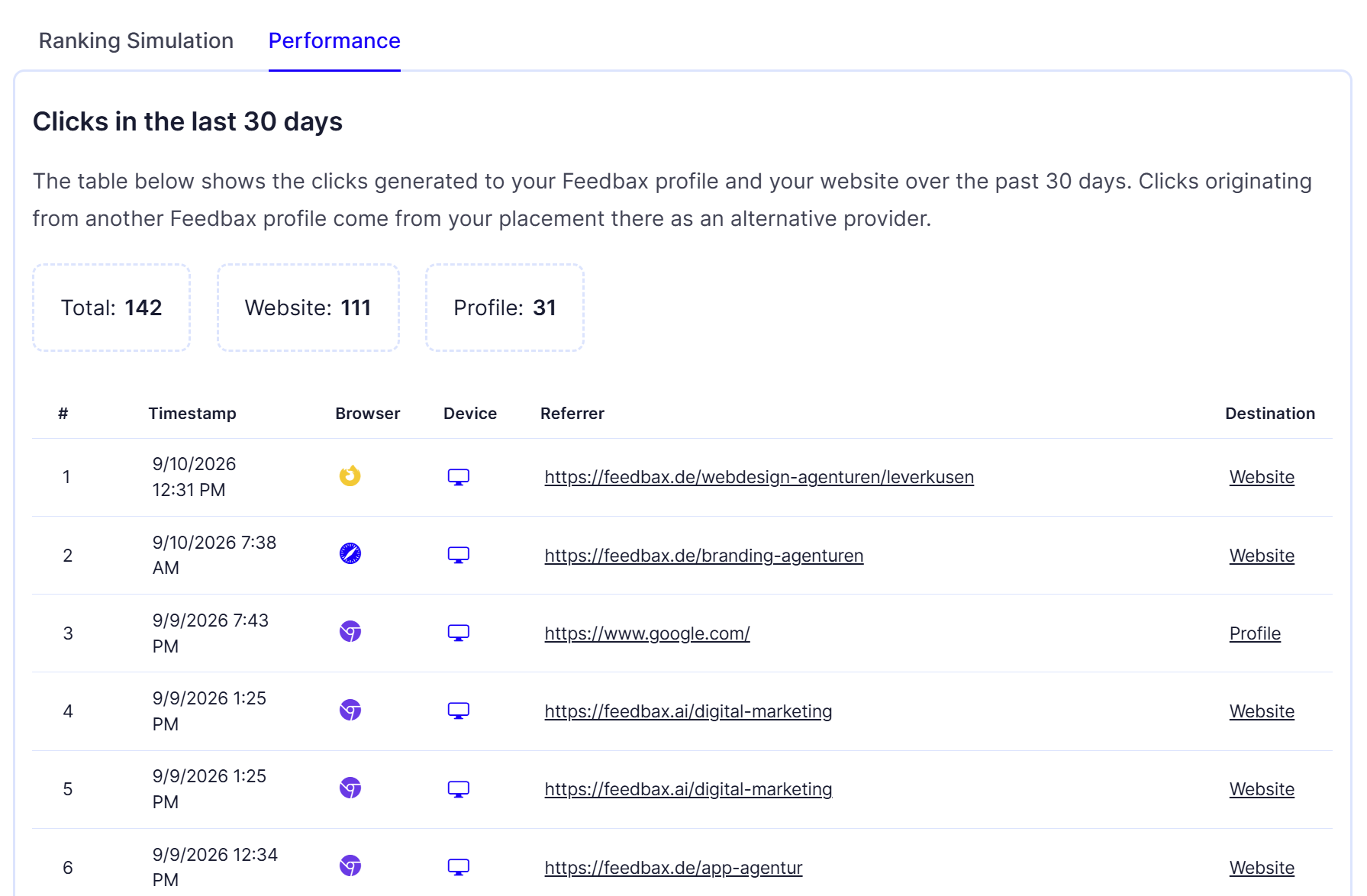
The three counters above the table
Total: all clicks of the last 30 days.
Website: the clicks that went straight to your own website.
Profile: the clicks that went to your Feedbax profile.
Both destinations are valuable, but in different ways. A click to your website is the shortest path to an enquiry. A click to your profile takes the prospect to your reviews, case studies and services first, which is where your Feedbax score works for you. Together they give you the number you can weigh against your monthly amount.
The columns of the table
# The running number. The table is sorted by time, the newest click is at the top.
Timestamp Date and time of the click. This is where you spot patterns: B2B enquiries usually cluster on weekdays between 9 and 17.
Browser As a small icon, for example Chrome, Safari, Firefox or Edge. Hover over it and the name appears.
Device Desktop, mobile or tablet, again as an icon with a tooltip. If many clicks come from phones, your landing page should be fast and readable on a phone.
Referrer The page the click happened on. This is the most interesting column, see below.
Destination Either Profile or Website. The entry is a link and opens exactly the page the click landed on.
Reading the referrer properly
The referrer tells you where a prospect became aware of you. Typically you see three kinds of entries:
A Feedbax directory page, for example an address containing "web-development-agencies". This is the classic case: someone looked at the directory list and clicked on you. That is exactly what your budget pays for.
A search engine, for example Google. In that case the visitor arrived on a Feedbax page through a search and moved on to you from there.
Another provider's profile. Those clicks happen because you are listed there as an alternative provider. That is extra visibility you do not pay for separately.
If one particular directory page shows up strikingly often, you know which directory really works for you. That directory is a strong candidate for your focus. How that works is explained in Focus directories.
What is not counted
To keep the numbers honest, Feedbax filters out two things:
Clicks from the dashboard. If you open a preview inside your own dashboard, it does not count. Your own checking clicks do not inflate the statistics.
Non-organic views. Only genuine clicks from directories and profiles are counted.
The table covers exactly the last 30 days. Older clicks drop out automatically. This view has no date filter and no export.
What your clicks are worth
For the searches that lead decision makers to the Feedbax directories a click through Google Ads usually costs 8 € to 30 €.
Do the maths for yourself once: take your Total figure and multiply it by 8 €. That is the cautious lower bound of what you would have paid on Google Ads for the same attention. Against it stands your fixed monthly amount, independent of the number of clicks. That is the heart of top placement: a click flat rate instead of a click price.
The example above shows 142 clicks in 30 days. Through Google Ads that would be several thousand euros, depending on the keyword.
What to do with the numbers
Many clicks, few enquiries. That is rarely the budget's fault. Look at where the clicks go. If most land on the profile, check your logo, description, reviews and case studies. If they land on your website, check the page they arrive on.
Few clicks. Then first check in the ranking simulation whether you are visible at all. A budget that does not reach the top 10 produces no clicks. See Reading the ranking simulation.
Clicks from only one directory. Then your profile is probably listed in only a few directories. Add matching services so your budget works in more directories at the same time.
How this connects to the Feedbax score
Clicks do not change your Feedbax score directly. But they are the raw material for it: more profile views lead to more project enquiries, more projects lead to more customer reviews, and reviews are the single strongest lever in the score.
The score in turn decides your organic position and the tie-break in top placement. That closes the loop: visibility brings reviews, reviews bring visibility. The full list of factors is in How does ranking in the directories work?.
What you need
The performance table belongs to top placement and requires an active subscription from Business upwards, plus a running budget. Without both the tab stays empty or hidden.
The plan is more than an unlock here: it includes yearly credit you can fund your budget from. Details are in the article Topping up your credit.
Frequently asked questions
Why do I not see the "Performance" tab?
It only appears once your top placement is active. As long as no budget is running there is nothing to analyse.
Why is my table empty?
Because no clicks were counted in the last 30 days. Check in the ranking simulation whether your budget puts you in the top 10 at all.
Do my own clicks count?
No. Clicks originating from your dashboard are filtered out.
How far back does the table go?
Exactly 30 days. Older clicks are no longer shown.
Can I export the data?
Not in this view. There is neither an export nor a date filter.
Why do the numbers differ from my own analytics?
Feedbax counts the click as the visitor leaves the directory page. Your own analytics tool only counts once your page has loaded and consent has been given. Drop-offs, ad blockers and declined cookie banners explain the difference.
What does "Profile" mean in the Destination column?
That the click landed on a Feedbax page, usually your provider profile. "Website" means it went straight to your own website.