

The ranking simulation shows you before you save which position you would land on with your planned budget. It is the most useful decision aid on the page Top placement > Directories, and it costs nothing: you can try as often as you like without booking anything.
You will find it below the configurator in the tab "Ranking Simulation".
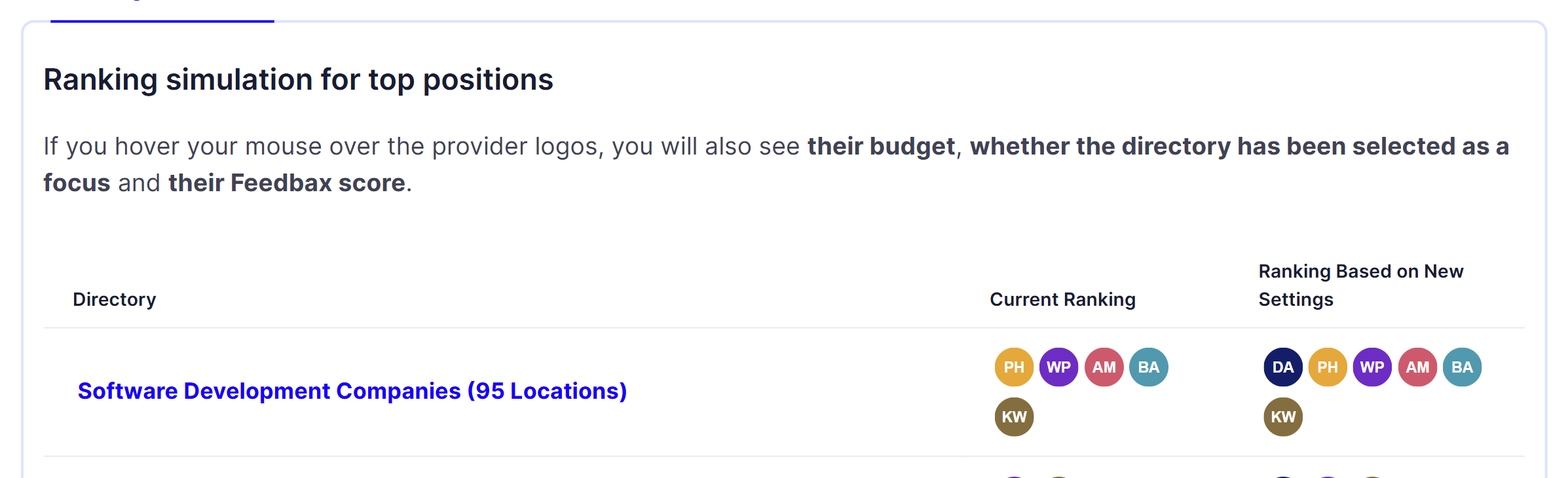
The three columns
Directory. The name of a directory your profile is listed in. In brackets behind it is the number of locations, for example "(99 locations)". The name is a link and takes you to the public directory page. Below it the individual locations are listed, also linked.
Current Ranking. The providers holding a top slot there today. From left to right: position 1, position 2 and so on. At most ten logos are shown, because there are no more than ten top slots per directory.
Ranking Based on New Settings. The same row, but calculated with the budget and the focus directories you have just set in the configurator. Here you see yourself where you would stand after saving.
Comparing the two right hand columns is the actual answer: if your logo jumps forward, your setting works. If nothing changes, the planned amount does nothing in that directory.
What the tooltip tells you
Hover over a logo. The tooltip shows four values:
Position: the slot in this directory.
Budget: the monthly amount this provider spends.
Focus Directory: a tick if this provider marked the directory as a focus, otherwise a cross.
Score: their Feedbax score in this directory.
This is the most useful part of the whole page. It shows you exactly what your competitors spend, so you can set your amount deliberately instead of guessing. If positions 1 to 3 all sit at 200 € and position 4 at 100 €, you know what a top 3 slot costs and what a top 5 slot costs.
Pay particular attention to ties. Where several providers spend the same amount, the focus decides, and after that the Feedbax score. You see both in the same tooltip. More on that is in the article Focus directories.
The simulation reacts immediately
You do not have to save anything or reload. The table recalculates as soon as you
release the budget slider, or
add or remove a focus directory.
While it recalculates, the table is briefly greyed out. Then the new result appears.
Use that as a tool: step through the amounts from the bottom up and watch at which point you slide into the top 3 of a directory. The jump is often not where you would expect it.
Why there are so many rows
The table shows every directory your profile is listed in, one row per directory. If you maintain many services in your profile, you will have correspondingly many rows.
That is not a glitch, it is the core of the offer: your monthly budget applies in all of these directories at the same time, and on top of that in the location subpages listed in the first column. So you are competing for a great many slots with a single amount. Scroll through the whole list once before deciding how high your budget should be.
The limits of the simulation
The simulation is an honest snapshot, not a guarantee. Three things you should know:
It calculates with today's budgets. If a competitor raises their budget tomorrow, the order shifts. That is what the switch "Receive notifications" is for: it emails you when someone outbids you.
It only shows the top 10. If you land on position 11, your logo does not appear in the column at all. That is the table's most important warning sign: a budget that does not put you in the top 10 keeps running but stays invisible.
At 0 € you disappear. Set the slider to 0 and your logo is removed from the right hand column. That shows you directly what you lose by ending your top placement.
The Feedbax score in the simulation
The score in the tooltip is your directory score, the rating of your profile for exactly this directory. It decides twice:
In top placement, when budget and focus are equal.
In the organic provider list below the top slots, where there is no budget at all.
If the simulation shows a competitor with the same budget and the same focus standing above you, the score is the difference. Another euro will not help there, a better profile will: reviews, case studies, complete details. The factors are listed in How does ranking in the directories work?.
How to work with it
Open Top placement > Directories and stay in the tab "Ranking Simulation".
Pick out the two or three directories that matter to your business.
Hover over the logos in "Current Ranking" and note the budgets of the leading slots.
Set the slider to the amount that would take you there.
Set your focus directories and check whether that gets you one step cheaper.
Make sure the budget does not exceed your Feedbax credit.
Only then click "Start Budget Now".
What you need
The page belongs to top placement and requires an active subscription from Business upwards. Without a plan no budget can be saved.
The subscription pays off twice here: it unlocks top placement, and it brings credit with it every year that can flow straight into your budget. Enterprise customers also receive 50 € of credit per month for exactly this purpose. Details are in the article Setting, renewing or changing your budget early.
Frequently asked questions
Does trying it out cost anything?
No. The simulation is a pure preview. Only the click on "Start Budget Now" and the confirmation that follows book anything.
Why do I not see my own logo in the right hand column?
Two possible reasons: your budget is set to 0 €, or your budget is not enough for the top 10 in that directory.
Why are both columns identical?
Because your planned setting does not change the order. Either you have not changed anything yet, or the amount you set is not enough for a better slot.
Why does one directory list so many locations?
A directory has its own subpage per location. Your budget and your focus apply in all of those subpages at no extra cost.
Can I see what my competitors pay?
Yes. Hover over their logo and the tooltip shows their monthly budget, their focus and their Feedbax score.
Is my position guaranteed after saving?
No. The simulation calculates with today's budgets. A competitor can raise theirs at any time. That is why you should leave the switch "Receive notifications" on.
Why does the table not update?
It only recalculates once you release the slider or change the focus selection. While it calculates it is briefly greyed out.